

 hello@kootenaymade.ca
 Castlegar, BC. Serving the Kootenays and beyond.
 10 min read
Key takeaways
- Five jobs: home, services, about, proof, contact. Legal pages sit in the footer and do not count against the design work.
- One page per service you want more of. Three services stacked on one page rank for none of them.
- A town page earns its place when you can write two hundred words about that town that could not be written about anywhere else.
- Count custom page designs rather than URLs when you price a build. A second page on an existing layout is nearly free.
- A trade with three services and four towns is about thirteen pages doing those same five jobs.

On this page
What pages does a small business website actually need?
Five jobs. A home page that says what you do and where. A page for each service you sell. An about page that says who shows up. A proof page that shows the work. A contact page that makes getting in touch easy. Legal pages live in the footer and are not part of this count.
This is for an owner planning a first site, or staring at a quote that says “up to eight pages” and wondering which eight. It is not for a business with a working site that already ranks, because reshuffling pages that earn their keep costs more than it returns.
- 01
Home
The one screen that decides whether anybody stays. It answers what you do, where you do it, and how to start, in that order, readable on a phone without scrolling. Everything else on the home page is supporting material.
- 02
Services
One page for each thing you get paid for and want more of. This is the part of the site that earns search traffic, because people search for the job rather than for the company.
- 03
About
Who is arriving at the door. For a trade or a clinic this is often the second most read page on the whole site, and a real photograph of yourself outperforms anything else on it.
- 04
Proof
Your own finished work, photographed as it is, with a line about each job. Reviews with real names beside it. This is the page that turns a maybe into a phone call.
- 05
Contact
A phone number people can tap, a short form, your hours, and one sentence saying what happens after they send it. That last sentence is the one everybody leaves out.
Those five stay five whatever size the business is. What grows is the number of URLs, because the services job and the geography job each want their own pages. A trade with three services in four towns is thirteen pages doing five jobs, and that is a healthy shape rather than bloat.
A website is not measured in pages. It is measured in questions answered before somebody has to phone you to ask.
What does each page have to say in its first screen?
Something specific enough that a stranger knows they are in the right place within about five seconds. Most small business pages fail here by opening with a mood rather than an answer, and the visitor leaves before the good material further down ever gets read.
| What is being compared | What the first screen has to say | The version I keep finding instead |
|---|---|---|
| Home | What you do, where you do it, and how to start, above the fold and readable on a phone. | A slideshow of mountains with the word Welcome on it. |
| A service page | The name of the job in the words customers use, what it costs or what it depends on, and a way to ask. | Three services stacked on one page so none of them can rank. |
| About | Who shows up at the door, how long you have done this, your ticket and your insurance. | A history of the company written in the third person. |
| Proof | Photographs of your own finished work with a line about the job, and reviews with real names. | A wall of logos and a five star graphic with nothing behind it. |
| Contact | A tappable phone number, a short form, hours, and what happens after they send it. | A form with nine required fields and no reply time. |
| A town page | The town in the heading, real local detail, and the same clear next step. | The same page with the town name swapped in, twelve times. |
The pattern across that table is the same one every time. The page that works states a fact, and the page that fails states a feeling. “Panel upgrades in Castlegar and Trail, usually a one day job” does more work than any amount of language about quality and dedication, because the first one can be checked and the second one cannot.
I go through the home page version of this failure in detail in why a small business homepage confuses people, and the contact page version in when a contact page feels like a dead end.
Why does each service need its own page?
Because people search for the job, not for the company. A page that names one job can answer one search and rank for it. Three services stacked on one page compete with each other for the same attention and usually rank for none of them.
The practical test is whether you could write four hundred honest words about the job on its own: what it involves, what it usually costs or what the cost depends on, how long it takes, what goes wrong, and what a customer should have ready before they call. If you can, that is a page. If you cannot, it is a paragraph on another page.
The opportunity here is larger than most owners assume. The Kootenay List’s contractors & renovations category, compiled September 3, 2026, counts 319 businesses with 176 of them running no website at all. Among the ones that do have a site, a single page listing every service is the most common shape by a distance. A competitor with one real page per service is not competing with those sites so much as walking past them.
One exception. A service you offer but do not want to grow stays a paragraph on purpose. A page brings you more of exactly what it describes, so do not build one for the job you take reluctantly at the end of a slow month. Service pages that bring more calls covers what belongs on one.
When does a town page earn its place?
When you actually work there and can write two hundred words about that town that could not be written about any other. A page carrying real local detail is worth building. Twelve pages with the town name swapped in are worse than no town pages at all, because a reader can tell in one paragraph.
- You take work in that town and will drive there this month.
- You can write two hundred words about that town that could not be written about any other: the neighbourhoods, the access, the housing stock, the season.
- There is something true to say about the work you have done there, or an honest sentence about being new to it.
- The town is big enough that somebody is searching for your trade plus that name.
- You are willing to keep it current, because a service area page that lies about your coverage costs you trust and a wasted drive.

Scale matters in the decision. On the List, compiled September 3, 2026, Castlegar carries 800 businesses and Rossland carries 177. A Castlegar page for a contractor is an easy call. A Rossland page is worth it if you actually take the winter drive up the hill and can say something true about working on those houses, and is a waste of everyone’s time if you cannot.
The honest alternative for towns on the edge of your range is one service area page that lists them, with a line about what you will and will not drive for. That is more useful to a customer than a thin page, and it saves you the call from somebody two hours away who read a page that implied otherwise. Local SEO for a Kootenay business covers how the geography side fits together.
What a real small business sitemap looks like
Here is the shape I build most often: an electrician working out of Castlegar who takes jobs in four towns. Five jobs, thirteen pages, and every page on it exists because a customer or a search engine needs it.
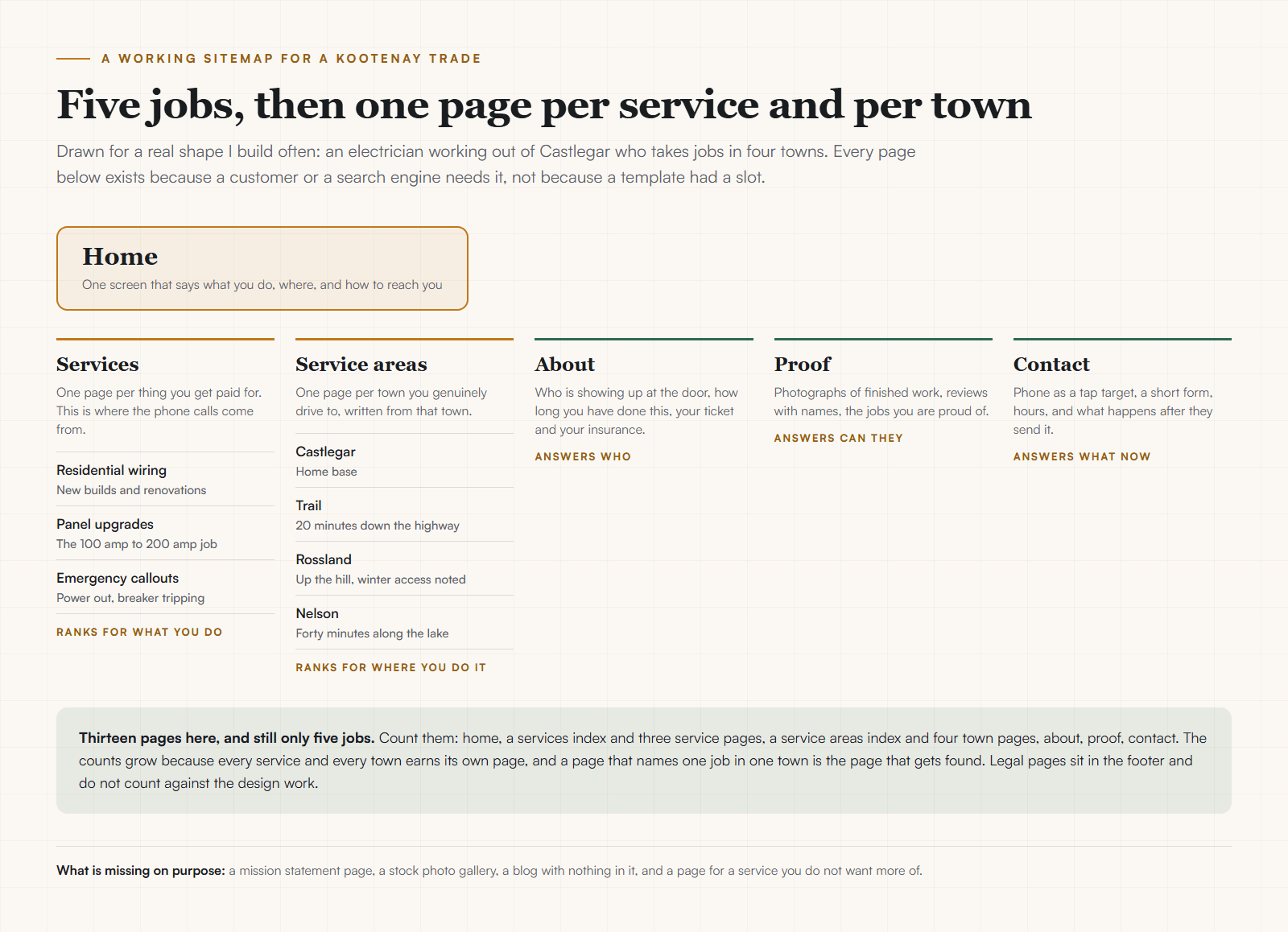
Notice what the drawing leaves out. The mission statement is absent. So is the team page, on a one person shop, and the blog waits until there is something worth publishing. Every column is either a job a customer needs done or a search somebody is running.
What should you leave off?
More than most sites do. Every page you add is attention divided, one more thing to keep current, and one more place for a phone number to go stale. When in doubt, leave it out and see whether anybody asks for it.
- A mission statement page. Nobody has ever hired anybody because of one.
- A gallery of stock photographs of people who do not work for you.
- A blog with two posts from 2023, which reads as abandoned rather than as content.
- A page for a service you do not want more of, because it will bring you exactly that.
- A pop-up asking for an email address before the visitor knows what you do.
The blog deserves a note of its own. A blog with two posts from 2023 actively hurts, because it tells a visitor the business stopped paying attention. Either commit to publishing pages that answer real customer questions, or leave the section off entirely and put the effort into the service pages. A good FAQ section is usually the better version of that instinct anyway.
Pages, or page designs?
When you are reading a quote, this distinction is the whole thing. A second page using a layout that already exists is nearly free. A page needing a new layout is the actual work. Quotes that count URLs and quotes that count designs are describing different amounts of labour.
That is why my own tiers are quoted in custom page designs. Three designs can carry a dozen pages, because four town pages sharing one design are four pages and one design. When you compare quotes, ask each builder which they are counting, and you will find the cheap one and the expensive one are often quoting the same site.
One more number for scale. Across the whole region, 2,527 of 5,836 businesses on the List have no website at all as of September 3, 2026. The bar for standing out is a site that does these five jobs properly, which is a smaller job than most people fear when they start.
Once the list of pages is settled, the next question is what a build like that costs and how long it takes. The website cost guide covers the money and the small business website timeline covers the weeks. If you would rather hand the build over, mine is small business website design with published prices.
Sources and further reading
- The Kootenay Business Web Census
The Kootenay List snapshot behind every town and trade figure in this guide. Compiled from public business listings and restated here through the site helper rather than typed in by hand.
- Kootenay Made Digital published pricing
The page counts quoted here are custom page designs rather than URLs, which is why a site with three designs can carry a dozen pages. The published ladder and what each tier includes.
- Google Search Central, creating helpful content
Google’s own guidance on people-first content, which is the documented reason a page written for one real service in one real town outperforms a page assembled from a template.
Frequently asked questions
What pages should a small business website have?
Five jobs: a home page, a page for each service you sell, an about page, a proof page, and a contact page. Legal pages sit in the footer and do not count. The number of URLs grows past five because each service and each town you serve earns its own page, and that is what gets found in search.
How many pages does a small business website need?
Somewhere between five and fifteen for most local businesses. A trade with three services and four towns is thirteen pages doing five jobs. Count custom page designs rather than URLs when you are pricing a build, because a second page using a layout that already exists is nearly free while a new layout is the actual work.
Should each service have its own page?
Yes, for anything you want more of. A page that names one job answers one search and can rank for it. Three services stacked on one page compete with each other and rank for none of them. The exception is a service you offer but do not want to grow, which can stay a paragraph.
Do I need a page for every town I serve?
Only for towns you actually work in and can write about with real detail. A service area page earns its place when it carries real local detail: the neighbourhoods, the access, the housing stock, the season. Twelve pages with the town name swapped in are worse than one honest page listing where you go.
Do I need an about page?
For a local trade or a service business, the about page is often the second most read page on the site. Somebody deciding whether to let you into their house wants to know who is arriving. Put a real photograph of yourself on it, say how long you have done this, and name your ticket and your insurance.
What should I leave off a small business website?
A mission statement page, stock photographs of people who do not work for you, an abandoned blog, a page for work you do not want, and a pop-up that appears before the visitor knows what you do. Each of these takes attention from the pages that get you called.
Do I need a blog?
Only if you will keep it up. Two posts from three years ago read as abandoned and quietly cost you trust. If you do want one, the useful version answers questions customers actually ask before hiring, which is closer to a set of reference pages than to a diary.
Related pages
- Trades and contractor websites
- Professional services websites
- Auto repair and tire shop websites
- Web design in Castlegar
- Web design in Trail
Kootenay Made Digital
I build websites, local presence, and calm AI setups for Kootenay small businesses. Plain language, published prices, and clear work that makes you easier to find and easier to choose.