hello@kootenaymade.ca
 Castlegar, BC. Serving the Kootenays and beyond.
 9 min read
Key takeaways
- Most small business websites take two to six weeks from kickoff to launch.
- A small, prepared site can move in 10 to 14 working days when content, access, scope, and approvals are ready.
- The timeline killer is rarely code. It is missing photos, unclear services, scattered feedback, and expanding scope.
- Kootenay businesses should plan around real seasonal pressure: tourism, winter services, market season, and customer search timing.
- If the deadline is close, launch the trust path first and move nice-to-have pieces into phase two.

On this page
How long does it take to build a small business website?
Most small business websites take two to six weeks from kickoff to launch. A small, well-prepared site with ready content and one decision-maker can move in 10 to 14 working days. Custom booking, ecommerce, heavy copy, photography gaps, or several approvers push the timeline out further.
That range is not mysterious. It comes from how much needs to be decided, written, gathered, designed, built, connected, reviewed, tested, and launched. The trap is asking for one magic number.
A five-page site for a Castlegar contractor with photos, service notes, one approver, and a clear quote path is not the same project as a Nelson accommodation site with booking tools, seasonal rates, photography gaps, and three people approving every paragraph. Same category, very different timelines.
In my own builds that maps cleanly: a starter presence site like KMD's Trailhead typically runs 2 to 3 weeks, and a bigger growth build like the Engine runs 4 to 5 weeks. Those are goals I work toward, not guarantees.
Two finished builds put page counts on those windows. Family Designs & Creations in Castlegar is a Trailhead: eight pages and four custom-order paths. Summit Handyman in Langley is an Engine: a production sitemap of 173 URLs, 92 of them service-and-location pages. Every build I run also ships a live preview link inside the first week, so the timeline is something you watch rather than wait for. Case studies checked September 2026.
A website project moves at the speed of its least-ready part, and that part is almost never the code.
What counts as a small business website?
A small business website is the site most local businesses need first: a homepage, service or product pages, proof, photos, FAQs, contact paths, local search basics, and a clean mobile experience. It helps people understand, trust, and contact the business. It is not a booking platform or a large catalogue.
Those bigger builds are legitimate, but they are not the same timeline. A custom marketplace, a membership portal, a large product catalogue, or a content library with dozens of pages carries far more machinery. If your project is heading that way, the planning matters even more. My guide to when a website becomes business infrastructure covers that line.
Brochure site vs booking site: how much does the timeline change?
A brochure site is mostly content, trust, and a clear contact path, so it tends to land in the two to four week range. A booking or ecommerce site adds products, payments, calendar logic, policies, notifications, and testing, which usually pushes the build to five to ten weeks or more.
| What is being compared | Brochure site | Booking or ecommerce site |
|---|---|---|
| Typical timeline | 2 to 4 weeks | 4 to 8 weeks or more |
| Core job | Explain, build trust, prompt contact | Take bookings, payments, and orders |
| Main content | Services, proof, photos, contact | Products, inventory, pricing, policies |
| Key build work | Pages, forms, local SEO basics | Payments, calendars, notifications, testing |
| Biggest delay risk | Missing photos and unclear services | Untested payment, calendar, and policy logic |
| Launch testing | Forms, links, mobile, Google profile | Full transaction and booking dry runs |
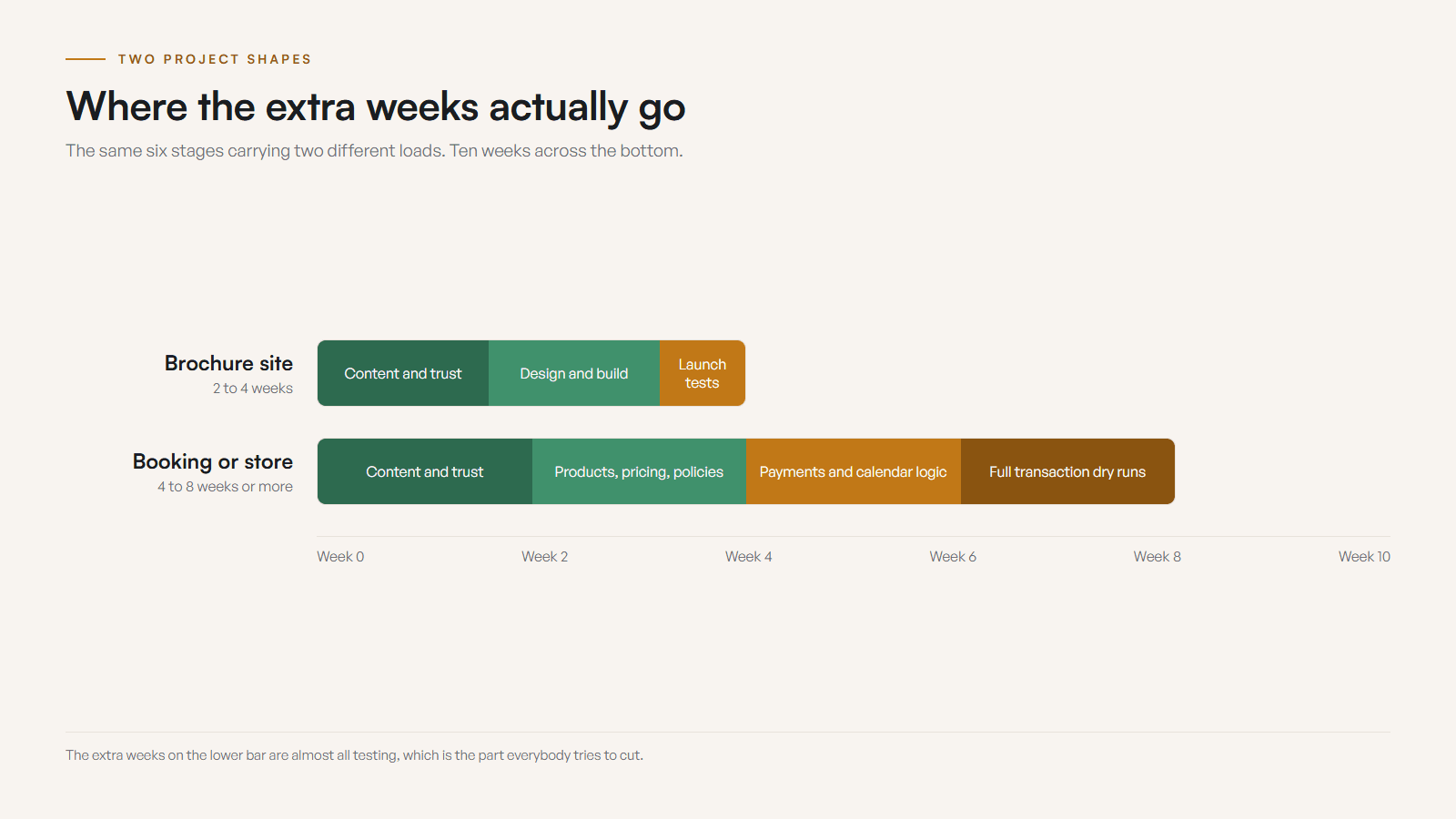
If your deadline is tight and the budget is fixed, a phased launch often wins: ship the brochure foundation first, then add booking or ecommerce once the trust pages are live and earning their keep. You can see how that shapes a finished build on my portfolio.
What are the stages of a website build?
A calm website timeline has six stages, and they do not all belong to the designer. Week zero is prep, then discovery and scope, structure and copy, design direction, build and connect, and finally review and launch. The stages overlap in real life, but the sequence keeps the project from wandering.
- 01
Week zero: prep the trailhead
Gather content, access, photos, offers, and proof before kickoff. This is the cheapest place to save time on the whole project.
- 02
Days 1 to 3: discovery and scope
Confirm the audience, the pages, the job the site must do, the conversion path, the deadline, and what can wait.
- 03
Days 3 to 7: structure and copy
Map the pages, sharpen the message, write service sections, arrange proof, and set the first-screen hierarchy.
- 04
Week 2: design direction
Build the visual system, the homepage direction, the key sections, and the mobile hierarchy before scaling the pattern.
- 05
Weeks 2 to 4: build and connect
Build responsive pages, forms, metadata, image handling, analytics, speed basics, and local search signals.
- 06
Weeks 4 to 6: review and launch
Test on phones, fix details, check forms and links, align the Google profile, connect the domain, and launch with a clean handoff.
These stages overlap. Copy can tighten while design starts, and inner pages can build while the homepage gets final polish. But if discovery is rushed the design wanders, if copy is vague the build becomes decorative, and if review is chaotic the launch slips on tiny decisions that should have been settled weeks earlier.
What makes a website project go faster?
Fast projects are not frantic, they are clear. The business knows what the site must do, the launch version has a sensible boundary, and the important inputs are ready before design begins. Five things, in your control, account for most of the speed.
- Scope is agreed: everyone knows the launch version and what waits for phase two.
- Content is ready: services, photos, proof, hours, and contact details are gathered before design starts.
- Access is in hand: domain, hosting, email, Google Business Profile, booking, and analytics logins are found.
- Feedback is clean: one decision-maker sends comments in one batch instead of scattered replies.
- Ambition is realistic: the first version solves the urgent problem, not every future problem at once.
Notice that none of these are about working faster at the keyboard. They are about removing decisions and dead ends before the build starts. A two-week project with scrambled content feels longer than a four-week project with calm decisions.
What usually causes website delays?
Most website delays are predictable, which means they are also preventable. The usual culprits are missing photos, unclear services, too many approvers, feature creep, access problems, and seasonal chaos. None of them are code problems. Each one has a simple control you can put in place during week zero.
- 01
Missing photos
Design stalls or launches with weak proof. Fix it by capturing a 12-shot list of good-enough images before homepage design begins.
- 02
Unclear services
Pages sound vague and revisions multiply. Fix it by writing the main offer, who it is for, the service area, and the next step first.
- 03
Too many approvers
Feedback arrives in fragments that contradict each other. Fix it by choosing one decision-maker and batching comments into one document.
- 04
Feature creep
A simple site quietly becomes three projects. Fix it by separating launch requirements from phase two ideas before design approval.
- 05
Access problems
Launch waits on domains, DNS, email, booking tools, or Google ownership. Fix it by finding logins in week zero, not on launch afternoon.
- 06
Season chaos
The owner vanishes into customer work right when approvals are needed. Fix it by planning feedback windows around your busy weeks.
How does Kootenay seasonal timing change the launch window?
Around the Kootenays, timing is rarely neutral. A restaurant does not want a new patio page after patio season starts. A landscaper does not want quote requests after the spring calendar is full. The smart move is to work backward from the business moment that matters and give the project enough runway.
- Contractors and trades
- Before and after photos, service area, quote path, warranty notes, crew capacity, and recent job proof drive the timeline more than page count.
- Restaurants and cafes
- Menus, hours, patio status, ordering, location clarity, parking notes, and Google profile alignment need to be ready before the busy season lands.
- Tourism and accommodation
- Availability, pricing context, policies, route notes, weather and smoke plans, and photo proof need more care than a generic brochure site.
- Retail and makers
- Products, pickup options, seasonal markets, local story, gift cards, and simple purchase paths should be mapped before design starts.
- Clinics and wellness
- Practitioner bios, scope of care, booking rules, privacy comfort, accessibility details, and trust proof create most of the content work.
- Professional services
- Positioning, intake forms, service fit, credibility proof, FAQs, and lead-quality filters decide whether the site is quick or strategic.
Castlegar, Nelson, Trail, Rossland, Christina Lake, Kaslo, Nakusp, Creston, and the Slocan Valley all have different search patterns, travel questions, and seasonal pressure points. Summer launch, ski season, holiday retail, market season, a hiring push, a grant deadline, or an event date all change how much runway you should give the project. A good timeline accounts for the business rhythm before it promises a launch date.
How do I prepare for a website build?
Get your content, access, and decisions on paper before kickoff. Six steps make the build faster and cheaper, and most of them you can finish in a single afternoon. The fastest build is usually the one that arrives with the boring things already found.
- 01List the core services, products, or offers in plain words a first-time visitor would understand.
- 02Gather the logo file, brand colours, and the strongest current photos of your work, team, space, or product.
- 03Collect proof: reviews, testimonials, certifications, guarantees, results, and before or after examples.
- 04Find the logins: domain, hosting, email, Google Business Profile, booking tool, and analytics access.
- 05Name the deadline: opening day, tourism season, market launch, hiring push, event, or funding date.
- 06Assign one decision-maker to send feedback in one clean batch, and park phase two ideas so they do not ambush the launch.
You do not need perfect copy or professional photography to start. You need usable, current, honest material and a clear sense of the deadline. If you want a second opinion on what is already working, the free check-up is a fast way to see your starting point before you commit to a build.
What should I do if I am already late?
Stop treating the full dream site as the only acceptable first version. Launch the parts that create trust and generate action, and defer the parts that only matter after the foundation is working. Cut scope before you cut quality, and protect the trust path above everything else.
- Clarify the homepage promise and who the business is for.
- Make the primary action obvious on mobile: call, book, quote, reserve, visit, or buy.
- Confirm hours, location, service area, contact details, and Google Business Profile consistency.
- Add the proof that reduces doubt: photos, reviews, credentials, results, or examples.
- Write the core service or offer page before decorating anything.
- Check forms, buttons, tap targets, contrast, speed, and map links on a real phone.
- Park nonessential pages and integrations until the foundation can launch cleanly.

A clean homepage, one strong service page, real proof, current photos, a working contact path, and aligned Google details will beat a sprawling half-finished site every time. Grand ambition can wait its turn. The deadline cannot. When you are ready to scope it, tell me the deadline and content state and I will tell you whether it is a sprint or a project that needs more prep.
Sources and further reading
- Google Search Central: SEO Starter Guide
Google rewards clear, helpful content and descriptive titles, which is exactly the content readiness that decides your build speed.
- Google Search Central: page experience
Mobile usability, HTTPS, and Core Web Vitals are launch-readiness checks, not afterthoughts, so plan time for them before you go live.
- Google Business Profile help
Keeping hours, contact details, services, and photos consistent with your site is part of every local launch and worth doing in week zero.
- Chrome for Developers: Lighthouse
A quick way to review performance, accessibility, SEO, and best practices during the review-and-launch stage before handoff.
Frequently asked questions
How long does a small business website actually take?
A focused small business website usually takes two to six weeks from kickoff to launch. A small, well-prepared site can move faster. Custom booking, ecommerce, extensive copy, photography gaps, or several decision-makers all push the timeline longer.
Can a website be built in one week?
Sometimes, but only when the scope is small, the brand direction is clear, content is ready, account access is available, and one person approves quickly. One-week builds fail when the project is still being figured out while it is being built.
What usually causes the biggest delay?
Content readiness. Missing photos, unclear service descriptions, old logo files, incomplete pricing, scattered testimonials, unavailable logins, and vague feedback cause more delay than the actual build work in most local website projects.
How early should a seasonal Kootenay business start?
Start eight to twelve weeks before the season you care about if you can. Tourism, patio, market, landscaping, winter service, and holiday retail projects all move better when the launch happens before customers are already searching.
Does ecommerce or booking change the timeline?
Yes. A brochure site is mostly content, trust, and contact flow. Ecommerce and booking add products, inventory, payments, policies, calendar logic, notifications, testing, and account access. That usually means a longer and more careful build.
Can I launch a smaller version first and improve it later?
Yes, and it is often the smartest move. Launch the pages that build trust and capture leads first, then add deeper service pages, galleries, case studies, hiring pages, content, or ecommerce once the foundation is live.
Related pages
Kootenay Made Digital
I build websites, local presence, and calm AI setups for Kootenay small businesses. Plain language, published prices, and clear work that makes you easier to find and easier to choose.