


 hello@kootenaymade.ca
 Castlegar, BC. Serving the Kootenays and beyond.
Answer "are you open, and is it worth it" before they scroll away.
Restaurant and cafe websites that fill the empty Tuesdays, not just the summer patio.
I build restaurant and cafe websites from Castlegar, BC for kitchens fighting no-shows, empty Tuesdays, and third-party delivery commission. A hungry search gives you about ten seconds: hours, menu, patio, book. Win that moment and the same site turns one visit into catering leads, gift cards, and Friday covers.

How a hungry search picks a table
Kootenay Made positions a restaurant site as a local conversion engine, not a digital menu board. Fast mobile answers to the five questions that decide the visit, menus that read like the food tastes, clean paths to book, order, and find you, and revenue pages for catering, events, and gift cards that a social post can never carry. Underneath it sits the trust layer most food sites skip: accurate hours, honest allergen language, accessible design, and online ordering handled by a hosted processor checkout so the whole thing stays credible.
- 01
Hunger has no patience
If hours, the menu, the address, the booking link, or the takeout button take more than a glance to find, they do not dig. They tap back and pick the place that made it obvious. Friction is the competitor.
- 02
The photo is the promise
People decide with their eyes before they read a word. The food has to look current, real, and cared for. Stale stock photos and a menu from two seasons ago quietly say this kitchen is not paying attention.
- 03
The empty Tuesday is a findability problem
July fills itself. The covers you actually control are the November Tuesday, and those go to whichever kitchen shows up when a local searches "open now" at 5:40 pm with accurate hours and a menu that loads. Midweek is won in search, not on the sandwich board.
- 04
The high-stakes booking is the group
A table for two is low risk. A rehearsal dinner, an office lunch for thirty, or a wedding cake order is not. That visitor is scanning for proof you can be trusted with the moment, and that is decided on the catering and events pages, not the home page.
- 05
Regulars are made, not found
One great meal is an accident unless something brings them back. Email capture, gift cards, seasonal menus, and event listings are how a first visit becomes a standing reservation and a word-of-mouth referral.
See the Smokefall concept in the wild.
Concept build from my portfolio, no real affiliation
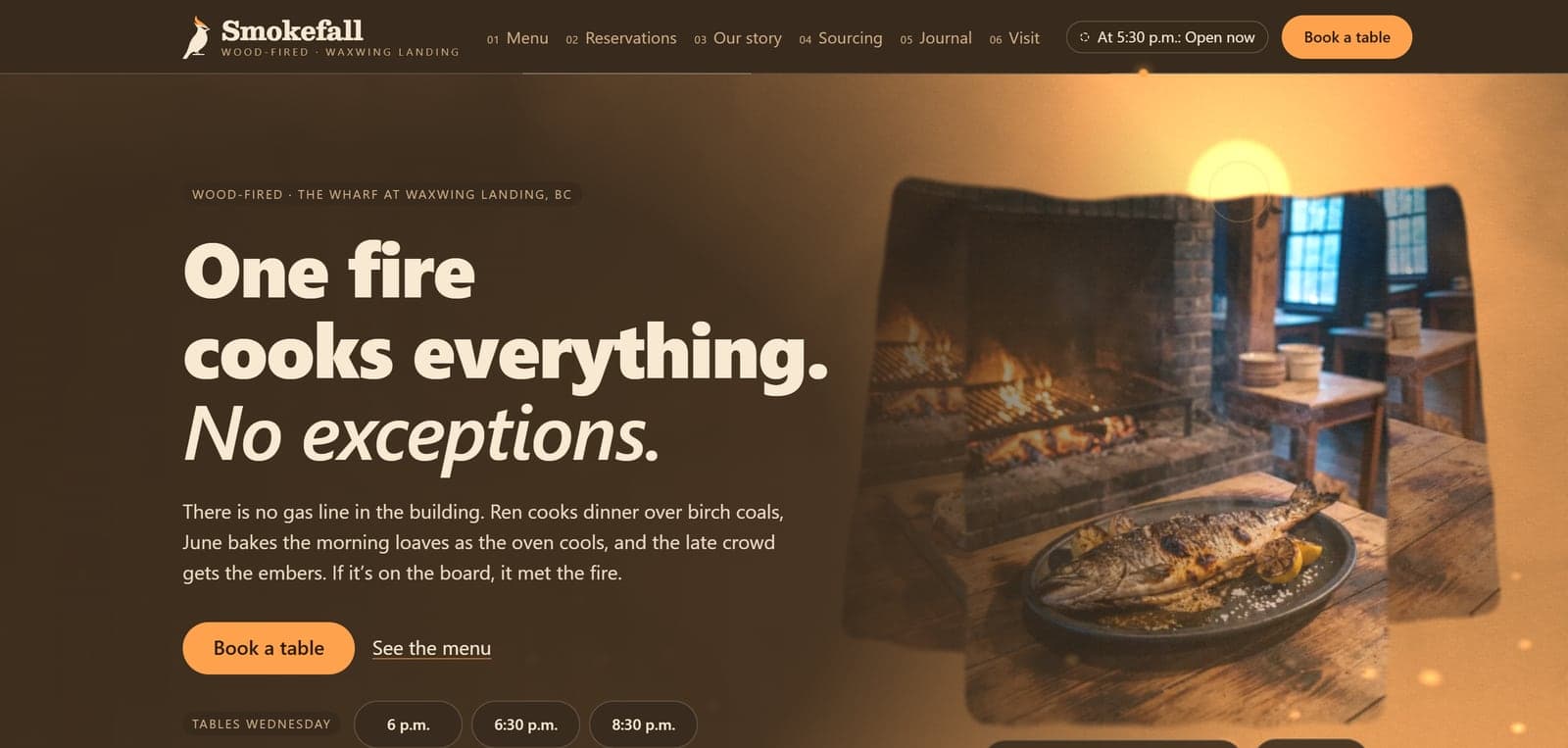
Smokefall is the fictional wood-fired restaurant I built to show the whole system working. The site re-lights with the actual clock across six light states, the open sign reads the real posted hours, and a draggable sun moves through the whole day. The menu is real text with Menu schema instead of a PDF, and booking is a two-week calendar with a table ticket that fills itself in.
- Six-state lighting console
- Open-now from real hours
- HTML menu with Menu schema
- 26 sitemap URLs
Smokefall is a fictional concept build created to demonstrate the category. No real restaurant affiliation, booking results, guest outcomes, or operating performance should be implied.
What goes into a site that fills covers
- 01
The five-second answers
Hours, location with one-tap directions, phone, and the right next action surfaced above the fold on mobile. Open now or closed, patio status, holiday hours, and whether to book, order, or just walk in, answered before anyone has to think.
- 02
Clean paths to book and order
I route visitors to your reservation, waitlist, takeout, and delivery tools without dumping five competing buttons in front of them. The site stays the brand; the platform stays the plumbing. Direct booking and direct ordering get nudged ahead of the apps that take a commission on every ticket.
- 03
Catering, private dining, and the big tickets
The pages that earn the real margin. Actual catering menus, group and private-dining inquiry forms, holiday pre-orders, and event listings, all built to capture the date, headcount, and details so you reply with a quote instead of a game of phone tag.
- 04
Gift cards and the February lever
Gift cards, email capture, and seasonal campaign foundations wired in so a busy December and a slow February both have a lever. The site becomes a reason to come back, not just a place to look you up once.
- 05
Local search that fills covers
Site content aligned with your Google Business Profile and structured for the searches that decide dinner: near-me, your cuisine, brunch, patio, bakery, brewery, catering, and the town name. The goal is simple, you show up when someone three blocks away is choosing where to eat.
The standard that comes with every build I ship.
- Restaurant or cafe homepage built for mobile-first decisions
- Fast, staff-editable menu system with dietary and allergen tags
- Hours, directions, reservation, ordering, and phone routing
- Catering, private event, and group inquiry pages with lead capture
- Gift card, email signup, and seasonal campaign foundations
- Local SEO and Google Business Profile alignment
- WCAG 2.2 AA accessibility baseline, fast Core Web Vitals, and payment handoff to a hosted processor checkout

The empty Tuesday has causes, and every one of them has a bill
Midweek covers are the ones you actually control, and they get lost in small pieces. Each row is a piece: what it costs the guest, what it costs your staff, and the build decision that closes it.
The menu is a PDF from two seasons ago
Costs them
They pinch and zoom on a phone, find prices that are wrong and a dish you stopped making, and read all of it as a kitchen that has stopped paying attention.
Costs you
Servers apologizing for the same three changes at every table, and guests who arrive set on something the kitchen 86'd weeks ago.
FixThe menu built as structured data, editable from a phone in seconds, with dietary and allergen tags and Menu schema so Google shows the dishes instead of a link.
Your hours are wrong somewhere online
Costs them
They drive across town on a holiday Monday, find the lights off, and write the review you can never fully answer.
Costs you
The phone ringing through service to ask whether you are open, and a wasted trip you get blamed for without ever meeting the person.
FixOne set of hours and holiday closures driving both the site and your Google Business Profile, with an open-now answer computed from the real posted times.
Group and catering asks turn into phone tag
Costs them
Somebody planning an office lunch for thirty cannot tell whether you do it at all, so they ask the kitchen whose site says yes and stop asking yours.
Costs you
Dates and headcounts taken on a notepad mid-service and lost between shifts, with the biggest tickets of the month going to whoever called back first.
FixCatering and private-dining pages with real menus and an inquiry form that captures the date, the headcount, and the dietary needs, so you reply with a quote.
The delivery app is the easiest way to order from you
Costs them
They pay a marked-up menu price to order from a kitchen three blocks away, and the cold arrival gets remembered as your food.
Costs you
Third-party delivery commission off every ticket, a regular whose contact details belong to the app, and no way to bring them back yourself.
FixDirect ordering and the phone line placed ahead of the app links, with local search pointing at your site instead of an aggregator listing.
Nothing reaches a local between the busy seasons
Costs them
A local deciding at 5:40 on a November evening never thinks of you, because nothing has reminded them since the patio came down.
Costs you
A dining room staffed for a night that never arrived, and a slow month with no lever you can pull on short notice.
FixGift cards, email capture, and event and seasonal pages wired in, so the shoulder season has something to send and a list to send it to.
One menu, updated once, correct everywhere. And a site built for both seasons.
Most restaurant sites treat the menu as a picture: a PDF the designer made once, wrong within a month, unreadable on a phone, invisible to Google and to screen readers. I build the menu as structured data instead. Change a price, swap the seasonal feature, or pull an item the moment the kitchen 86's it, in one place, from a phone, and the site, the schema Google reads, and the print-ready version all stay in step. No more emailing the web person.
The Kootenays serve two different rooms a year. Summer is the wave: Highway 3 traffic, Baker Street foot traffic in Nelson, visitors searching "patio near me" who have never heard your name. February is locals deciding whether to leave the house. The build handles both: visitor-intent pages and current photos to catch the surge, plus gift cards, events, and email to give the shoulder season a lever.
- Staff-editable structured menu with dietary and allergen tags
- Sold-out and 86'd items pulled in seconds, from any phone
- Menu schema so Google shows dishes, not just a link
- Seasonal swaps: patio and visitor pages up for summer, comfort and events forward for winter
Allergens, gift cards, and the rules of the room
A site in this category is judged on more than looks. These are the obligations and reassurances I build in by default, so the business stays credible and protected.

Allergen honesty, done right
Canada does not require allergen labelling on restaurant menus the way it does on packaged food, which means clear, accurate allergen and gluten language is a trust advantage most kitchens skip. I tag menu items against the priority allergens, keep the wording careful and non-guaranteeing, and add a plain "tell us about allergies" prompt so guests feel safe and your staff stays in control of the conversation.
Accurate hours, location, and menu
Wrong hours and a stale menu are the fastest way to a one-star review and a wasted drive. Under BC and federal consumer rules, prices and offers shown to customers must be truthful. I make hours, holiday closures, and menu pricing easy to keep current, and align them with your Google listing so the story is the same everywhere.
Card numbers stay with the processor
Anyone accepting card payments online has card-industry rules to meet. I keep your site out of cardholder-data scope by handing checkout to a tokenized processor like Stripe, Square, Helcim, or your POS provider, so card numbers never touch your server. That keeps your liability low without a heavy compliance burden on you.
Gift cards under BC law
In BC, the Business Practices and Consumer Protection Act bans expiry dates on most gift cards and requires any fees or terms to be disclosed clearly. I present gift card terms in line with the rules, so a thoughtful purchase never turns into a complaint to Consumer Protection BC.
Email marketing that respects CASL
Every promotional email in Canada needs consent, clear sender identification, and a working unsubscribe under CASL, and the burden of proving consent is on you. I build signup with proper opt-in, and structure your list so newsletters and seasonal offers stay compliant and out of the spam folder.
Accessibility built in, not bolted on
I build to WCAG 2.2 AA: keyboard navigation, real colour contrast, alt text, and screen-reader-friendly menus. It widens who can order from you, and it keeps you ahead of where the Accessible British Columbia Act is clearly heading beyond public bodies. Menu PDFs that no screen reader can parse are exactly the trap I design out.
Want this standard on your site?
One conversation, no pitch deck. Tell me where the business is stuck and I will tell you what I would build.
212 of the 447 Restaurants on The Kootenay List have no website, as of September 3, 2026. The ones that do are the ones a customer can find.
What a build like this costs.
A focused presence site starts with the Trailhead: $2,000, or $500 today and $142 a month on Own It Monthly ($2,204 total). Plenty of businesses in this industry need exactly that and nothing more.
Bigger jobs usually land at $6,500, or $1,625 today and $457 a month on Own It Monthly ($7,109 total)
The Engine · typical timeline 4 to 5 weeks
A restaurant site has to carry a living menu, booking and ordering paths, and catering lead capture at once; the Engine build is the tier where all three run without compromise.
The price depends on what you actually need, not on a package name. Start with the free check-up or the contact form, and I will book a proper 45-minute consultation with you, no pressure either way.
Comparing options right now? What a website should cost breaks down how to read any quote, and who actually owns your website covers what you keep if you ever leave, on any platform, including mine.
Reservation, ordering, and listing platforms does the plumbing. KMD wins the decision.
The tools handle the order. The website has to make a stranger choose this place tonight, trust it for the group of twelve, and remember it next month. That is brand work, and platforms do not do brand work.
OpenTable, Square, Toast, DoorDash, and your Google Business Profile run the transaction and the listing. You rent every one of them. Your story stays off them, and the catering, private-event, and seasonal searches where the real margin lives go to whoever published a page for them. Every third-party order pays a commission. Your own site is the asset that earns the direct booking instead.
What the category tool covers
- Online ordering, reservations, waitlists, and POS-connected checkout
- Third-party delivery listings and aggregator marketplaces
- Google Business Profile, hours, photos, and review collection
- Gift card issuance and basic loyalty inside the POS
- Payment processing and card data handled on the platform side
Where the upgrade actually pays off.
- 01
Make the five questions impossible to miss on mobile: hours, menu, location, book, order, with everything else below.
- 02
Stop letting Instagram be the whole website. It is discovery, not infrastructure, and it cannot rank, book a wedding, or sell a gift card.
- 03
Treat catering, private events, gift cards, and seasonal menus as real revenue pages, not afterthoughts buried in a footer.
- 04
Confirm group bookings by email or deposit through the platform you already use, so one no-show party of twelve does not sink a Friday service.
- 05
Push the direct booking and order ahead of the apps that take a commission, and keep the platforms in their lane while your site owns the brand and local search.
Where I would start.
- Custom websitesThe Engine is where most builds for this kind of business land, and every tier is priced on the page.
- Brand identityA menu, a sign and a website that look like the same place make a room feel established.
- The Lantern, short story videosA 20 to 30 second story film opens on a moment your regulars know and ends on why they come back, made for Instagram and Facebook.
- The Signal, social media postingI post the specials, the new dishes and the patio opening every week from your own photos, so the feed looks as open as the room.
Related guides.
- BentoBox Alternative: A Restaurant Website That Actually Gets Found
- Why a Facebook Page Is Not a Website for a Growing Business
- What Your Website's First Impression Is Saying
- Own Videos or a Produced Ad? Two Different Jobs
- Apple Business Connect and Bing Places in Canada: The Listings After Google
- You Got a Bad Google Review. Here Is What to Do
- What a Great Website for a Kootenay Restaurant, Cafe, or Food Business Needs
- Does Your Business Need Video, or Better Photos?
- What Should a Small Business Post on Facebook and Instagram?
- Why Is My Website So Slow, and What Do I Do?
Questions owners ask between services
Do you have an example of a restaurant website?+
Yes. Smokefall is my full working restaurant concept, clearly labelled as fictional: a site that re-lights with the actual clock, answers open-now from the real posted hours, and serves the menu as real HTML instead of a PDF. The case study and live site are both in my portfolio, so you can judge the standard before we ever talk.
How much does a restaurant website cost in BC?+
Most restaurant and cafe sites I build land in the Engine package: $6,500, or $1,625 today and $457 a month on Own It Monthly ($7,109 total), typically live in 4 to 5 weeks. That covers the editable menu system, booking and ordering paths, catering pages, and local SEO. A simpler cafe or food truck presence can start smaller; a multi-location group scopes higher.
Can it handle reservations without the no-shows?+
The site routes bookings into whatever tool you run, OpenTable, a waitlist, or POS-connected reservations, and those platforms carry the confirmation emails, reminders, and deposit options that actually cut no-shows. My job is making the direct booking path so obvious that guests use your system, where those protections live, instead of a third-party page.
Can my staff update the menu or pull an 86'd item without breaking the site?+
Building the menu as data is what makes this possible: anyone on staff can change a price, flag a sold-out special, pull an item the kitchen just 86'd, or swap the seasonal menu in seconds, from a phone, with no design skills and nothing to break.
Do I still need a website if my Instagram is busy?+
Instagram is discovery, not infrastructure. It cannot rank in Google, hold a readable menu, take a catering inquiry, sell a gift card, or be the accessible, accurate source of truth people check before they drive over. A site does the converting; social does the noticing. They work together.
Can the site reduce what I pay in third-party delivery commission?+
It can shift the mix. Delivery apps charge a commission on every order they touch, so the build puts your direct ordering and phone line ahead of the app links, and local search brings people to your site instead of an aggregator listing. Regulars who order direct are margin you keep, every week.
How do you handle allergens and dietary info?+
I tag items against the priority allergens and add clear, careful language plus a prompt for guests to flag allergies with your team. Canada does not mandate allergen labels on restaurant menus, so doing it well is a trust signal competitors miss. The wording stays honest and non-guaranteeing so your kitchen keeps the final call.
Will I show up when someone nearby searches for food?+
That is the design goal, and it matters most on the quiet nights. I align your site with your Google Business Profile and structure it for the searches that drive walk-ins: your cuisine, brunch, patio, bakery, brewery, catering, and the town name, all with near-me intent. Accurate, consistent details across both is what earns the local ranking.

Who builds this
I am Brett, the person behind Kootenay Made Digital. I plan, design, and build every site myself from Castlegar, BC, so the person you email is the person doing the work.
Founder, Kootenay Made Digital · Castlegar, BC
Book the quiet nights, not just the rush
Whether you are replacing a menu-PDF site or opening your first room, the goal is the same: more covers on the quiet nights, fewer no-shows on the loud ones, and a summer wave that finds you before it finds the place next door.
No website yet?
Start My First WebsiteAlready have one?
Get a Free Check-Up