hello@kootenaymade.ca
 Castlegar, BC. Serving the Kootenays and beyond.
 12 min read
Key takeaways
- A website quote only means something once the scope is clear. Price first, scope later is how businesses buy the wrong site twice.
- For most small businesses, a serious custom website lives in the low to mid thousands. Ecommerce, branding, and larger systems cost more because the work is bigger.
- The biggest cost drivers are page count, copy, design depth, functionality, local visibility, mobile quality, ownership, and maintenance.
- Cheap is not automatically bad and expensive is not automatically safe. Vague is bad. Clear is safe.
- Over five years a builder subscription plus a few paid apps commonly lands between $2,800 and $4,800, and you own nothing at the end of it.
- Before signing, confirm domain control, hosting terms, admin access, ongoing costs, and what happens after launch.

On this page
What should a website cost for a small business?
For most small businesses, a serious custom website lands in the low to mid thousands. At Kootenay Made Digital, presence sites start from $2,000 and bigger growth builds from $6,500, scoped to what you actually need. To spread it, the Own It Monthly plan is $2,000 once, or $500 today and 12 monthly payments of $142, $2,204 all in, and you own the site at the end.
These ranges are a practical reading, not a law carved into the Selkirks. A fair quote can sit outside them when the scope explains why. The trap is comparing prices before you compare what each quote actually includes. My websites page lists what a small business website costs with me, package by package.
Here is a rough map of where website projects tend to land, and what each band is best for. Use it to place a quote, then read the scope to confirm it.
- 01
Under $1,000: template or placeholder build
Useful when you need a simple proof of life, have all content ready, and accept that the site may need replacing later. Often skips copy, local search, mobile polish, and ownership cleanup.
- 02
$2,000 to $4,000: serious custom local site
A strong fit for service businesses, clinics, contractors, restaurants, shops, and firms that need clear pages, trust, local proof, search basics, and a real launch process. The danger here is not the price. It is a quote in this range that still leaves copy, ownership, or SEO vague.
- 03
From $5,500: Shopify or ecommerce store
Makes sense when the project includes products, payment setup, shipping or pickup rules, policies, customer emails, and checkout testing. Cheap ecommerce often hides product setup, taxes, theme limits, and app costs.
- 04
$5,500 and up: brand, growth system, or larger build
Needed when the work includes brand identity, many pages, service architecture, content strategy, integrations, or a stronger local growth engine. A bigger invoice still needs a clear outcome.
Two builds in my own portfolio put real numbers on those bands. Family Designs & Creations in Castlegar sits on the Trailhead at $2,000: eight pages, four custom-order paths, and the shop’s 41 Facebook recommendations surfaced where buyers actually see them. Summit Handyman, over in Langley, sits on the Engine at $6,500: thirteen core services expanded into 92 service-and-location pages, 173 URLs in the production sitemap. Both counts come straight from the case studies, checked September 2026.
As of September 3, 2026, 2,527 of the 5,836 businesses on The Kootenay List have no website at all.
A number floating in a nice PDF is not a price yet. It is a price once you know what it buys and who holds the keys.
Why do website quotes vary so much?
Quotes vary because the same word covers very different work. A five-page website can mean five empty layouts waiting for you to write everything, or it can mean discovery, copywriting, custom design, development, local SEO, mobile testing, forms, analytics, launch support, and training. Those are not the same product, so they should not cost the same.
Page count is easy to compare and dangerously incomplete. A homepage, services page, about, FAQ, and contact can be thin decoration, or a proper local sales path with proof, search structure, trust signals, and clean calls to action. That is why the cheapest number often looks tempting first: it may not be charging for the work that makes the site useful.
Sometimes a low number is exactly right because you only need a starter. Sometimes it is the opening scene of a rebuild story with worse lighting. The only way to tell the difference is to make the scope visible. If you already have a site that needs replacing, my guide to what a website redesign costs in Canada covers that job.
What drives the price of a website?
Eight things move a website quote far more than the word website ever will: page count, copy, design depth, development complexity, local visibility setup, mobile and accessibility polish, launch and handoff, and ongoing maintenance. When two quotes differ in price, the gap almost always lives in this list.
- 01
Page count and structure
More pages cost more when each one has a job: service pages, location pages, about, FAQ, contact, proof, and product or booking pages.
- 02
Copy and messaging
Good copy turns a list of services into a reason to call, book, or buy. If the provider writes or reshapes the words, that is real work, not a freebie.
- 03
Design depth
A custom visual system takes more time than dropping content into a common template. The difference shows in trust, memorability, and how premium the business feels.
- 04
Development complexity
Forms, booking, ecommerce, filters, CMS editing, maps, calculators, portals, and integrations each change the build effort and the price.
- 05
Local visibility setup
Titles, descriptions, headings, internal links, local business details, schema, and Google Business Profile alignment are part of a serious local site.
- 06
Mobile and accessibility polish
Readable type, tap targets, form labels, contrast, keyboard access, page speed, and real phone testing take time. They are not sprinkled on at launch.
- 07
Launch and handoff
Domain records, redirects, analytics, Search Console, backups, training, final QA, and form tests are boring until they save the day.
- 08
Maintenance and growth
A site that will evolve needs a plan for updates, security, content, support, reporting, and new pages after launch week.
If a provider only talks about page count, you are missing the map. A fair quote connects the price to the business outcome you actually want, whether that is calls, bookings, better leads, foot traffic, or ecommerce sales. My process page walks through how I scope that before anyone designs a page.
Cheap vs proper website: which is the better buy?
Cheap is the right move when the offer is simple, the content is ready, the scope is small, and the provider is honest about limits and ownership. Proper is the right move when the site has to carry business weight: more services, more towns, booking logic, or trust questions. The deciding factor is whether the scope is clear.
| What is being compared | Cheap (done well) | Proper (done well) |
|---|---|---|
| Best for | New businesses, simple offers, first foothold | Established businesses carrying real weight |
| Scope | Small, clearly limited, written down | Mapped to the business goal and audiences |
| Copy | Owner-supplied, ready to go | Written or reshaped to convert |
| Local search | Basics only, or a later phase | Built in: titles, schema, local details |
| Mobile and access | Tested on real phones | Tested and tuned for speed and access |
| Ownership | Clear domain and hosting terms | Clear keys, training, and handoff |
| The risk | Outgrowing it sooner than planned | Paying for complexity you did not need yet |
Cheap becomes a trap only when it hides the work that matters: content, proof, local search, mobile experience, accessibility, launch support, and ownership. Call that what it is, a trap wearing a discount hat. Expensive becomes a trap when it is premium language without details: big promises, guaranteed rankings, and vague deliverables. The clearest quote beats the loudest invoice. If you are weighing a builder choice too, my Wix vs custom guide covers that decision.
What does a website builder cost over five years?
Over five years, a mid-tier builder plan plus a few paid apps commonly lands between $2,800 and $4,800 in subscription costs, and you own nothing at the end. The Trailhead at $2,000 once works out to about $33 a month across the same five years. The Engine at $6,500 once works out to about $109. That is where the sticker price stops telling the truth.
Those builder prices are real published numbers, read off each platform’s own pricing page and checked in August 2026. Wix runs about $21 to $165 a month on annual billing. Squarespace runs about $16 to $99. Shopify runs about $29 to $299, and takes 2.4% to 2.9% plus a flat fee on every sale through its own processor. Monthly billing costs more than annual on all three. If Wix is the platform you are actually weighing, my Wix pricing reference for Canada lists every plan in Canadian dollars.
| What is being compared | Five-year spend | Effective cost per month |
|---|---|---|
| Squarespace Core (~$23/mo) plus ~$25/mo of apps | ~$2,880 over five years, and you own nothing at the end | ~$48 a month, forever, rising at renewal |
| Wix Business (~$44/mo) plus ~$30/mo of apps | ~$4,440 over five years, before any transaction fees | ~$74 a month, forever, rising at renewal |
| Shopify Grow (~$79/mo) plus apps and per-sale fees | ~$4,740 on the plan alone, with fees stacked on every sale | ~$79 and up, growing with your sales |
| The Trailhead, $2,000 once | Paid once, then a domain and hosting | ~$33 a month across five years, then the site is yours |
| The Engine, $6,500 once | Paid once, then a domain and hosting | ~$109 a month across five years, then the site is yours |
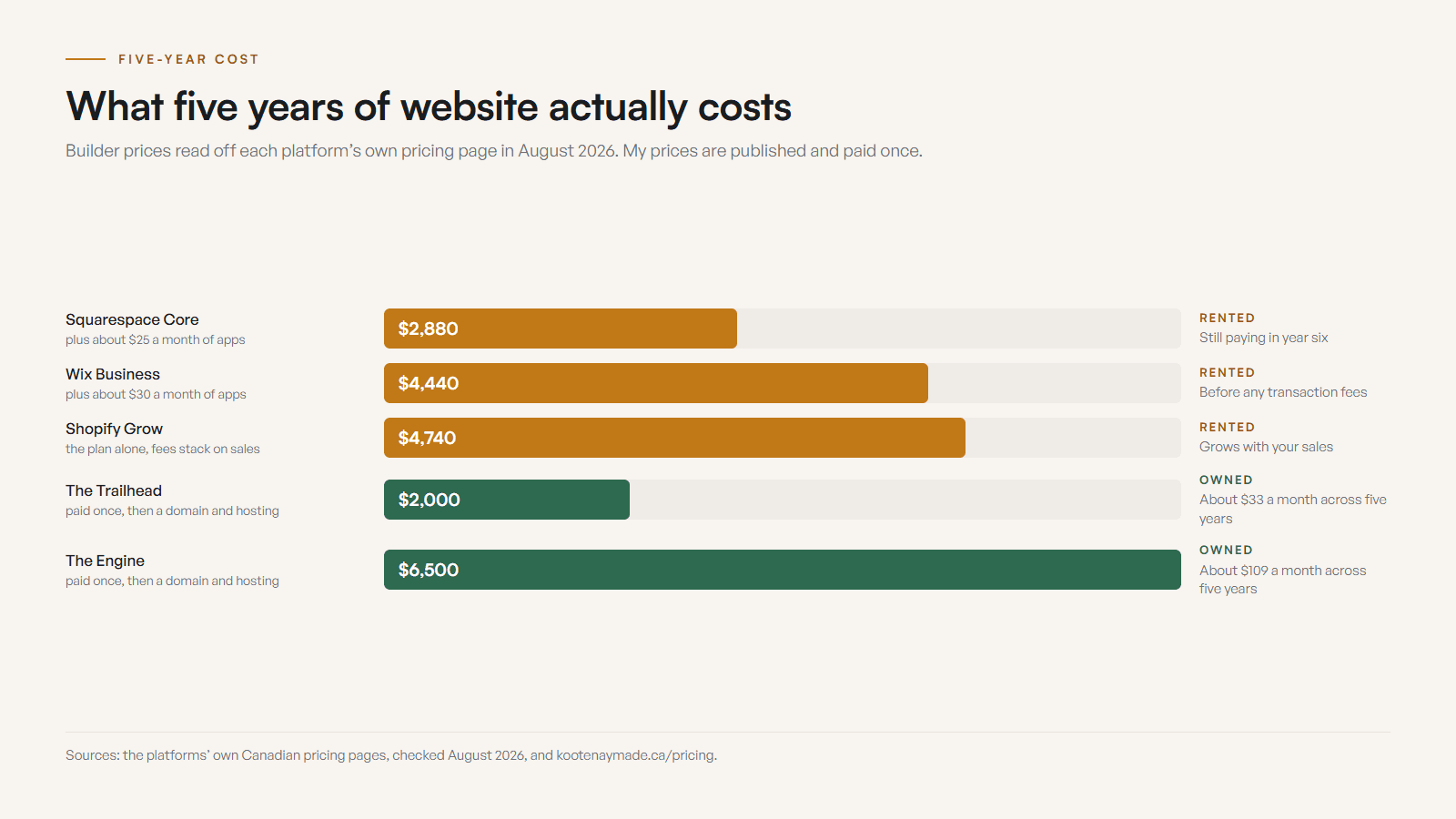
The plan price is rarely the real price. Builders make their money on what you add after you sign, and none of it shows up on the headline sticker.
- The plan price climbs as you add ecommerce, storage, staff seats, or advanced features, and the renewal rate often sits above the first-year promo.
- Paid apps stack up fast. Bookings, reviews, email, SEO tools, popups, and forms are frequently separate monthly charges.
- Transaction fees apply on every sale when you use a payment processor other than the platform default, on top of normal card-processing rates.
- Templates have a ceiling, so custom design or developer help becomes its own cost once you outgrow the defaults.
- You are renting the platform, so the cost recurs for as long as the site exists and leaves you an empty hand at the end.
- Moving off a builder later is a project of its own, because content, URLs, and search history all have to be rebuilt somewhere else.

Ongoing is a word that hides things, so here is what it means on a build I hand over. The domain renews once a year at whatever your registrar charges. Hosting is a choice you make at launch: I can host the site on my own account at no extra cost to you, or you can hold the account yourself, which runs about $20 USD a month on a plan that permits business use. Either way it is one known line item you control, with no platform bill stacked on top. My hosting guide covers what that money buys, and why the free tiers you see advertised are closed to a business.
Read the table and a simple Squarespace site can still beat my Engine over five years. It stays a rental that rises, and you carry the platform’s speed and search ceiling the whole time you are on it. The Trailhead already undercuts a mid-tier builder over the same window and leaves you owning the result. For a seasonal page, a single event, or an idea you are still testing, a builder is the smarter spend.
What should be included in a website quote?
A useful quote names the page list, who writes the content, the design approach, the platform, mobile and accessibility expectations, SEO basics, local business details, forms or booking, analytics, hosting, domain ownership, revision rounds, the timeline, a launch checklist, training, maintenance options, and the exclusions. If any of these is missing, the price is not complete yet.
The exclusions matter as much as the inclusions. A quote that says exactly what you must provide, and what happens if owner-written copy arrives weak, is doing you a favour. Broad words like custom, complete, optimized, or included are warning flares until someone explains what they actually mean.
Who should own the website, and what are the ongoing costs?
You should own your website. At minimum the business controls the domain, knows who controls hosting, holds admin access where appropriate, understands renewal billing, and has a written transfer path. Ongoing costs are part of the real price: domain renewal, hosting, app or plugin fees, content updates, backups, security, and support. A good quote names them before you sign.
- You control the domain: registrar, account owner, renewal date, billing method, and transfer path are written down.
- Hosting terms are clear: platform, billing, backups, updates, cancellation, and who handles technical issues.
- You have admin access where it matters: CMS, analytics, forms, booking tools, and any connected accounts.
- The maintenance plan is named: updates, security, backups, small edits, response times, and what costs extra.
- Source files and image libraries are addressed in writing.
The build invoice is only one layer. Surprise monthly fees are not a business model, they are raccoons in the crawlspace. Managed hosting is fine when the quote explains platform, billing, backups, cancellation, and who handles technical issues. The boring line items are what decide whether the site is an asset or a hostage.
How much does a website cost by business type?
Cost changes because the job changes. A Castlegar contractor qualifying renovation leads does not need the same site as a Nelson cafe posting menu updates, a Rossland tour operator taking seasonal bookings, or a Trail clinic building patient trust. Here is what tends to drive the scope, and the price, for common Kootenay business types.
- Contractors and trades
- Cost depends on service pages, town coverage, before and after proof, quote forms, project galleries, and whether the site filters better leads, not just more.
- Restaurants and cafes
- Budget for menus, hours, reservations or ordering, patio or takeout notes, current photos, map links, and Google Business Profile alignment.
- Clinics and wellness
- A good scope includes practitioner trust, service explanations, booking clarity, privacy-aware wording, forms, and a calm mobile path for new patients.
- Tourism and seasonal operators
- Budget for availability, booking rules, weather or smoke updates, cancellation policies, parking, drive time, and weak-signal mobile use.
- Retail and local makers
- Cost shifts with product categories, gift cards, pickup or shipping, market dates, the maker story, and whether ecommerce is needed now.
- Professional services
- The site needs authority, process clarity, service pages, FAQ, lead qualification, testimonials, and contact paths that do not feel like a dead end.
The local layer is not decoration. A West Kootenay service business may need town-specific pages for Castlegar, Trail, Nelson, and Rossland. A tourism business may need seasonal updates, road context, and booking policies. A quote that never asks about towns, service area, seasonality, or local proof is not cheaper because it is efficient. It is cheaper because it has not found the real job yet. You can see how I approach this in my portfolio.
How do I compare website quotes fairly?
To compare quotes fairly, force them into the same categories and make every provider answer the same questions in writing. Compare scope, not sticker price. If one quote includes copywriting and another assumes you write everything, those prices are not competing. The moment you put them side by side on equal terms, the numbers usually stop looking mysterious.
- 01Write the main business outcome the site must drive: more calls, better bookings, stronger leads, local trust, or ecommerce sales.
- 02Build a scope grid with the same rows for every quote: pages, copy, design, development, SEO, mobile, ownership, launch, training, maintenance, and exclusions.
- 03Send every provider the same questions in writing and wait for clear answers.
- 04Confirm domain, hosting, CMS, analytics, and transfer terms before debating colours.
- 05Compare the corrected scope, not the original sticker price, then choose the clearest tradeoff.
Do not pick yet if you already have three quotes. Put them all into the same grid, highlight anything vague or assumed, ask every provider the same questions, and compare the corrected scope. A website should cost enough to do the job properly and not so much that you are buying complexity you do not need. The only way to know the difference is to make the scope visible. When you are ready, send me the quote and I will give you a clean read before money changes hands.
Sources and further reading
- Google Search Central: SEO starter guide
Lays out crawlable pages, helpful titles, descriptions, headings, links, and useful content. A quote that ignores these basics is not quoting the whole website job.
- Google Search Central: LocalBusiness structured data
Documents local details like address, phone, hours, and service area. Local sites should not treat those as afterthoughts, so they belong in the scope.
- WCAG 2.2 quick reference
Accessibility basics affect contrast, labels, keyboard use, forms, and readable content. A serious website budget should account for usable design.
- Wix official pricing page
Wix Premium plans as of 2026: Light, Core, Business, and Business Elite. Annual billing roughly $21, $33, $44, and $165 CAD per month (verified August 2026). Prices are set by Wix and subject to change.
- Squarespace official pricing page
Squarespace plans as of 2026: Basic, Core, Plus, and Advanced. Annual billing roughly $16, $23, $39, and $99 per month. Prices are set by Squarespace and subject to change.
- Shopify official pricing page
Shopify plans in Canadian dollars, checked September 2026: Basic $37, Grow $99, and Advanced $389 a month on yearly billing, plus per-transaction fees. Prices are set by Shopify and subject to change.
- Vercel pricing and fair use guidelines
Fetched 2026-08-28. The source for the hosting figure in this guide: Vercel publishes Pro at $20 USD a month, and restricts its free Hobby plan to non-commercial personal use, defining commercial to include any site someone was paid to build or host.
- ICANN: domain name registrant information
Explains the role of the domain registrant. Quotes should make ownership, renewal responsibility, account access, and transfer paths clear before launch.
Frequently asked questions
What should a small business website cost in 2026?
For many small businesses, a serious custom website lands in the low to mid thousands, not a few hundred dollars and not automatically tens of thousands. At Kootenay Made Digital, presence sites start from $2,000 and bigger growth builds from $6,500, scoped to what the business actually needs rather than a package name.
Why do website quotes vary so much?
Quotes vary because the same words cover different work: discovery, copywriting, design, development, SEO setup, photos, forms, booking, ecommerce, hosting, analytics, training, and maintenance. Two quotes can both say five-page website while describing two very different projects.
What should be included in a website quote?
A useful quote names the page list, content responsibilities, design approach, platform, mobile and accessibility expectations, SEO basics, local details, forms or booking, analytics, hosting, domain ownership, revision rounds, timeline, launch checklist, training, maintenance, and exclusions.
How much does a Shopify or ecommerce site add?
Ecommerce adds cost because it needs product structure, checkout setup, shipping or pickup rules, taxes, payment configuration, policies, trust signals, and testing. At Kootenay Made Digital, Shopify stores start at $5,500, and product count, theme work, and custom sections decide where a store lands.
Is Wix or Squarespace cheaper than a custom website?
In year one, usually yes. Over three to five years the gap narrows or reverses once you add paid apps, transaction fees, and annual renewals. A $6,500 one-time build spread across five years works out to about $109 a month, with no rising subscription and a site you own at the end.
What are the hidden costs of website builders?
The plan price is only the start. Paid apps for bookings, email, reviews, and SEO add monthly fees, transaction fees apply when you use a processor other than the platform default, renewal rates often exceed the promo rate, and outgrowing a template means paying for custom work anyway.
Do I own my website on Wix or Squarespace?
You own your content and your domain. You do not own the site itself, because it lives inside their system and stops existing when you stop paying. A custom build is yours: the code, the content, and the domain, hosted wherever you choose.
What ongoing costs should I expect after launch?
Expect domain renewal, hosting, possible plugin or app fees, email or form tools, content updates, backups, security maintenance, and support. Some sites have very low ongoing costs. Others need a monthly plan. The quote should name these before you sign.
Related pages
- Web design across British Columbia
- Web design for Canadian businesses
- BC Small Business Website Grants and Funding (2026)
- What to Expect When Working with a Web Designer
- How to Tell If a Website Quote Is Too Cheap to Be Safe
Kootenay Made Digital
I build websites, local presence, and calm AI setups for Kootenay small businesses. Plain language, published prices, and clear work that makes you easier to find and easier to choose.