

 hello@kootenaymade.ca
 Castlegar, BC. Serving the Kootenays and beyond.
 8 min read
Key takeaways
- Suspended, unverified, and simply not ranking are three problems with three different fixes.
- A name carrying your service or your town breaks Google guidelines, and the consequence is suspension.
- Google picks your verification method automatically and it cannot be changed.
- Fix the violation before you appeal, and have your documents ready: the evidence form closes after 60 minutes.
- Never create a second profile while an appeal is under review.

On this page
Suspended, unverified, or just not showing?
Three different problems wear the same costume, which is a business that cannot be found. Suspension means a guideline breach and needs an appeal. Unverified means Google has not confirmed you can represent the business. Neither describes a healthy profile that simply loses to competitors. This guide is for the first two; the third has its own guide.
- Suspended
- The profile is gone from Maps and Search, and the dashboard shows a suspension notice. Google says it may suspend or disable profiles that do not follow its guidelines. This needs an appeal.
- Not verified
- The profile exists but Google has not confirmed you are allowed to represent the business. It shows limited or nothing publicly. This needs verification, and Google picks the method.
- Verified and simply not ranking
- The profile is healthy and findable by exact name, and it loses to competitors on service searches. This is a relevance and prominence problem, and appealing anything will not help.
Test it in one minute. Open a private browser window, search your exact business name, and see whether the profile appears at all. Found by name and losing on service searches is the third problem, and the guide on why a business is not showing up on Google Maps is the one you want instead.
What actually triggers a suspension?
Four causes cover most small-business suspensions, and three of them are self-inflicted by somebody trying to help. Google publishes all four as guideline requirements rather than secrets, which makes them fixable.
- 01
Keywords stuffed into the business name
Google requires the real-world name used on your storefront, website, and stationery. Adding your service or your town to the name breaks that rule, and Google documents suspension as the consequence.
- 02
A service-area business showing an address
Google tells businesses that visit customers to hide the address. A trade working out of a house that displays that address is a common trigger, and a house is not a customer-facing location anyway.
- 03
An address or category change on an established profile
Edits that move a business or redefine what it is get reviewed. A cluster of edits made in one sitting looks more suspicious than the same edits made over a month.
- 04
Duplicate profiles
Google states there should only be one profile per business, with exceptions for departments and individual practitioners. Old profiles under an old name, an old address, or a previous owner all count.
The first one deserves the warning. A business that quietly renames itself to its trade plus its town is breaking the name rule, and Google documents suspension as the consequence rather than a soft demotion. If a marketing company suggested that change, this is the paragraph to send them.
The name goes on your truck, not in your keyword list. Google checks.
How do I work out which one I have?
Follow the branches rather than guessing. Every path ends in one action, and picking the wrong branch costs you weeks, because an appeal on an unverified profile and a verification attempt on a suspended one both go nowhere.
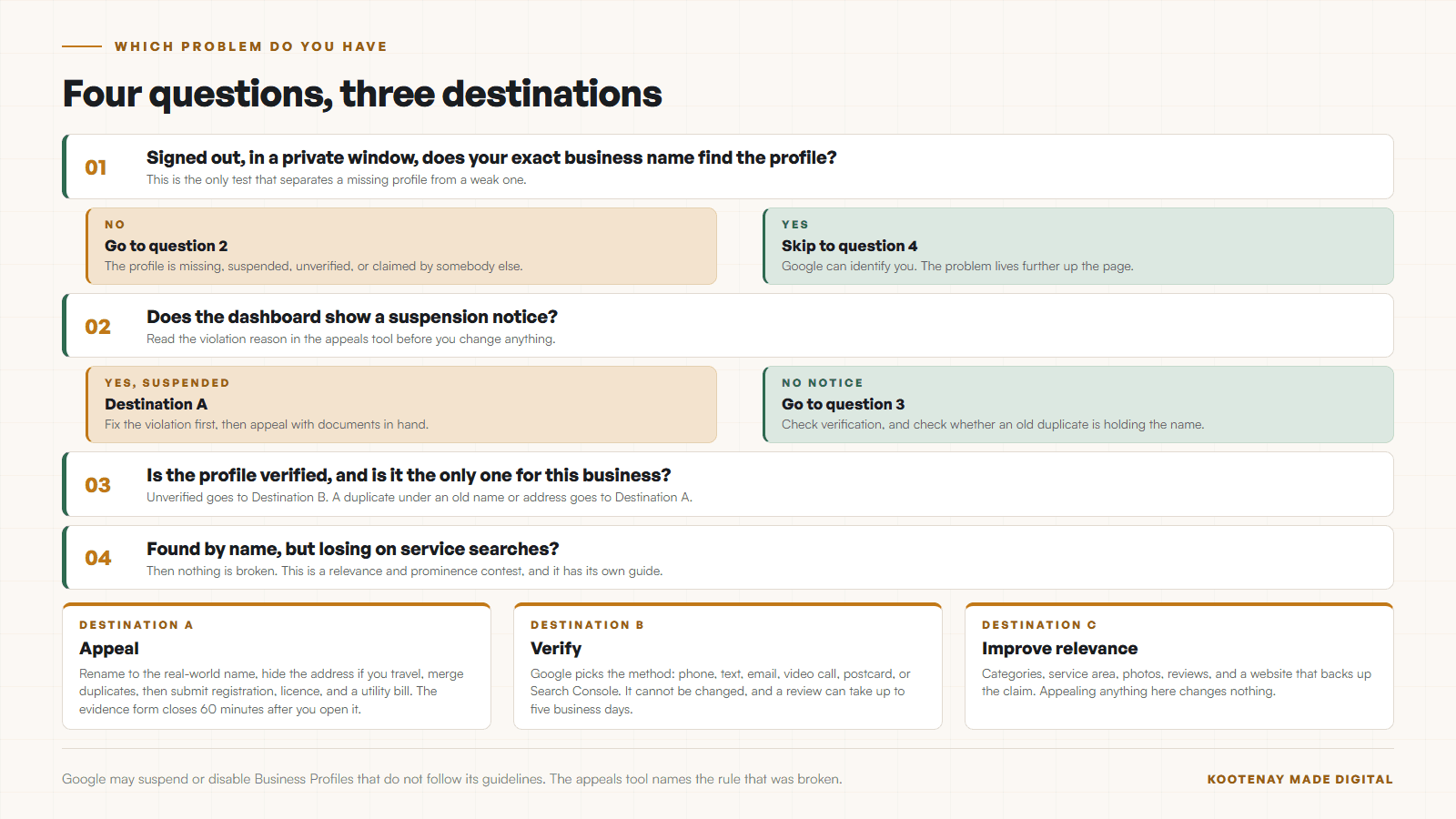
Half the trades in this region are service-area businesses running from a house, which puts them on the branch that trips most often. As of September 3, 2026, The Kootenay List counts 319 businesses in its contractors & renovations category, with 176 of them carrying no website at all. For those, the profile is the entire online presence, so a suspension is not a marketing setback. It is the phone going quiet.
How does verification work now?
Google offers five methods, and it decides which ones you get. That is worth knowing up front, because owners lose days trying to force the fast option. Reviews after you complete the steps can take up to five business days.
- Phone or text
- A code by call or text, entered in the profile. Fast when Google offers it.
- Verification steps sent to an email address Google associates with the business.
- Live video call
- You show the location, the business, and proof of ownership to a support representative. Google recommends this when the business is eligible, and calls are only available within your listed opening hours.
- Postcard
- Google mails a code to the business address. Slower, and it needs the address to be real and receiving mail.
- Search Console
- Verifying your website in Search Console can verify the profile instantly.
Google states that verification methods are automatically determined and cannot be changed, and that the options depend on your business type, public information, region, and hours. Some businesses are asked for more than one. The video call is the one people dread and the one that usually goes fastest, so have your signage, your vehicle, your tools, and a piece of mail ready before you start.
How do I write a reinstatement that works?
Fix the violation first, then appeal with documents in hand. The appeal is not an argument about whether the rule is fair. It is a short, factual demonstration that the profile now complies and that the business is real.
- 01Read the guidelines page first and find the specific rule you broke. The appeals tool shows the violation reason and links the policy, so start from Google words rather than your own theory.
- 02Fix the violation before you appeal. Rename the business to the real-world name, hide the address if you visit customers, merge or remove duplicates.
- 03Gather the documents Google accepts: business registration, licences, tax certificates, and utility bills showing the same business name and address.
- 04Open the appeals tool, confirm the account, select the suspended profile, and submit. Google reviews the submission and replies by email.
- 05Have the evidence files ready before you open the evidence form. Google gives you 60 minutes from opening it, and anything you submit after that will not be attached to the appeal.
- 06If the appeal is denied, you can request an additional review of the denied request. Change something real before you do, because resubmitting the same case gets the same answer.
The 60 minute window on the evidence form is the detail that catches people. Google states that once you open it, anything submitted after an hour will not be attached to your appeal. Scan the business licence, the tax document, and a utility bill showing the same name and address before you open anything.
What should I avoid while I wait?
Mostly, avoid making it worse. The two moves that hurt most are creating a second profile and continuing to edit the suspended one, and both feel productive at the time.
- Do not create a second profile for the same business. Google says not to while the appeal is under review, and a duplicate usually makes the original harder to recover.
- Do not keep editing the suspended profile. Every change is another thing the reviewer has to evaluate.
- Do not buy a service that promises reinstatement. Google states there is no way to request or pay for a better local ranking, and reinstatement follows the same principle.
- Do point your marketing at the website and the phone while you wait, so the business keeps working.
- Do write down every change you made in the two weeks before the suspension. The trigger is usually in that list.

Meanwhile, keep the business findable. Your website, your phone number, and your existing customers do not care about the listing status. This is exactly the week you find out whether the site can carry the load on its own, which is the argument in what local SEO actually looks like for a Kootenay business. When I build that into a site for a client, the work is local SEO for Kootenay businesses.
How do I keep the profile out of trouble?
Set it up the way Google describes it and then leave it alone. The table below is the whole rulebook for a small local business, in the two columns that matter.
| What is being compared | What Google asks for | What gets you flagged |
|---|---|---|
| The business name | The real-world name on your storefront, website, and stationery. | The name with your service and town appended. |
| The address | A precise address, or a hidden address with a service area if you travel. | A post office box, or a home address left visible. |
| Categories | The fewest that describe the core business. The test is "this business IS a". | A long list added as keywords. |
| Profiles | One per business, with departments or practitioners as documented exceptions. | An old profile from a previous name or owner left live. |
| Service area | Set by city, postal code, or area, up to 20, staying inside about two hours driving. | Every town in the region, hopefully. |
The service-area row has real teeth around here. Google says the overall boundary should not be more than about two hours of driving time from base, and it wants areas set by city or postal code rather than a radius. Nelson to Grand Forks is roughly two and a half hours on the highway, so a Nelson trade listing Grand Forks is at or past Google’s published boundary. Claim the towns you actually drive to, and prove the rest with service pages that earn the call instead.
Once the profile is healthy again, the work moves to keeping it that way: current photos, honest hours, and reviews arriving steadily. Both halves of that are in the Google Business Profile guide for a Kootenay business and how to get more Google reviews without begging or buying.
Set it up the way Google describes it, then stop fiddling. Most suspensions start with a good idea.
Sources and further reading
- Google: fix a suspended Business Profile
Checked September 5, 2026. States that Google may suspend or disable profiles that do not follow its guidelines, documents the appeals tool and the accepted evidence, warns against creating a new profile while an appeal is under review, and sets the 60 minute limit on the evidence form.
- Google: verify your Business Profile
Checked September 5, 2026. Lists the verification methods, states that methods are automatically determined by Google and cannot be changed, and notes reviews can take up to five business days.
- Google: guidelines for representing your business
Checked September 5, 2026. Requires the real-world business name, no keywords or location in the name, a precise address or service area with no post office boxes, the fewest accurate categories, and one profile per business.
- Google: set your service area
Checked September 5, 2026. Service areas are set by city, postal code, or area rather than a radius, up to 20 of them, and the overall boundary should not be more than about two hours of driving time from base.
Frequently asked questions
Why was my Google Business Profile suspended?
Google says it may suspend profiles that do not follow its guidelines, and four causes account for most small-business suspensions: keywords or a town added to the business name, a service-area business displaying its address, a batch of address or category edits on an established profile, and duplicate profiles. The appeals tool shows the violation reason it was flagged under.
How long does reinstatement take?
Google reviews the appeal and replies by email, and there is no published turnaround. Verification reviews are documented as taking up to five business days, and appeals commonly take longer. Fix the actual violation before appealing, because a rejected appeal costs you the whole wait again.
Can I choose how Google verifies my business?
No. Google states that verification methods are automatically determined and cannot be changed, and which ones you are offered depends on your business type, public information, region, and hours. Live video calls are only available during your listed opening hours, which is worth checking before you schedule one.
Can I put my town in my business name to rank better?
No, and this is the single most common self-inflicted suspension. Google requires the real-world name used on your storefront, website, and stationery. Adding your service or your town breaks that rule, and Google documents suspension as the consequence.
Should I make a new profile while I wait?
No. Google says not to create a new Business Profile for the same business while your appeal is under review. A duplicate splits your signals, usually gets caught by the same review, and can make the original harder to recover than it already was.
Related pages
- Trades and contractor websites
- Wellness and clinic websites
- Auto repair and tire shop websites
- Web design in Nelson
- Web design in Grand Forks
Kootenay Made Digital
I build websites, local presence, and calm AI setups for Kootenay small businesses. Plain language, published prices, and clear work that makes you easier to find and easier to choose.