

 Castlegar, BC. Serving the Kootenays and beyond.
 13 min read
Key takeaways
- The map pack is where Kootenay "near me" searches are won, and a thin rural market means fewer rivals to beat.
- A service-area business should list the real towns it drives to, not a home address or the whole region.
- Your primary category is the strongest relevance lever, even when the perfect rural category does not exist.
- Tourist season changes the search: visitors use "near me", so accurate hours and current photos matter most when you are busiest.
- In a small market you need fewer reviews to stand out, so a steady, honest trickle beats a one-time burst.
- Claim and verify before anything else. A listing you do not control makes every other fix fragile.

On this page
Why does the map pack matter so much for a Kootenay business?
The map pack is the boxed set of three local listings, with a map, that sits at the top of a local search. For a Kootenay business it is the cheapest, fastest way to get found by people who are searching "near me" and ready to act. Those three spots come straight from Google Business Profiles.
When someone in Nelson searches "coffee near me" or "electrician Castlegar", Google does not lead with ten blue links. It leads with a map and three local listings. If yours is missing, unclaimed, or thin, you are invisible at the exact moment a local customer wants you. The upside in a rural market is real: you are not fighting a hundred rivals like a city business, so a complete, active profile stands out fast.
The map pack is where local buying decisions happen. In a small Kootenay market, a complete profile beats a bigger, quieter competitor.
How does Google decide who wins the Kootenay map pack?
Google ranks local results on three factors: distance, relevance, and prominence. Distance is how close you are to the searcher. Relevance is how well your profile matches the search. Prominence is how known and trusted you are. You cannot change distance, but you can directly improve the other two, and in a thin market that is often enough.
- 01
Distance
How close you are to the person searching. You cannot move the building, but a clear service area and accurate address help Google show you across the right Kootenay towns, not just your own block.
- 02
Relevance
How well your profile matches the search. Your primary category, services, description, and website content all tell Google what you actually do, which matters more in a thin rural market where fewer businesses compete.
- 03
Prominence
How known and trusted you are. Reviews, ratings, links to your site, and consistent listings feed this. In a small market you need fewer reviews than a city rival to stand out, so steady wins.
The practical takeaway is simple. You will not always be the closest business, so you win on the parts you control: a complete, accurate, specific profile for relevance, and a steady stream of genuine reviews and links for prominence. In the Kootenays, most of your local competitors are not pulling those levers, which is exactly the opening.
How do I set up a multi-town service area?
Most Kootenay trades serve more than one town. A Castlegar electrician drives to Trail, Rossland, and Fruitvale. The map pack rewards an honest service area: list the towns you reach, hide your home address if customers do not come to you, and let the towns do the local-relevance work.
- Storefront business
- A Nelson cafe or Trail shop lists its real address, since people come to you. Distance works in your favour for the town you sit in.
- Service-area business
- A Castlegar electrician who drives to Rossland, Warfield, and Fruitvale hides the home address and lists towns as a service area instead.
- Hybrid
- A Creston clinic with a location that also does home visits shows the address and a service area, so both kinds of searcher find the right answer.
- Multi-town coverage
- List only the towns you genuinely serve. Padding the area with places you will not drive to weakens relevance and disappoints the caller.
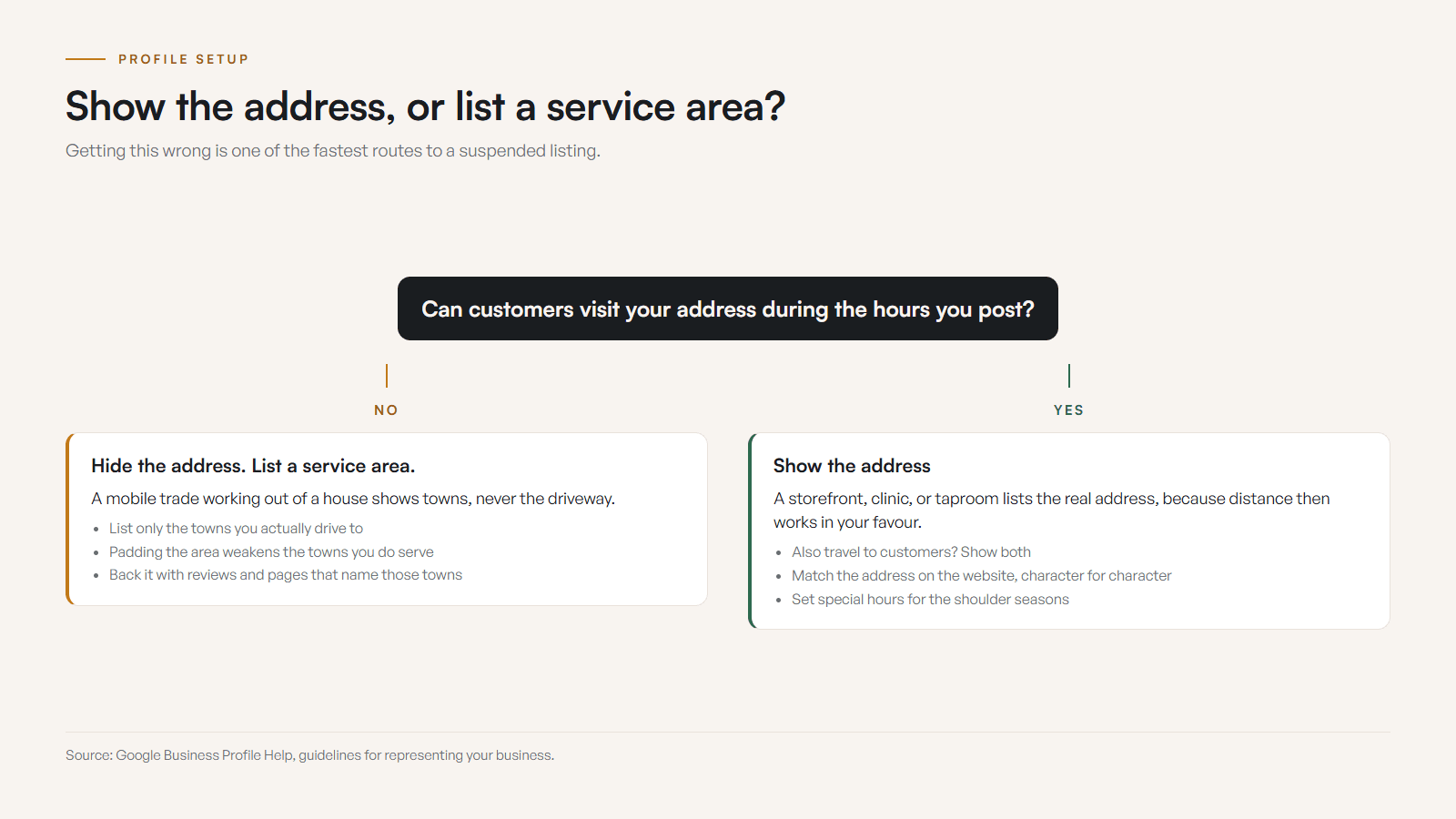
Do not pad the area with towns you will not drive to. It weakens your relevance for the places you actually serve and sets up disappointed callers. A tight, honest service area, backed by reviews and website pages that name those towns, is what lets a Nelson-based business also show up in Trail and Rossland searches.
How do I choose a category for a rural or niche trade?
Pick one primary category that is the most specific match for your core business, then add 2 to 3 relevant additional categories. The primary category is the strongest relevance signal you have, so specificity wins: choose "Emergency plumber" over "Contractor", or "Coffee shop" over "Cafe", whenever a closer match exists.
Rural trades sometimes hit a wall: the perfect category simply is not in Google's list. When that happens, choose the closest specific option and use your services and description to fill in the rest. A small-town operator with an unusual mix of work is better served by one accurate near-match plus clear services than by a vague catch-all category that tells Google nothing.
- One primary category, as specific as the list allows for your trade.
- Two to three additional categories that are truly relevant, not aspirational.
- No padding with loosely related categories; it dilutes your relevance.
- If no exact match exists, pick the closest specific one and lean on services and description.
How does tourist season change my profile?
The Kootenays run on seasons. Summer brings lake and trail visitors, ski season fills Rossland and the resorts, and shoulder season empties them out. Tourists search "near me" without knowing town names, so accurate hours, current photos, and clear details matter most exactly when you are busiest and most visible to strangers.
Set special hours for statutory holidays and for the shoulder-season changes that visitors never expect. Post seasonal updates so a July tourist and a January local both see current information. If you close for a season or shift to reduced hours, say so on the profile. Nothing burns a first-time visitor faster than driving to a business that Google said was open and finding a dark window.
How many reviews do I need in a small market?
Ask happy customers soon after a good experience, send a direct review link so it takes one tap, and reply to every review by name, mentioning the town or the job. Reviews feed prominence, and in a small Kootenay market you need far fewer than a city rival to stand out. Steady and honest beats a one-time burst.
- 01Make a short list of recent happy customers worth asking, and note the town each one is in.
- 02Ask in person or by text or email within a day or two, while the experience is fresh.
- 03Send a direct link to your review form so it takes one tap, not a search.
- 04Reply to every review, good or bad, within a day or two, by name, mentioning the town or the job.
- 05For a hard review, thank them, take it offline, and fix the issue. Never argue in public.
- 06Keep the flow steady. In a small market, a slow honest trickle beats a one-time pile of reviews.
Two facts make that concrete rather than encouraging. On The Kootenay List, compiled September 3, 2026, Kimberley has 318 businesses and 205 of them run no website at all, so the field you are standing in is thinner than it feels from inside it. On Summit Handyman, a build of mine over in Langley rather than up here, the Google review proof sits on the website beside the quote path as well as on the profile. That is the arrangement that carries a small review count the furthest.
Replying matters as much as collecting. Responding to reviews, including the hard ones, is a clear trust signal to both Google and future customers. A review that names the town and the work also quietly tells Google you serve that area. Never argue in public, and stay away from bought reviews; both can get your profile suspended, which in a small market is a hole you cannot easily climb out of.
How important are photos and posts?
Photos and posts keep your profile active and build trust. A profile with real, current photos of your space, team, and work looks open and credible, while a bare one looks abandoned. In a tourist-driven market, seasonal photos also help a first-time visitor recognize the place they are about to drive to.
- Exterior
- Your storefront or building from the street, in good light, so people recognize you when they arrive in Nelson, Trail, or Castlegar.
- Interior
- What the space feels like inside. Useful for shops, cafes, clinics, and studios where the vibe is part of the decision.
- Team
- Real faces of the people customers will meet. Local businesses win on trust, and faces build it faster than logos.
- Work and products
- The actual thing you sell or make: finished jobs, plated food, products on the shelf, before-and-after results.
- Seasonal
- Summer patio and winter snow, so a tourist in July and a local in January both see a business that matches the day they are searching.
Aim for at least ten genuine photos and add new ones regularly. Skip the stock imagery; local customers can tell, and authenticity is the whole advantage a Kootenay business has over a faceless chain. For posts, a fresh one every week or two is plenty, tuned to the season: a summer offer, a winter hours change, a finished job, or a simple update. Consistency beats volume.
How do I claim, verify, and set the profile up?
Set it up in order rather than all at once. Claim and verify the listing first, then clear any guideline risk, then choose the category, set address or service area, fix hours and links, and finish with photos and reviews. That sequence stops you polishing a profile you do not yet control.
- 01Confirm ownership and verification, and recover access from an old employee or the wrong account before you touch anything else.
- 02Clear the guideline risks: a name stuffed with towns, an address customers cannot visit, a duplicate listing, or an off-topic category.
- 03Set the best primary category, clean up the secondary ones, and rewrite services in the plain language customers use.
- 04Decide address versus service area, then bring hours, special hours, phone, website link, and booking link into line with the site.
- 05Add current photos, ask recent happy customers for honest reviews, and reply to the ones already sitting there.
Ownership comes first for a boring reason. If the listing is unclaimed, sitting in an old employee's account, tied to the wrong login, or waiting on verification, every other change you make is fragile or invisible. Go to business.google.com, find or add the business, claim it, and finish whichever verification Google offers, usually video or phone. Resist creating a second listing when the first one is slow, because duplicates are one of the fastest routes to a suspension.
Before
A Trail service business had an old phone number on the website, vague profile services, weak category choices, no current photos, and hours that disagreed with the voicemail. People could find the listing, and the trust path was full of loose boards.
After
The cleanup fixed ownership, category, services, hours, phone, website link, photos, review replies, and service-area clarity. The profile and the website finally told the same story, so customers had fewer reasons to hesitate.
Composite example based on common Kootenay profile issues. No invented case-study numbers and no ranking promises.
What mistakes put the listing at risk?
The mistakes that hurt most are self-inflicted. Stuffing the business name with towns or keywords, showing an address customers cannot visit, creating duplicate profiles to chase nearby towns, adding unrelated categories, and offering perks for reviews all risk trust, and several of them risk suspension. In a small market a suspension is a hole you cannot easily climb out of.
- Do not add towns or services to the business name unless they are part of the real-world name.
- Do not show a public address where customers cannot actually visit during the hours you state.
- Do not create multiple profiles for one business just to chase nearby towns.
- Do not use unrelated categories because they look searchable.
- Do not offer discounts, gifts, or perks in exchange for reviews.
- Do not turn on messaging if nobody will answer it promptly.
- Do not leave critical information in a profile post when it belongs in hours or on the website.

Google's guidance here is boring on purpose: represent the real business accurately. The competitor who simply keeps hours, category, and photos current usually beats the one chasing shortcuts, and they do it without ever risking the listing.
Profile vs. website: which do I actually need?
You need both, because they do different jobs. The Google Business Profile gets you found in the map pack and answers quick questions. Your website earns the trust, tells the full story, and closes the booking or sale. Google also reads your website to judge relevance, so a strong site lifts your profile too.
| What is being compared | Google Business Profile | Your website |
|---|---|---|
| Primary job | Get found in Maps and the map pack | Win trust and close the sale |
| Cost | Free | An investment you own (custom sites from $2,000) |
| You control | Listing details, photos, posts, replies | Everything: design, content, structure, speed |
| Best for | Hours, location, reviews, quick decisions | Story, proof, services in depth, booking, payments |
| Ranking role | Drives local map pack visibility | Feeds relevance and prominence signals |
| Limitation | Google owns it; you only manage it | Needs building and upkeep, but it is fully yours |
The profile is free, but the website is the asset you actually own. A Trailhead custom site is $2,000 once, or $500 today and 12 monthly payments of $142, $2,204 all in, through Own It Monthly, and the site is yours outright either way. The two reinforce each other: the profile sends ready-to-act searchers to a site built to convert them, and the site gives Google the content it needs to rank the profile. If your website is thin or slow, even a perfect profile leaves money on the table.
What does a fully optimized Kootenay profile look like?
A fully optimized Google Business Profile is complete, specific, and active: the right primary category, an honest service area, accurate seasonal hours, real photos, listed services, a steady review flow with replies, and regular posts. Work through the checklist below, and you will be ahead of most local competitors in Castlegar, Nelson, Trail, and Rossland.
- Primary category is the single most specific match your rural trade allows (for example "Coffee shop", not "Cafe"; "Emergency plumber", not "Contractor").
- Name, address, and phone match your website and other listings exactly, character for character.
- Service area lists the real towns you cover: Castlegar, Nelson, Trail, Rossland, Creston, Nakusp, or wherever you actually go.
- Hours are accurate, with special hours set for statutory holidays and the shoulder-season changes visitors never expect.
- A 750-character description leads with what you do and the towns you serve, written for people, not stuffed with keywords.
- Services and products are listed individually, each with a short, plain description.
- At least 10 real photos, including exterior, interior, team, and work, added and refreshed regularly.
- Review requests go out to happy customers every week, and every review gets a reply that mentions the town or the job.
- A fresh post goes up every week or two, tuned to the season: an offer, an event, a finished job, or a hours update.
- The listing is claimed, verified, and controlled by an account the business can actually get into today.
- The business name matches the real-world name, with no extra towns or search phrases bolted on.
- The public address appears only if customers can visit that location during the hours you state.
Once the cleanup is done, watch what it changes: calls, website clicks, direction requests, booking clicks, the themes running through your reviews, and the questions customers keep asking anyway. Those numbers tell you which part of the profile or the site is still making people hesitate.
Most of this is free and takes an afternoon to set up, then a few minutes a week to maintain. If you would rather have it done right and tied into a website that converts, the free check-up will show exactly where your profile and site are leaking visibility, and what to fix first.
Sources and further reading
- Google Business Profile Help: Add or claim your Business Profile
The official walkthrough for finding, adding, and claiming your business so you control the listing.
- Google Business Profile Help: Enter and edit your service area
How to set the towns and areas you serve, and when to hide your address for a service-area business.
- Google Business Profile Help: Tips to improve your local ranking
Google explaining its own ranking factors: distance, relevance, and prominence, and how completeness and reviews help.
- Google Business Profile Help: Manage your business category
How to choose a primary category and add additional categories, and why specificity matters.
- Google Business Profile Help: Guidelines for representing your business
Google sets the rules for names, addresses, service areas, categories, and eligibility. This is the source for what counts as guideline risk.
- Google Business Profile Help: Prohibited and restricted content in reviews
Confirms that owner replies are public and that offering incentives for reviews is not allowed, which is what keeps a review strategy honest.
- Google Search Central: LocalBusiness structured data
Documents the website structured data that clarifies address, hours, phone, and geo, so the profile and the site reinforce each other.
Frequently asked questions
How do I win the map pack in a Kootenay town?
Set the most specific primary category, define an honest service area covering the towns you actually reach, and earn a steady flow of reviews that name those towns. In a thin rural market you compete against fewer businesses, so a complete, active, accurate profile stands out faster than it would in a city.
How do I show up for "near me" searches across multiple towns?
Use the service-area feature to list the real towns you drive to, keep your primary category specific, and add website content and reviews that mention each town. A business physically in Nelson has a natural edge for Nelson, but a clear service area and local proof help you appear in Trail, Rossland, and Castlegar searches too.
Should I list my home address if I work out of my house?
No. If customers come to you, list the address. If you drive to them, hide the address and set a service area instead. Showing a home address for a mobile trade can hurt trust and does not help you rank in the towns you actually serve.
How many reviews do I need in a small market?
Fewer than you think. In a Kootenay town you are not fighting a city rival with two thousand reviews. A steady trickle of recent, honest reviews that name the town and the job, each with an owner reply, will often put you ahead of local competitors who have gone quiet.
What if the perfect category does not exist for my rural trade?
Choose the closest specific category the list offers, then use your services and description to fill in the rest. A niche rural trade sometimes has no exact match, but a specific near-match plus clear services still tells Google and customers what you do.
How do I claim or verify my Google Business Profile?
Find the business on Google Search or Maps, then use the claim or manage option from a real business account. Google usually asks for verification by video or phone before changes publish. Hold off on building the profile out until ownership and access are stable, because every edit before that is fragile.
What are the most common Google Business Profile mistakes?
Stuffing the business name with towns or keywords, showing an address customers cannot visit, creating duplicate profiles to chase nearby towns, adding unrelated categories, and offering perks for reviews. Each one risks trust, and several risk suspension, which in a small market is a hole you cannot easily climb out of.
Do I still need a website if I have a Google Business Profile?
Yes. Google reads your website to judge relevance, and your profile links to it. The profile gets you found in the map pack; the website earns the trust and the booking. They work together, and the strongest local businesses invest in both.
Related pages
- Auto repair and tire shop websites
- Salon and barbershop websites
- Restaurant and cafe websites
- Web design in Castlegar
- Web design in Nelson
- Google Business Profile Suspended or Not Verified
Kootenay Made Digital
I build websites, local presence, and calm AI setups for Kootenay small businesses. Plain language, published prices, and clear work that makes you easier to find and easier to choose.