

 hello@kootenaymade.ca
 Castlegar, BC. Serving the Kootenays and beyond.
 9 min read
Key takeaways
- Missing by name is a profile health problem. Buried by service is a relevance and prominence problem. They need different fixes.
- Google describes local ranking around relevance, distance, and prominence. You cannot edit distance, but you can clean every other signal.
- Service-area businesses need realistic territory and town-specific proof, not a list of every town in the Kootenays.
- Fix profile health, category, location, hours, proof, and website alignment before paying for mystery SEO.
- A focused afternoon is usually enough to stop looking invisible, stale, or suspicious.

On this page
Why is my business not showing up on Google Maps?
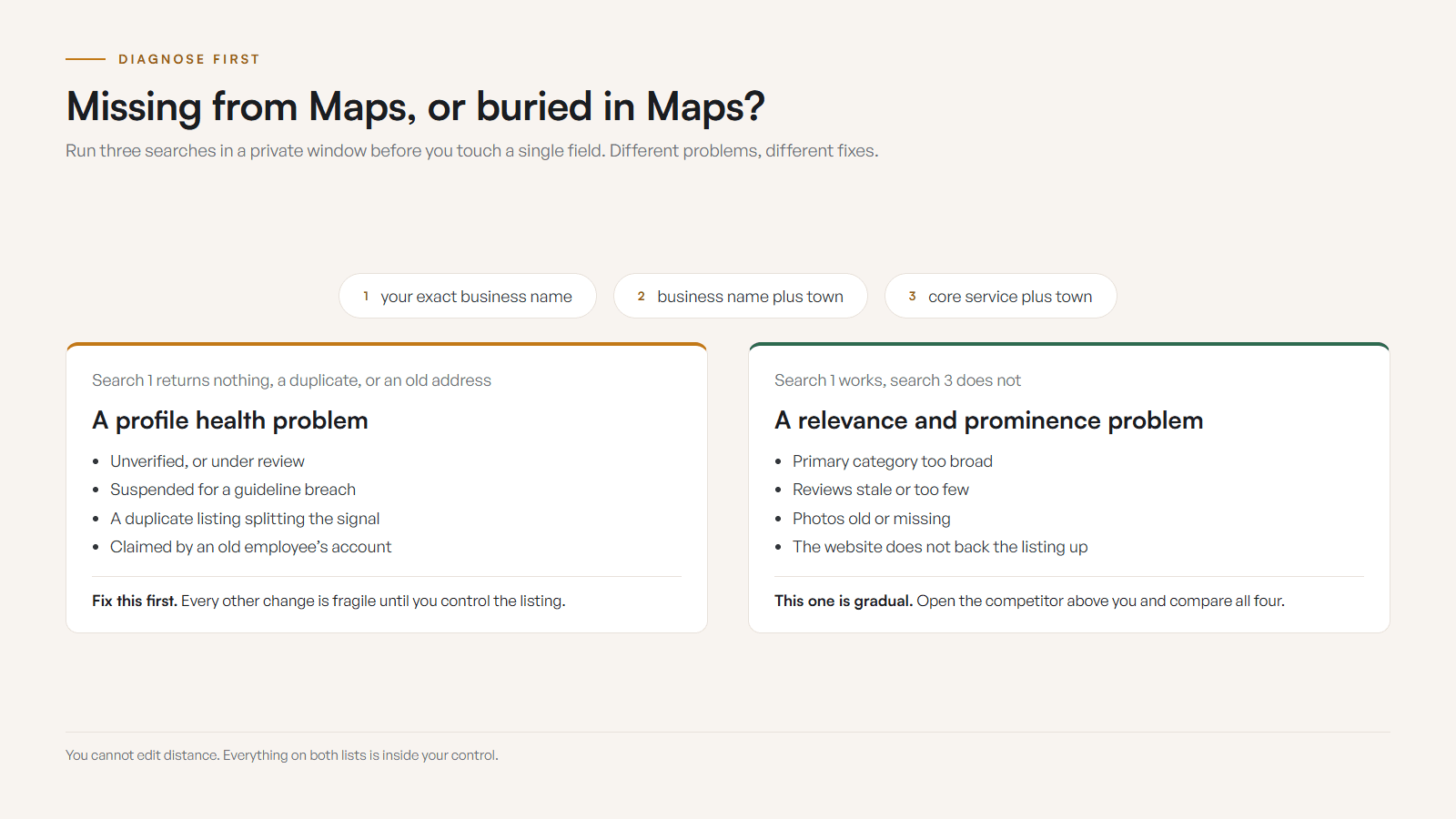
Most Maps visibility problems come down to one of four things: the profile is not healthy, the location settings do not match how people search, the proof is too thin, or the website does not back up the listing. Diagnose which one is true before you touch anything.
The common mistake is treating every Maps problem like the same problem. A missing profile, a wrong category, a hidden address issue, weak reviews, stale photos, a thin website, proximity limits, duplicate listings, and a suspension all need different fixes. Guessing wastes time and can make things worse.
Random edits are not free. They can trigger reviews, create contradictions between the profile and the website, or bury the real issue under fresh confusion. So the first move is always to diagnose the type of visibility problem, then act.
Diagnose the type of visibility problem before touching anything.
Missing from Maps vs. buried in Maps: what is the difference?
If your exact business name does not bring up the profile, that is a profile health problem: verification, suspension, ownership, or a duplicate. If the name works but service searches do not, the profile exists and is simply too weak for the non-branded query. Same swamp, different animal.
Run the test in a private browser window. Search the exact business name, then the name plus town, then the core service plus town. Then check Maps on mobile from the area you actually want to be found in. A search from downtown Nelson and a search from a driveway in Castlegar are not the same test. If the name search comes up empty, read this first: Google Business Profile suspended or not verified.
| What is being compared | Missing by name | Buried by service |
|---|---|---|
| What it means | The profile is not findable at all | The profile is found but ranks below competitors |
| Likely cause | Verification, suspension, duplicate, ownership | Category fit, reviews, photos, website, proximity |
| First check | Profile health and ownership | Relevance and prominence signals |
| Typical fix | Reinstate, verify, merge duplicates | Stronger category, proof, and website support |
| How fast | Often quick once the block is cleared | Gradual, as Google reprocesses signals |
| Worst move | Poking random fields under review | Stuffing categories and towns hopefully |
What does Google actually rank local results on?
Google says local results are mainly shaped by three things: relevance, distance, and prominence. That is not a promise you can fix everything with a profile edit. It is a map of where to look. You cannot bribe distance, but you can clean the other two.
- 01
Relevance
How well the profile and website match the search. Driven by category fit, services, business description, reviews, and website content.
- 02
Distance
How close the business is to the searcher or the place they searched. You cannot edit distance, only prove realistic service-area relevance.
- 03
Prominence
How known and trusted the business looks: reviews, photos, links, mentions, activity, and how strong nearby competitors are.
Relevance asks whether your profile and website match the search. Distance asks how close you are to the searcher. Prominence asks whether the business looks known, reviewed, linked, and active enough to deserve the spot. Most fixable problems live in relevance and prominence.
The contest is smaller here than most advice assumes. On The Kootenay List, compiled September 3, 2026, 36 percent of Trail’s 276 businesses have a website, and Kimberley sits at the same 36 percent of 318. Roughly two in three of the businesses ranked around you have no site backing their listing at all. A clean profile with one real service page behind it moves you a long way in a field that thin.
How do I diagnose why I am not showing up?
Work through the profile like an inspector, not like an owner emotionally refreshing Maps. Check each item below before buying ads, renaming the business, or paying for mystery local SEO. The checklist is boring on purpose. Boring finds the real problem.
- You can find the profile by exact business name in Maps while signed out or in a private window.
- The profile is claimed, verified, active, and free of suspension or verification warnings.
- The primary category is the most specific accurate description of the main thing you sell.
- Every secondary category names a service you actually sell.
- The public address is accurate, staffed, and customer-facing if you choose to display it.
- If you hide the address, the service area is realistic for how far you actually travel.
- Hours, holiday hours, and seasonal hours match the website, voicemail, booking tool, and socials.
- Photos are current enough to prove the business is open, local, and real this season.
- Reviews mention the services, towns, staff, and outcomes you actually want to rank for.
- No duplicate, old-name, old-address, or practitioner listings are splitting your signals.

If most of these are already true and you are still buried, you are probably in a relevance and prominence contest with stronger competitors, not fighting a broken profile. That is a signal-building project, covered in my guide to what local SEO actually looks like for a Kootenay business. The website half of that project is local SEO built into your website.
What should I fix first?
Fix the foundation before chasing ranking hacks. Work top to bottom: profile health, then category and service match, then location settings, then hours and live details, then proof, then website alignment. Each step removes a reason Google or a customer might distrust the listing.
- 01
Profile health
Check verification, suspension notices, ownership access, and rejected edits. Confirm the listing is findable by exact business name before anything else.
- 02
Category and service match
Set the primary category to the core service, then remove vague or unrelated secondary categories that make the profile look confused.
- 03
Location settings
Clean up the address, map pin, service area, and appointment rules so Google and customers understand where the business actually operates.
- 04
Hours and live details
Update regular hours, special hours, holiday closures, phone, booking link, website URL, and services so nothing contradicts the website.
- 05
Proof refresh
Add current photos, reply to reviews, and request honest recent reviews that reflect the service and towns you want to win.
- 06
Website alignment
Make the linked site confirm the same services, towns, contact details, LocalBusiness data, and mobile experience as the profile.
One rule throughout: contradiction is the enemy. If the profile says one thing and the website says another, you weaken both. Hours, services, towns, phone, and address should tell the exact same story everywhere a customer or Google can look.
What do Maps problems look like by business type?
The pattern is the same for everyone, but the specifics change with the business. Trades need service areas and travel rules. Clinics need accurate service categories. Restaurants need live hours. Here is what to focus on for common Kootenay business types.
- Trades and mobile services
- A Castlegar electrician, Trail roofer, or Nelson plumber needs clear service areas, emergency rules, town-specific reviews, job photos, tap-to-call, and realistic travel boundaries.
- Clinics and wellness
- A Nelson clinic or Rossland practitioner needs categories that match real services, booking links, accessibility and parking notes, and reviews that mention treatment types.
- Restaurants and cafes
- A Trail cafe, Creston restaurant, or Nakusp brewery needs live hours, menu links, patio status, current photos, holiday hours, and a profile that matches the website.
- Tourism and accommodation
- A Kootenay Lake stay, Rossland rental, or Cranbrook tour needs route context, season dates, ferry or highway notes, availability links, and fresh exterior photos.
- Retail and local shops
- A downtown Castlegar shop or Nelson maker needs product categories, in-store photos, hours, parking, local pickup, and reviews that describe what people actually buy.
- Professional services
- A bookkeeper, designer, or legal office needs accurate service categories, location or appointment rules, proof of local relevance, and a site that explains who they help.
Three kinds of business live or die inside that results box, because the search usually happens with an engine running: garage and tire shop websites built for local search, campground websites built for near-me and highway searches, and brewery and winery websites built for the road-tripper's search. Your profile can say you serve the Kootenays. Your proof has to make that believable. Reviews from the towns, photos from real work, directions that make sense, and pages that explain local service nuances all help the listing feel real rather than assembled from a template.
How do I fix it in one afternoon?
If you only have one afternoon, do not redesign the website or rename the business out of panic. Clean the profile, align the obvious signals, and confirm whether this is a profile health issue or a ranking strength issue. Six focused moves cover most of it.
- 01Search the exact business name, old names, old addresses, and owner names in a private window. Note duplicates, wrong pins, suspension notices, and missing fields.
- 02Fix the primary category, phone, website URL, hours, services, address, and service area. Avoid suspicious bulk edits if the profile is already under review.
- 03Add current photos: exterior, entrance, team, work, products, vehicles, signage, and the thing customers are actually buying.
- 04Align the website so service copy, towns served, contact details, LocalBusiness markup, map link, and mobile CTA all match the profile.
- 05Reply to recent reviews and ask recent customers for honest feedback without discounts, gifts, or pressure.
- 06Compare three visible competitors on category, review recency, photos, site clarity, and proximity, then fix the one gap that matters most this month.
This will not perfect your local SEO in one night. The goal is narrower and more useful: stop looking invisible, stale, or suspicious, and make the first real fix obvious. If time is left over, claim your Apple Maps and Bing listings with the same details. If you want a second set of eyes on the profile, the website, and the local signals together, run the free check-up and I will tell you which problem you actually have.
The first fix should be the obvious one, not a guess in a nice jacket.
Sources and further reading
- Google Business Profile: improve your local ranking
Google describes local ranking around relevance, distance, and prominence, and recommends complete, accurate information, current hours, photos, and review responses.
- Google Business Profile: guidelines for representing your business
Covers accurate address or service area, choosing the fewest accurate categories, representing the real business, and keeping one profile per business.
- Google Search Central: LocalBusiness structured data
Documents the LocalBusiness fields that clarify address, geo, opening hours, phone, and department details on your website.
- Google Search Central: page experience
Recommends a good overall page experience, including Core Web Vitals, secure pages, mobile display, and avoiding intrusive elements after the Maps click.
Frequently asked questions
Why is my business not showing up on Google Maps at all?
Start with profile health. The listing may be unverified, suspended, hidden behind a duplicate, claimed by the wrong account, or using a name Google does not trust. If you cannot find it by exact business name, treat it as a profile problem before an SEO problem.
Why do I show up for my business name but not for my service?
A branded search proves Google can identify you. A service search asks whether your category, website, reviews, proximity, and local relevance beat nearby competitors. That is usually a relevance and prominence problem, not a missing listing.
How long does it take to show up after fixing the profile?
Basic cleanup can appear quickly, but ranking for competitive local searches changes gradually as Google processes better information, review activity, and website signals. Do not expect one edit to erase years of weak signals overnight.
Does my website affect my Google Maps ranking?
Yes. The website confirms what you do, where you work, how to contact you, and whether the experience is trustworthy after the click. A thin, slow, vague, or locally empty site gives the profile much less support.
Can a service-area business rank in towns without an address?
Yes, but it is harder away from your base because distance still matters. A plumber near Castlegar can serve Trail, Rossland, or Nelson, but the website, reviews, and service pages need to prove real relevance, not just list every town.
What causes a sudden drop in Maps visibility?
A sudden drop often points to suspension, a verification review, a rejected edit, a duplicate conflict, an address change, or a category change. Slow decline is more often competition, stale reviews, weak photos, or a website that no longer supports the service.
Related pages
- Auto repair and tire shop websites
- Salon and barbershop websites
- Restaurant and cafe websites
- Web design in Cranbrook
- Web design across the East Kootenay
Kootenay Made Digital
I build websites, local presence, and calm AI setups for Kootenay small businesses. Plain language, published prices, and clear work that makes you easier to find and easier to choose.