

 hello@kootenaymade.ca
 Castlegar, BC. Serving the Kootenays and beyond.
 8 min read
Key takeaways
- The window is about a day wide: ask when the job is finished and they are pleased.
- One spoken sentence beats any email template, and the link goes out within the hour.
- Google generates the review link and the QR code from your own Business Profile.
- Incentives, buying, pressure at the counter, and telling people what to write all break Google policy.
- Three a week is a habit. Twenty in one afternoon is a pattern Google notices.

On this page
When should I ask for a review?
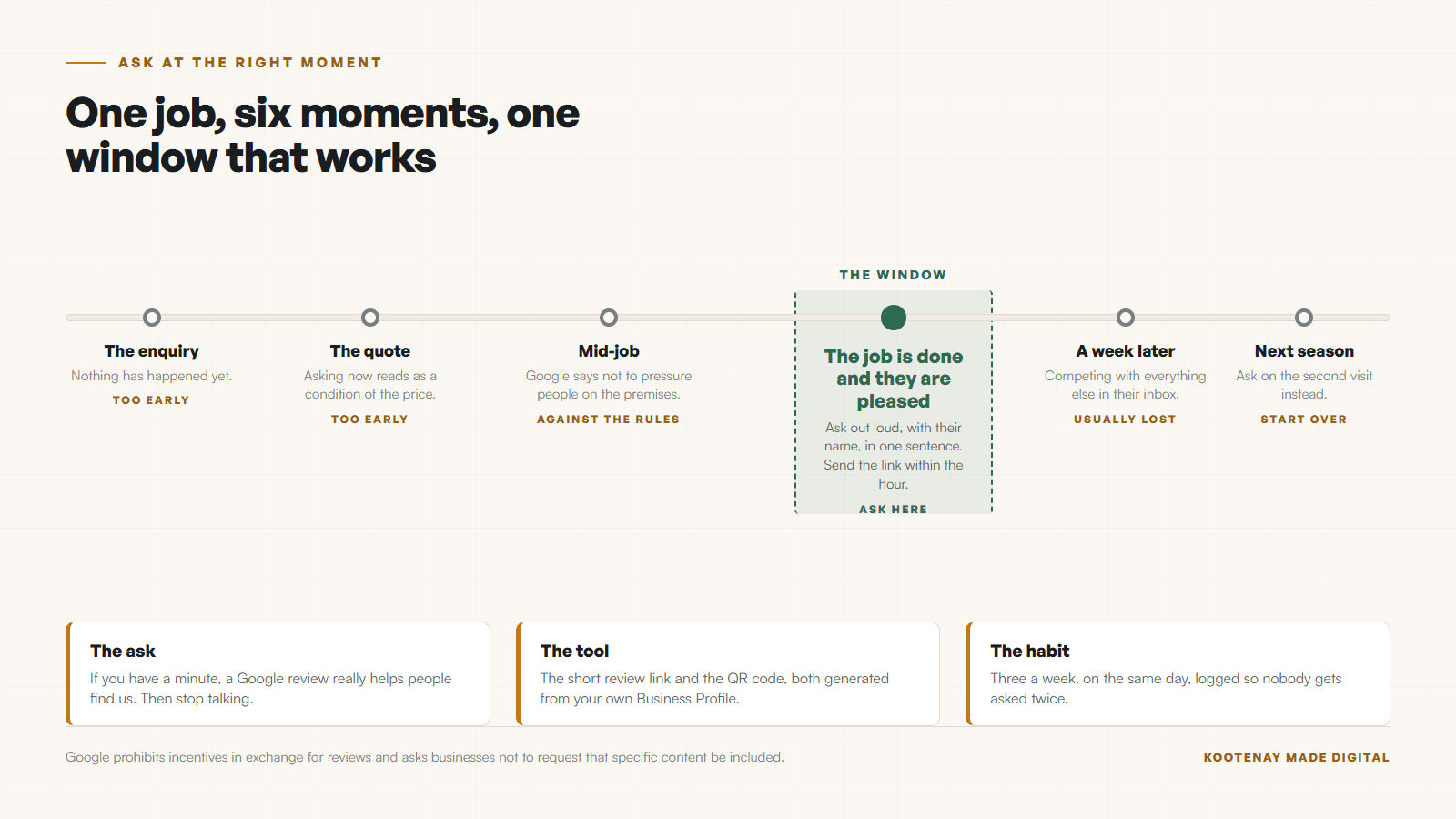
When the job is finished and the customer is visibly pleased. That window is about a day wide, and almost every review a small business fails to get was lost by asking three weeks late. This guide is for an owner who has earned good work and has nothing to show for it online; if you just got a bad one, the sibling guide handles that.
- 01
The job is finished and they are pleased
The invoice is settled, the driveway is clear, the haircut is done and they are still looking in the mirror. The window closes in about a day.
- 02
They said something nice out loud
Somebody tells you the shop looks great or the repair held up. That sentence is a review that has not been written down yet. Ask right then.
- 03
You solved a problem they were worried about
The furnace on the coldest week, the emergency appointment, the part nobody else had. Relief is the most honest thing a review can carry.
- 04
The second visit
A returning customer has already decided. They are the easiest yes in the list and the least likely to be asked.
Season shapes the timing as much as the moment does. A Rossland ski shop does most of its asking between December and March, and a Creston fruit stand does most of its asking in six weeks of late summer. Build the habit before your season starts, because nobody sets up a QR code during their busiest fortnight.
The reason this matters more here than in a city is coverage. As of September 3, 2026, The Kootenay List counts 800 businesses in Castlegar and 320 of them with no website at all. For a lot of your neighbours the Google profile is the whole storefront, which makes the review count the thing customers actually compare.
Almost every review you never got was lost by asking three weeks late.
What exactly do I say?
One sentence, spoken, with their name in it. Something like: if you have a minute, a Google review really helps people find us. Then stop talking. The pause does more work than another sentence would.
- 01Say it out loud, in person, with their name. Written asks work; spoken ones work better because a person is standing there.
- 02Use one sentence, and make it a request rather than a campaign: "If you have a minute, a Google review really helps people find us."
- 03Hand over the QR code or send the link within the hour, while the conversation is still fresh.
- 04Say nothing about what the review should say. Google asks businesses not to request that specific content be included.
- 05Ask everybody, not only the ones you expect to be kind. Google says a mix of positive and negative feedback often feels more trustworthy.
- 06Thank people who write one, briefly, in the reply. It is the only follow-up needed.
Two of those steps are policy rather than style. Google asks businesses not to request that specific content be included, so telling somebody to mention your town or your service crosses a line. And Google says a mix of positive and negative feedback often feels more trustworthy, which is the polite version of a rule worth taking seriously: ask everybody on the same schedule.
Where do I get the link and the QR code?
Both come from your own Business Profile, and both take about two minutes to set up once. Google makes the short link that opens the review box and will generate a QR code from the same link, so nobody has to search for your business to leave feedback.
- The review link
- Google generates a short link from your Business Profile that opens the review box directly. Get it once, save it, and stop making people search for you.
- The QR code
- Google will make a code from the same link. Print it at counter size and at card size, because the two get used differently.
- Where to put it
- The counter, the back of the business card, the bottom of the invoice, the email signature, and the thank-you message after a job.
- One thing to know first
- Google states customers must be signed into a Google Account to leave a review. Somebody who is not signed in on their phone will hit a wall, so give them the link rather than a lecture.
One practical detail saves a lot of confusion at the counter. Google states that customers must be signed into a Google Account to leave a review. Most people on an Android phone already are, and most people on an iPhone might not be. Hand them the code, let them sort it out at home, and do not turn it into a technical support session.
What does the weekly habit look like?
Six steps, thirty minutes, one afternoon a week. The point is a trickle rather than a wave, because a steady arrival of honest reviews reads as a working business and a sudden pile reads as a campaign.
- 01Pick a day. Friday afternoon works because the week is fresh in your head.
- 02Open your invoices, bookings, or jobs from the last seven days and pick the three that went well.
- 03Send three messages. Name the job in the first line so it does not read as a blast.
- 04Log who you asked, so you never ask the same person twice.
- 05Reply to any review that arrived that week, good or bad, in two sentences.
- 06Stop at three. A steady trickle looks like a business; twenty in one afternoon looks like a campaign.
Three a week is fifty in four months if half of them write one. That is enough to change what somebody sees when they compare you with the shop down the street, and it costs you half an hour a week. The case for why reviews move the phone at all is in reviews, local search, and the phone ringing. Reviews are one part of local search and the website is the other, the part I build as local SEO for Kootenay businesses.
What breaks Google rules?
Six things, and three of them are habits well-meaning owners pick up from bad advice. Every one of them is documented by Google, and reviews collected these ways get removed, which means the money and the effort are both wasted.
| What is being compared | What Google says | Do this instead |
|---|---|---|
| Offering a discount or a free item for a review | Prohibited. Google names incentives in exchange for posting, changing, or removing a review. | Ask for nothing in return, and thank people in the reply. |
| Filtering: asking happy customers only | Against the spirit of the policy. Google values honest and balanced reviews and warns against seeking only positive feedback. | Ask everybody, on the same schedule. |
| Buying reviews | Prohibited as fake engagement. Reviews paid for, directly or in kind, are removed. | Nothing bought survives, and the account risk lands on you. |
| Pressuring somebody at the counter | Google says businesses should not require or pressure users to leave reviews while on the premises. | Ask once, hand over the code, and drop it. |
| Asking staff, family, or contractors | Google names reviews from people with a professional or personal relationship to the business. | Their goodwill is worth more elsewhere. |
| Telling people what to write | Google says not to request that specific content be included. | Ask for their honest experience and let it be theirs. |
The filtering one is the trap. Screening customers first and sending the link only to the pleased ones feels prudent and is exactly what Google is describing when it warns against seeking only positive feedback. It also removes the thing that makes a profile believable, which is a couple of fours among the fives.
How many do I actually need around here?
Fewer than you fear, and you can check instead of guessing. Nobody publishes a regional review count, so go and count. Open the profiles of your three nearest competitors, note the number on each, and you have your target for the season.
- Search your main service plus your town in a private window and note the three profiles above yours.
- Write down each profile’s review count and the date of its most recent review.
- Recency matters as much as volume. A profile whose newest review is from 2023 is beatable this quarter.
- Set your target at the leader number plus ten, then divide by three a week to get your finish date.
- Check again in ninety days, because the target moves when your competitors read the same advice.
Then make sure the reviews land somewhere. A profile full of good reviews pointing at a slow or confusing website wastes the work, which is the argument in whether your website is trusted enough to call. If the listing itself is the weak part, start with the Google Business Profile guide for a Kootenay business, and if one of the reviews that arrives is a bad one, here is what to do about a bad Google review.
Three a week, asked honestly, beats any campaign you could buy.
Sources and further reading
- Google: get more reviews on your Business Profile
Checked September 5, 2026. Documents the review link and QR code, states that customers must be signed into a Google Account to leave a review, and prohibits offering incentives in exchange for reviews.
- Google Maps: prohibited and restricted content
Checked September 5, 2026. Defines fake engagement, says businesses should not require or pressure users to leave reviews while on the premises or request that specific content be included, and names reviews from people with a professional or personal relationship to the business.
- Google Business Profile: improve your local ranking
Checked September 5, 2026. Places review count and score inside prominence, one of the three factors Google names, and states there is no way to request or pay for a better local ranking.
Frequently asked questions
When is the best time to ask for a Google review?
Right after the job is finished and the customer is visibly pleased, or the moment they say something nice out loud. That window is roughly a day wide. A request that arrives a week later competes with everything else in their inbox and usually loses.
What should I actually say?
One sentence, spoken, with their name in it: if you have a minute, a Google review really helps people find us. Then hand over the QR code or send the link. Do not suggest what the review should say, because Google asks businesses not to request that specific content be included.
Where do I get my Google review link and QR code?
Both come from your own Business Profile. Google generates a short link that opens the review box directly and will make a QR code from the same link. Save the link once, print the code at counter size and card size, and put it wherever the transaction ends.
Can I offer a discount for leaving a review?
No. Google prohibits offering incentives such as payment, discounts, or free goods and services in exchange for posting a review, changing one, or removing a negative one. Reviews obtained that way count as fake engagement and get removed, and the risk lands on your profile rather than the customer.
How many reviews do I actually need?
Fewer than you think in a small market, and you can check rather than guess. Open the profiles of your three nearest competitors and count. In most Kootenay categories the leader is in the low dozens, which means a steady three a week catches up inside a season.
Related pages
- Trades and contractor websites
- Wellness and clinic websites
- Restaurant and cafe websites
- Web design in Castlegar
- Web design in Rossland
Kootenay Made Digital
I build websites, local presence, and calm AI setups for Kootenay small businesses. Plain language, published prices, and clear work that makes you easier to find and easier to choose.