


 hello@kootenaymade.ca
 Castlegar, BC. Serving the Kootenays and beyond.
Every visit is planned before anyone leaves home.
Museum websites that get more people through the door.
About half the people on a museum's website are planning a visit, and they come with four questions: is it open, what will it cost us, will the kids enjoy it, and can Grandma manage the stairs. Most small museum sites make them hunt for every answer. I build museum and heritage websites from Castlegar, BC, that answer all four in the first screen, then show the collection and the archives well enough to bring people in to see the originals.

What a family decides before the drive
I treat the website as the museum's front counter and its best exhibit label. The first screen answers the trip: open today, the price for the group, the route and the way in. Then the collection and the archives get told as stories, each one ending with an invitation to come and see the original. Where you already keep a catalogue or a member list, I connect to it rather than replace it, so a community museum website and the society behind it read as one well-run place.
- 01
Half of the visits to the site are planning a visit
Museum visitor research keeps finding the same split: about half the people on a museum website are planning a trip. They want the hours, the price and the way in, and they decide quickly. Answer that first and the rest of the site gets read.
- 02
The group decides, not the person browsing
A museum visit is rarely made alone. The person on the phone is planning for children, a partner or a grandparent, and one unanswered question about the price, the stairs or boredom is enough to pick somewhere else.
- 03
Access is a deciding question
Many visitors check a venue's access information before they go, and a missing answer reads as a no. An honest, photographed access guide brings in the visitors other sites quietly turn away.
- 04
Stories bring people in, catalogues do not
A catalogue record with an accession number and a date answers a researcher. A visitor comes for the story: whose it was, what happened, and why it is in this town's museum. Told that way, the collection becomes a reason to visit.
- 05
Members join for the mission
People who join a historical society mostly join to keep it going, not for a discount. A membership page that shows what a year of support keeps running earns more members than a list of perks.
See Marrick Museum & Archives, a community museum in a 1912 post office.
Concept build from my portfolio, no real affiliation
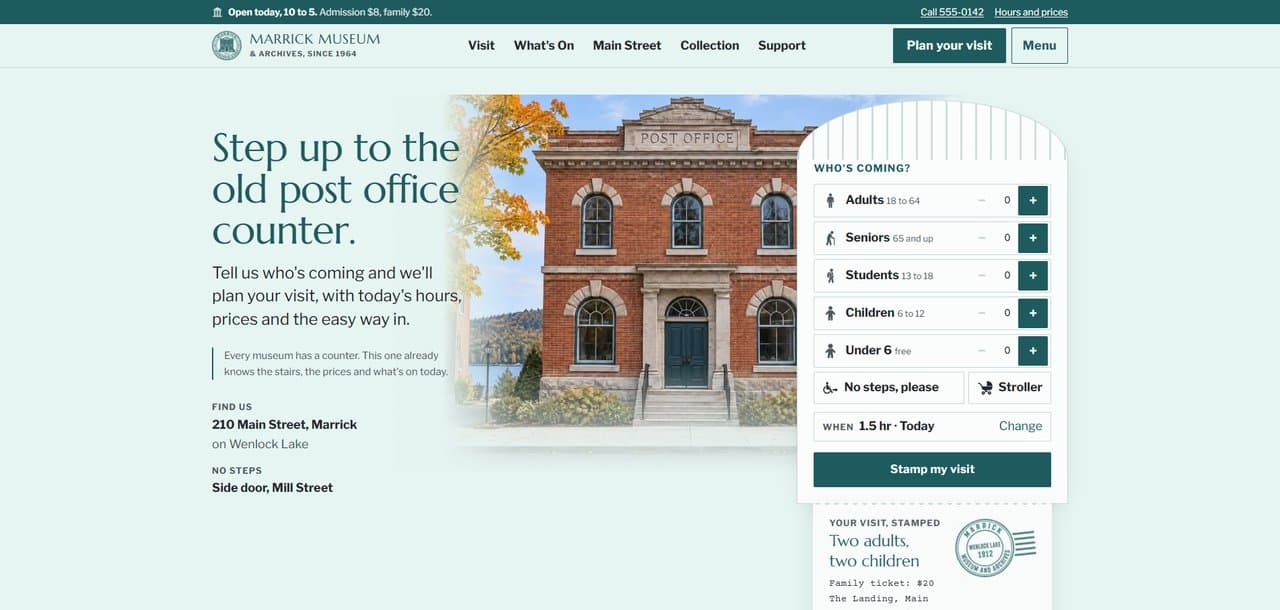
Marrick is a fictional museum built to the full standard. A family says who is coming and the site stamps their visit: the group's price, the route through five galleries, the way in without steps and today's events. Around it sit What's On, Main Street then and now, twelve objects with their stories, three school programs, an archive search by surname, and a demo back office for changing today's hours.
- Concept build, labelled on every page
- The visit planner on the first screen
- Twelve objects with their stories
- Archive search by surname or street
- Three school programs by age
- A demo back office for hours and events
Marrick Museum & Archives is a fictional concept build. The town, the lake, the historical society, the staff, the objects and every photograph are invented, and the site is labelled as a concept on every page. No real museum is implied.
What I build for museums and heritage sites
- 01
Open today, first
Today's hours and admission lead every page, from one calendar that switches seasons on its own dates. Closures and holiday hours show where the visitor will see them, not buried in a news post.
- 02
The visit, planned for the group
A visitor says who is coming and how long they have, and gets back the price for the group, a route through the galleries that suits them, the way in without steps, and what is on today, with a printable card for the car.
- 03
The collection, told as stories
Objects get their own pages with their stories, where they came from and which gallery holds them, linked both ways. The archives can offer a search by family name or street, with every result ending in an invitation to come and see the originals.
- 04
Schools and groups
Programs by grade with ties to the BC curriculum, class size, length, cost, the lunch spot and bus parking, and a request form that asks for the grade and a date range the first time.
- 05
Members, donors, and volunteers
Membership pitched on what it keeps going, donations one-time or monthly, and volunteer roles with their real time commitments, so the society's supporters can find their way in from any page.
The standard that comes with every build I ship.
- Today's hours and admission at the top of every page, from one calendar
- A visit planner that totals the price and plans the route for the group
- What's On, with events and the feature exhibit from the same calendar
- Collection pages that tell each object's story, linked to its gallery
- A schools page with programs by grade and a request form
- An honest, photographed access guide to the building
- Membership, donation and volunteer pages
- Privacy notice, consent language, and accessible forms

Every visit lost to a question the website could have answered
Nobody writes in to say they stayed home. The cost shows up as a quiet weekday, a volunteer answering the same question again, and a grant report with fewer visitors in it than the year deserved.
The hours sit behind a menu and the season's changes never reach the page
Costs them
A family drives out on summer hours in October and finds the door locked.
Costs you
A disappointed first visit, a review you did not earn, and a family that does not try again.
FixToday's hours and admission at the top of every page, switched by date from one calendar.
Admission is listed per person, with no total for a group
Costs them
A parent does the math for two adults, a teenager and a six-year-old, and guesses what counts as a child.
Costs you
The same price questions by phone and email, answered by whoever is on the desk.
FixA planner that totals the visit for the whole group, including the family rate.
Nobody says whether the building has steps
Costs them
A grandparent with a walker cannot tell whether the visit will work, so the family picks somewhere else.
Costs you
The visitors who most needed an answer stay home, and you never hear why.
FixAn honest access guide to the building, with photographs of the steps, the lift, the washrooms and the seating.
The collection lives in a database nobody browses
Costs them
A curious visitor from a search lands on a catalogue record with an accession number and no story.
Costs you
Years of cataloguing that never turns into a reason to visit.
FixObjects with their stories, each linked to its gallery, with an invitation to come and see it.
School visits are arranged by phone tag
Costs them
A teacher cannot see the programs, the class size or the cost, so the trip goes to a place that published them.
Costs you
Calls and emails to explain the same three programs every September.
FixA schools page with programs by grade, logistics and a request form that asks the right questions the first time.
The front counter: say who is coming, get the whole visit back
A museum's front desk already does this job in person. Someone walks in with two kids and a grandparent, and the person behind the counter tells them the price for the group, the route that suits them, where the lift is, and what is on today. Online, the same family gets a page of opening hours and a per-person price list, and has to work the rest out alone.
I build the counter into the website. A visitor taps who is coming and how long they have, and the site hands back their visit: today's hours, the total for the group, a route through the galleries in the order that suits them, the way in without steps, and today's events. The answers come from one file the museum keeps, so the planner, the visit page and the calendar never disagree, and after closing time the planner offers the next open day instead.
- Open today, the hours and the admission, in the first line of every page
- A visit planned for the whole group: price, route, access and today's events
- Hours, prices, galleries and access facts kept in one file, so nothing contradicts
- A printable visitor card for the car, where the signal runs out
Donors, members, archives, and the rules around them
A site in this category is judged on more than looks. These are the obligations and reassurances I build in by default, so the business stays credible and protected.

Digital Museums Canada will not pay for this website
Digital Museums Canada funds online storytelling projects, up to $250,000 for a Digital Project built with a web agency, or $25,000 for a Community Story built on its own template. Its rules exclude institutional websites, hosting and maintenance. So the museum's own site comes from its own budget, and a funded digital exhibit is a separate project with its own application, due December 1 each year.
Member and donor information under BC's privacy law
Membership forms, donor records and research requests collect personal information, and in British Columbia a society handles it under the Personal Information Protection Act. I write a plain privacy notice, limit each form to what you actually need, and keep records in your inbox or your membership tool rather than on the public site.
Archive images and the people in them
A family photograph in the archive can show people whose families are still in town. Where a site invites visitors to name people in old photos, suggestions stay private until staff confirm them, a museum can close naming on any photo, and no face recognition runs on the collection.
Donations, memberships, and card payments
Online donations and memberships go through PCI DSS compliant processors, so card numbers never touch your site. Official donation receipts follow the CRA's rules for registered charities, and the site says who issues them and when.
CASL and the newsletter
A newsletter about the season opening or a new exhibit is a commercial electronic message under Canada's Anti-Spam Legislation. I set up consent at signup, clear sender details and a working unsubscribe, so the society's email list stays onside.
Accessibility to WCAG 2.2 AA
The visitors a museum most wants to reach include older people, families with strollers and people with disabilities. I build to WCAG 2.2 AA: readable contrast, labelled forms, keyboard access, captions on video, and descriptive alt text on collection images, so the site works for every visitor before they arrive.
Want this standard on your site?
One conversation, no pitch deck. Tell me where the business is stuck and I will tell you what I would build.
What a build like this costs.
A focused presence site starts with the Trailhead: $2,000, or $500 today and $142 a month on Own It Monthly ($2,204 total). Plenty of businesses in this industry need exactly that and nothing more.
Bigger jobs usually land at $6,500, or $1,625 today and $457 a month on Own It Monthly ($7,109 total)
The Engine · typical timeline 4 to 5 weeks
Most community museums need the visit planner, What's On, the collection, schools, access and support pages, which is what the Engine covers. A small volunteer-run museum can start on the Trailhead.
The honest answer depends on what you actually need, not on a package name. Start with the free check-up or the contact form, and I will book a proper 45-minute consultation with you, no pressure either way.
Comparing options right now? What a website should cost breaks down how to read any quote, and who actually owns your website covers what you keep if you ever leave, on any platform, including mine.
Your collections software and your Facebook page does the plumbing. KMD wins the decision.
These tools are built for the people who already know the museum: the volunteers who catalogue and the followers who see the posts. The visitor deciding whether to come this Saturday needs a different front door.
Collections software such as PastPerfect or CollectiveAccess keeps the catalogue, and a Facebook page carries the news and the event photos. Both do real work. Neither one tells a family whether the museum is open today, what the visit will cost the group, or whether the building has steps, and a catalogue record is not a reason to visit.
What the category tool covers
- Cataloguing and accession records
- An online collections listing, in some packages
- Event posts and photos for followers
- Messages from people who already found you
Where the upgrade actually pays off.
- 01
Put today's hours and admission on every page instead of behind a menu
- 02
Price the visit for the group, not just per person
- 03
Publish an honest access guide with photographs of the building
- 04
Tell objects as stories that end with a reason to visit
- 05
Ask members to keep the museum going, not to collect a discount
Where I would start.
- Custom websitesThe Engine is where most builds for this kind of business land, and every tier is priced on the page.
- Grant writingA Digital Museums Canada application for an online exhibit is its own job, due December 1, and separate from the museum's website.
- Ongoing supportHours, exhibits and events change with every season, and a support plan keeps them current.
Questions museum boards and directors ask me
How much does a museum website cost in BC?+
Most community museums land in the Engine at $6,500, or $1,625 today and $457 a month on Own It Monthly ($7,109 total), typically delivered in 4 to 5 weeks. A small volunteer-run museum can start on the Trailhead at $2,000, or $500 today and $142 a month for 12 months ($2,204 total). It depends on what you actually need, not on a package name.
Can a grant pay for our new website?+
Usually not directly. Digital Museums Canada excludes institutional websites, and most heritage grants fund projects rather than a museum's own site. The website normally comes from the operating budget. A funded online exhibit is a separate project, and the site I build can link to it.
Can people plan a visit for their whole group?+
Yes. A visitor taps who is coming and how long they have, and the site gives back the price for the group, a route through the galleries, the way in without steps, and today's events. The Marrick concept shows it working.
Do we have to put our whole collection online?+
No. A few dozen objects told well bring in more visitors than thousands of catalogue records. I build object pages for the pieces with the best stories, and they can link to your full online catalogue if your collections software publishes one.
We are run by volunteers. Who keeps the site up to date?+
The things that change often, the hours, events and notices, live in one place your staff or volunteers can update without touching code. Everything else stays put. If you want help through the season, a support plan is there, and it is optional.
Can teachers book school visits through the site?+
Yes. A schools page lists the programs by grade with the logistics teachers ask about, and a request form collects the grade, class size and a date range. Requests arrive in your inbox, and a booking calendar can come later.
Can members join and donors give online?+
Yes. Membership and donations can run through a secure payment processor, so card numbers never touch your site, or link to the platform you already use. The pages lead with what a year of support keeps going.
Will we own the website?+
Yes. The code lives in your own GitHub account, the site runs on hosting in your name or mine, your choice, and the domain is registered to the museum or the society.
Will the site work for older visitors and people with disabilities?+
I build to WCAG 2.2 AA, with readable contrast, labelled forms, keyboard access and descriptive alt text on collection images, plus an access guide to the building itself, so visitors can tell before they leave home whether the visit will work for them.

Who builds this
I am Brett, the person behind Kootenay Made Digital. I plan, design, and build every site myself from Castlegar, BC, so the person you email is the person doing the work.
Founder, Kootenay Made Digital · Castlegar, BC
Bring it to your next board meeting
Most community museums land in the Engine build: open today first, the whole visit planned for the group, and a collection worth coming to see, ready for the season.
No website yet?
Start My First WebsiteAlready have one?
Get a Free Check-Up