

 Castlegar, BC. Serving the Kootenays and beyond.
 9 min read
Key takeaways
- You always own your content and can always own your domain. The design, code, and platform are where ownership splits.
- Wix and Squarespace sites cannot be exported as working websites. Leaving means rebuilding, and that is documented by the platforms themselves.
- Shopify is the most exit-friendly hosted platform: products, customers, and orders export as files. The storefront still stays behind.
- A lapsed domain is the most common way a small business loses its site. Registrar account in your name, current card, auto-renew on.
- Ownership should be written down: an access record for every account, and an agreement that says you own the finished site.

On this page
Who owns your website?
You own your content and your domain, on every platform. What you may not own is the website itself: on Wix and Squarespace the assembled site cannot leave the platform, on Shopify your data exports but the storefront stays, and only self-hosted WordPress or a custom build can hand you the whole thing. Ownership is a spectrum, and most owners discover where they sit on it at the worst possible moment.
This is not a scare piece about website builders. Renting is a perfectly fair deal for a young business with a simple site. The problem is renting without knowing it, because the lease terms only get read on moving day. If the monthly-payment part is what you like about renting, there is a middle path: I break down the rent vs own math, and Own It Monthly puts a custom build on 12 payments you finish, then keep. Hosting is the part people most often confuse with ownership, so here is what a hosting bill actually buys and how to find out who hosts you.
You do not find out what you own when you build the website. You find out when you try to leave.
The five layers of website ownership
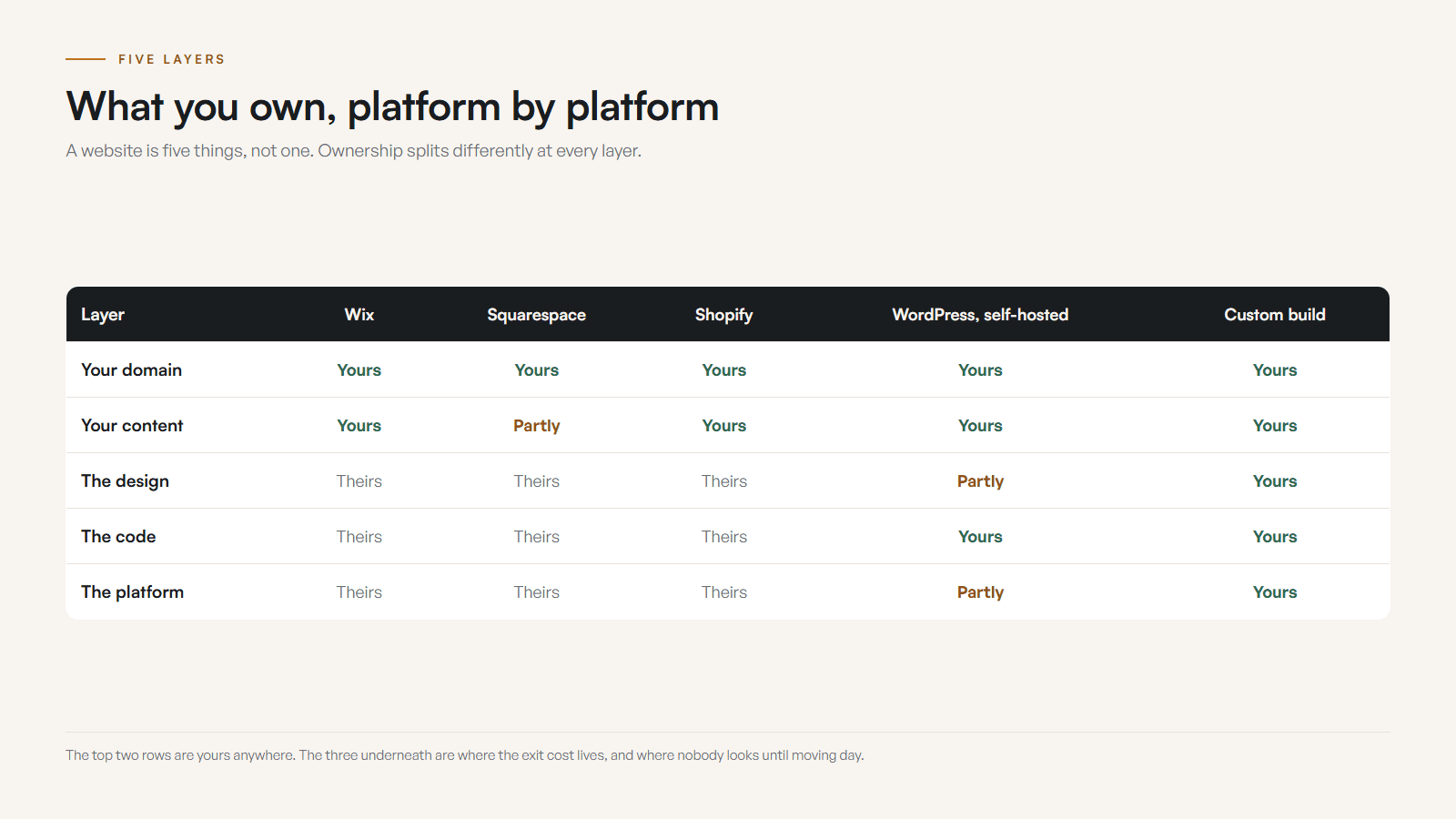
A website is not one thing, so ownership is not one answer. It splits into five layers: the domain, the content, the design, the code, and the platform. You can own the first two everywhere. The last three are where the platforms differ, and where the exit costs hide.
- Your domain name
- The one thing you can fully own on any platform, but only if it is registered in your own account with your own email and a current payment card. A lapsed domain is the single most common way a small business loses its website.
- Your content
- Your words, photos, logo, and product data are yours everywhere. What differs is how much of it you can actually export in a usable form when you leave.
- The design and layout
- On builder platforms, the assembled design lives inside their editor and usually cannot leave. On a custom build, the design is code you can own outright.
- The code and functionality
- Builders never hand over code. WordPress gives you the files if you host it yourself. A custom build can be delivered as a codebase you own, host anywhere, and hand to any developer.
- The platform itself
- Always rented. Editors, apps, checkout systems, and hosting dashboards belong to the company, along with the right to change prices, features, and rules.
When someone says "you own your website," ask which layer they mean. A platform can be completely truthful saying you own your content while the working website, the thing customers actually see, cannot follow you anywhere.
What you own on Wix, Squarespace, Shopify, WordPress, and custom
Wix is explicit that sites cannot be exported or transferred. Squarespace exports some content but not layouts or styles. Shopify exports your products, customers, and orders. Self-hosted WordPress hands you files and a database. A proper custom build hands you everything. Here is the honest platform-by-platform read.
- Wix
- You own your content and domain. The site itself cannot be exported: Wix documents that sites built in its editor cannot be transferred to another host. Leaving means rebuilding.
- Squarespace
- You own content and domain, and some content exports in a basic format. Layouts, styles, product configurations, and most blocks do not transfer. Expect a rebuild on exit.
- Shopify
- You own your product data, customer list, and content, and you can export them as files. The theme, apps, and checkout stay behind. Of the big platforms, it is the most exit-friendly, which is one reason I build on it for serious stores.
- WordPress
- Portable if self-hosted: the files and database are yours to move. The catch is that the burden of updates, plugins, security, and hosting is also yours, and a site held together by page builders can still be painful to migrate.
- Custom build
- The whole stack can be yours: code, design, content, structure, and the choice of where it runs. At Kootenay Made Digital, clients own the code, the content, and the domain, in writing.
Notice the pattern: the easier a platform makes it to start, the harder it tends to make leaving. That is not malice, it is the business model. The editor that saves you from code is the same editor your site cannot live without. If you are weighing that trade right now, the Wix vs custom guide walks through the whole decision.
The domain trap: the one ownership mistake that kills websites
Whatever platform you choose, the domain is the layer that takes everything else down when it fails. A lapsed domain is the most common way a small business loses its website: the renewal card expires, the warning emails go to an old address, the grace period passes, and eventually anyone can buy your address out from under you.
The fix takes ten minutes and is absurdly cheap insurance. The domain must be registered in an account you control, under an email you actually read, with a current payment card and auto-renew turned on. Not your developer's account. Not your nephew's. Yours, with delegated access for whoever helps you.
The second most common failure is quieter: nobody wrote down where anything lives. The owner knows the business, the developer knew the logins, and when that developer retires, moves, or just stops answering, the business is locked out of its own infrastructure. An access record, one page listing every account and who controls it, turns that crisis into a non-event.
The five ownership questions every business should be able to answer
You do not need to be technical to protect the asset. You need clear answers to five questions. If any answer is "I am not sure," that answer is your to-do list.
- Is the domain registered in an account you control, with your email and a current payment card, and auto-renew on?
- If you stopped paying the platform or developer tomorrow, what exactly would you still have?
- Can you export the site, and is the export something a developer could actually use, or just a content dump?
- Who holds the logins for the domain, hosting, email, and analytics, and is that written down anywhere?
- Does your agreement say, in plain words, that you own the code and content of the finished site?

I ask new clients these questions during every website check-up, and "I am not sure" is the most common answer to all five. The owners are not careless. Nobody ever told them which parts of the website were theirs.
How to verify what you own in 20 minutes
Five practical checks, in order of how badly each one can hurt you. Do the first one today even if you skip the rest.
- 01Log in to your domain registrar today. Confirm the account is yours, the email is current, the payment card is not expired, and auto-renew is on.
- 02Write an access record: every account that touches your website, who controls it, and where the login lives. A password manager note is enough.
- 03Ask your platform or developer one question in writing: what do I own, and what can I take with me if I leave?
- 04Test the export. Download whatever your platform lets you export and look at it. If it is a thin text file, you now know the true exit cost.
- 05Check your agreement or invoice for an ownership clause. If there is none, ask for one in an email and keep the reply.
- 01
If you find a problem
Do not panic and do not start over. Most ownership problems, a domain in the wrong account, missing logins, no written agreement, can be fixed in an afternoon while everyone is still on good terms.
- 02
If everything checks out
Write the access record anyway and revisit it once a year. Ownership is a habit of knowing where your keys are.
The Kootenay angle: small towns, long memories
Around Castlegar, Nelson, Trail, and Rossland, websites often outlive the arrangements that built them. The cousin who made the site moved away. The agency was bought. The platform subscription is on a card from a bank that no longer exists. Small-town businesses keep websites for a decade, which makes ownership questions more important here, not less.
It is also why I put ownership in writing on every build: clients own the code, the content, the design, and the domain. The site I build for you should never be a reason you are stuck with me. If the work is good, you stay because it is good. That is the whole arrangement, and you can see how it plays out in the process and the portfolio. The same ownership logic reaches past the website: if you run a CRM, renting half a tool versus owning a custom one is the same question about who really holds the keys.
Here is what that looks like on a finished build. Family Designs & Creations in Castlegar is a Trailhead: the domain is registered in Kim’s name, and the site’s files live in her own GitHub account rather than mine. Hosting is a choice she makes. I host it at no extra cost to her, or she holds her own Vercel account at 20 USD a month. If she ever wanted a different developer, she would hand over the repository and the domain and be finished in an afternoon. Published standard and case study checked September 2026.
Whatever you do next, do the domain check today. Of everything in this guide, that is the ten minutes most likely to save your website.
Sources and further reading
- Wix Help Center: exporting or embedding your site
Wix states directly that sites cannot be exported or transferred to another host, which defines the real exit cost of the platform.
- Squarespace Help: importing and exporting content
Squarespace documents which content exports and which does not. Layouts, styles, and many block types stay behind.
- Shopify Help Center: exporting store data
Shopify documents exporting products, customers, and orders as CSV files, which is why it is the most portable of the hosted platforms.
- CIRA: domain registrant rights
For Canadian businesses, the registrant on record is the legal holder of the domain. If that is not you, the domain is not really yours.
Frequently asked questions
Do I own my website if I built it on Wix or Squarespace?
You own your content and your domain, but not the website as a working thing. The assembled site depends on the platform and cannot be exported as a usable website. If you leave, you take your words and images and rebuild the rest.
Who owns my domain name?
Whoever is listed as the registrant in the registrar account. If a developer, an agency, or a platform registered it under their account, they control it, regardless of who paid. The domain should always live in an account you control, with your email on it.
Can I take my Shopify store somewhere else?
You can export your products, customers, and orders as files, which is more than most platforms allow. The theme, apps, and checkout stay with Shopify. Moving means importing your data into something new and rebuilding the storefront around it.
What happens to my website if my web designer disappears?
It depends entirely on what you hold. If the domain, hosting access, and a copy of the code or content are in your hands, another developer can pick it up. If everything lived in the designer’s accounts, you may be starting over. This is worth sorting out while everyone is still friendly.
Does a custom website mean I own everything?
It should, but only if the agreement says so. A proper custom build hands you the code, the content, the design, and the domain. At Kootenay Made Digital that ownership is explicit: clients own the finished site and could take it to any developer.
Is renting a website always bad?
No. Renting is a fair trade when the business is young and the site is simple. It becomes a problem when the website carries real revenue and the platform quietly holds the keys: prices rise, features change, and leaving costs a rebuild. Rent deliberately, never accidentally.
Related pages
- Retail and ecommerce websites
- Professional services websites
- Web design for Canadian businesses
- Website Down or Domain Expired? How to Get It Back
- Domain Names in Canada: .ca or .com, and Who Should Own It
Kootenay Made Digital
I build websites, local presence, and calm AI setups for Kootenay small businesses. Plain language, published prices, and clear work that makes you easier to find and easier to choose.