


 hello@kootenaymade.ca
 Castlegar, BC. Serving the Kootenays and beyond.
 8 min read
Key takeaways
- Four causes account for most slow small-business sites, and images are the most common one.
- Read the field data panel in PageSpeed Insights first. It comes from real visitors; the score is a simulation.
- Google puts the good line at 2.5 seconds to the largest element, 200 milliseconds to respond, and 0.1 of layout shift.
- A ten-minute check on your own phone tells you which cause you have.
- One heavy component can cost more than everything else on the page combined.

On this page
Why is my website so slow?
Four causes account for most of it: images saved at camera size, a page builder loading code for features your site never uses, hosting that pauses before it answers, and third-party embeds fetching files from servers you do not control. Find out which one you have before you spend a dollar. This guide is for an owner with a live site that feels sluggish; if you have no site yet, these decisions get made during the build instead.
Slow is a business problem before it is a technical one. Somebody standing in a parking lot in Trail with two bars of signal gives your page a few seconds, then taps back and opens the next result. You never see that visit in any report.
Google measures the same experience in three numbers, and it publishes the lines it considers good. The largest thing on screen should appear within 2.5 seconds. A tap should get a response inside 200 milliseconds. The page should shift under 0.1 while it loads. Those thresholds were checked in September 2026 and have been stable for years.
Slow is a business problem first. The technical part is just where the fix lives.
Where do the seconds actually go?
A page loads in a fixed order, and each step waits on the one before it. That is why a single slow server or one oversized image delays everything downstream. Seeing the order makes the fix obvious, because you stop guessing and start looking at the step that stalls.
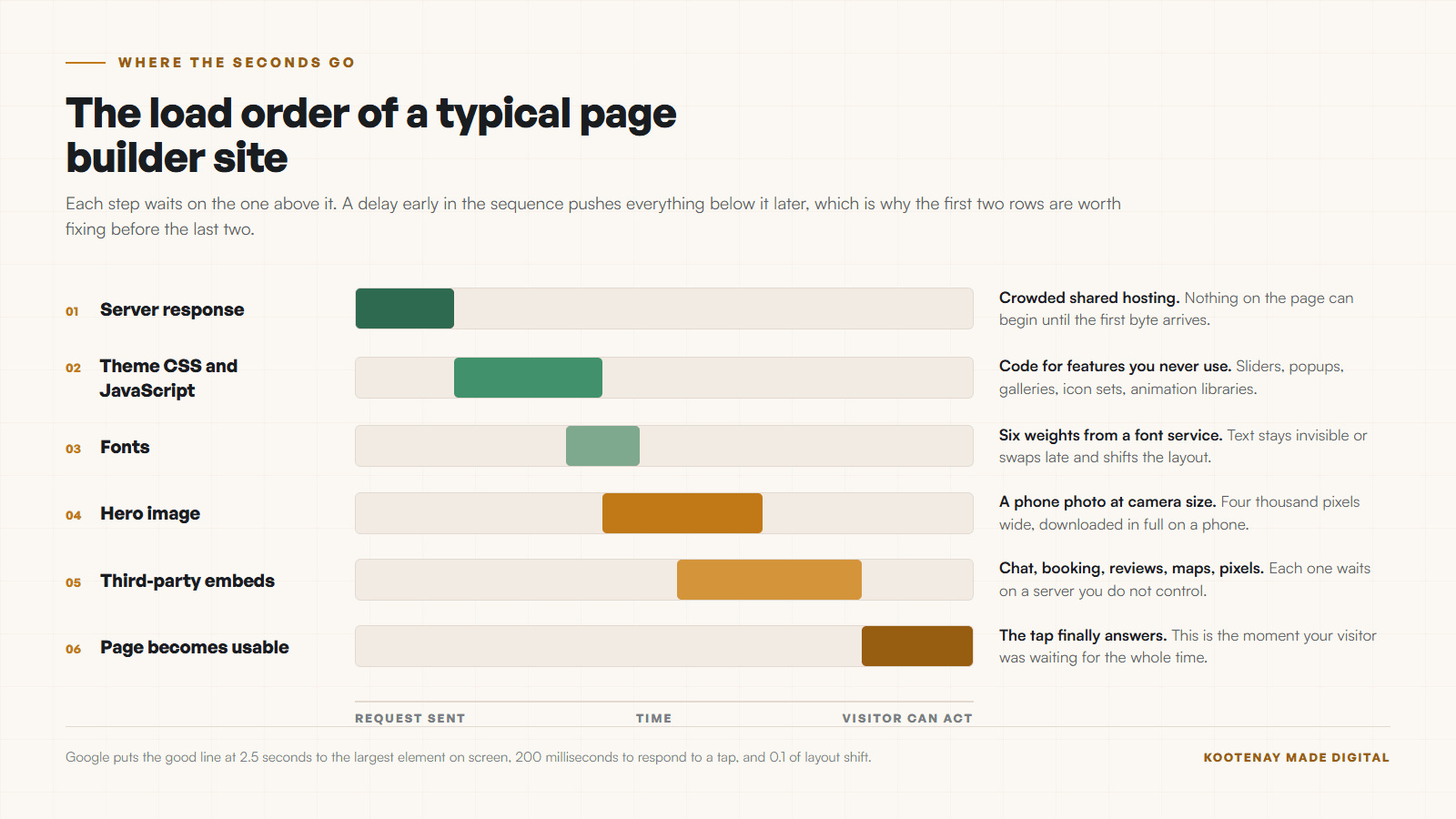
The four causes below map onto that order. Work down the list rather than across it, because fixing step five while step one is broken buys you nothing.
- 01
Images saved at camera size
A phone photo is often 4,000 pixels wide and several megabytes. Dropped straight into a page, it still downloads at full size on a phone. This is the most common cause I find, and the easiest to fix.
- 02
A theme carrying code you never use
Page builders ship one bundle for every feature the theme supports: sliders, popups, galleries, animation libraries, icon sets. Your site loads all of it whether the page uses it or not.
- 03
Hosting that stalls before it answers
On crowded shared hosting the server can sit for a second before it sends the first byte. Nothing on the page can start until that byte arrives, so every other delay stacks on top of it.
- 04
Third-party embeds
A chat widget, a booking iframe, a review carousel, a tracking pixel, a font service. Each one is a request to a server you do not control, and each can stall the page while it answers.
A worked example from my own site, measured July 26, 2026 on a throttled mobile lab run. Pages carrying a WebGL background scored 52 to 59. Plain pages on the same site, same fonts, same framework, same host, scored 90 and 93. One heavy component was the entire gap. Yours will be an image or a widget rather than a shader, and the lesson holds: one thing usually owns most of the delay.
How do I read a speed test without a degree?
PageSpeed Insights shows you two panels. The top one is field data from real Chrome visitors to your site. The bottom one is a lab simulation on a throttled phone. Read the field panel first, because that is the one describing your actual customers.
- Largest Contentful Paint
- How long until the biggest thing on screen appears. Google puts the good line at 2.5 seconds. On a small business site this is almost always the hero image or the headline.
- Interaction to Next Paint
- How long the page takes to respond when someone taps. Google puts the good line at 200 milliseconds. Heavy scripts are what push this up.
- Cumulative Layout Shift
- How much the page jumps around while it loads. Google puts the good line at 0.1. Images without a reserved size are the usual culprit.
- The performance score
- PageSpeed Insights calls 90 and above good, 50 to 89 needs improvement, and below 50 poor. Google also warns that a good lab score does not prove real visitors are having a good time.
Google states in its own documentation that good lab data does not necessarily mean real visitors are having a good experience. That works both ways. A frightening score on a page real people load quickly is a lab artifact, and a comfortable score with no field data behind it proves very little.
One more thing worth knowing. Google crawls with a smartphone agent, so the phone version of your page is the version being judged for search. If your site is fast on a desktop and slow on a phone, the slow one is the one that counts. That is also the read behind what Google actually sees when it visits your site. Speed is not the only way the phone version lets a business down, and why a website looks bad on a phone covers the rest.
What can I check in ten minutes?
You can narrow four causes down to one without any tools beyond your phone and a browser. Do these six things in order and write down what you find. The answer is usually obvious by step three.
- 01Open your site on your own phone, on cell data, away from your wifi. Count the seconds out loud until you can read the headline.
- 02Run your homepage through PageSpeed Insights and look at the field data section first. Field data comes from real Chrome visitors and is the half that matters.
- 03Right-click your hero image, open it in a new tab, and check its dimensions. Anything wider than about 2,000 pixels on a page is doing nothing but costing you time.
- 04Count the third-party things on the page: chat bubble, booking widget, review strip, map, social feed, analytics. Write the number down.
- 05Load the same page twice in a row. If the second load is fast and the first is slow, the server response is a suspect.
- 06Check one competitor the same way, on the same phone. That tells you whether you are behind or the whole category is slow.
The competitor step matters more in a small market than people expect. As of September 3, 2026, The Kootenay List has 276 businesses in Trail and only 98 of them with a website at all. Being two seconds faster than the other roofer in town is a real advantage here, and it is cheaper to buy than almost any marketing.
What is fixable in an afternoon, and what needs a rebuild?
Most speed work is maintenance rather than surgery. Images, embeds, fonts, and reserved layout space are all afternoon jobs on almost any platform. The line moves to a rebuild when the platform itself is what is slow, or when the design depends on the thing you would have to remove.
| What is being compared | The afternoon fix | When it becomes a rebuild |
|---|---|---|
| Oversized images | Resize and compress, set width and height. An afternoon. | Rarely needs a rebuild. |
| Too many embeds | Remove the ones nobody uses, defer the rest. An afternoon. | A rebuild if the page was designed around them. |
| Slow server response | Move to better hosting, turn on caching. A day, mostly waiting. | Sometimes forced by the platform you are on. |
| Theme bloat | Disable unused modules and plugins. Half a day, with testing. | A rebuild once half the theme is switched off. |
| Fonts | Cut to two weights, host them yourself. An afternoon. | Rarely needs a rebuild. |
| Layout jumping | Reserve space for images and embeds. An afternoon per template. | A rebuild if there is no structure to reserve. |
Be honest about the fourth row. Once you have switched off half a theme to make it fast, a clean build costs less over two years than the patching does. That is the math I walk through in a refresh against a full rebuild.
When is it time to call someone?
Call when the cheap fixes are done and the number has not moved, or when the pages that bring in work are the slow ones. Speed work has a floor set by your platform and your host, and no amount of image compression gets you under it.
- You have done the image pass and the score has barely moved.
- The platform will not let you touch the code that is slowing you down.
- The site is fast on your laptop and slow on every phone you try.
- Turning things off breaks the layout, so you turn them back on.
- The slow pages are the ones that bring in work: services, contact, booking.
There is one more trigger worth naming. If you are paying a monthly platform fee and still cannot make the site fast, you are paying rent on a ceiling. My guide to hosting in Canada, explained without the jargon covers what you are actually buying, and what website maintenance is supposed to include covers who should have been watching this, and my website maintenance plans are laid out on their own page.
What does it cost to fix?
A speed pass on an existing site is a few hours of work: images, embeds, fonts, caching, and a re-measure to prove it landed. A rebuild is a different order of spend, and it buys you a site with no ceiling rather than a faster version of the old one.
My builds start at $2,000 for The Trailhead, and every one of them is measured before it goes live rather than after somebody complains. If you want the full range with the reasoning behind each tier, that lives in what a small business website actually costs in Canada.
Whatever you spend, insist on a before and after measurement with the date on it. Ask for the field numbers a month later too, because that is when you learn whether real visitors got the benefit.
Insist on a measurement with a date on it. Without one, nobody can tell whether the site got faster.
Sources and further reading
- Google Search Central: Core Web Vitals
Checked September 5, 2026. Documents the three metrics and their good thresholds: LCP within 2.5 seconds, INP under 200 milliseconds, CLS under 0.1.
- Google: About PageSpeed Insights
Checked September 5, 2026. Explains field data against lab data, the 90 and above scoring band, and the warning that good lab data does not guarantee good real-world experiences.
- Google Search Central: mobile-first indexing
Checked September 5, 2026. Google crawls with the smartphone agent, so the phone version of your page is the version being judged.
Frequently asked questions
How fast should my website be?
Google puts the good line for Largest Contentful Paint at 2.5 seconds, measured on real visitors at the 75th percentile. In practice, aim to have your headline and hero readable in under two seconds on a phone using cell data. If you can count to three before anything appears, visitors already noticed.
Why does my site score badly on PageSpeed but feel fine to me?
You are testing on a fast laptop, on your own wifi, with the page already cached in your browser. PageSpeed runs a throttled mobile simulation on a cold cache. Google itself says a good lab score does not guarantee good real experiences, and the same works in reverse. Read the field data panel, which comes from real Chrome visitors.
Will compressing my images fix it?
It fixes a large share of slow small-business sites on its own. It is also the cheapest thing to try first. Resize to the width the page actually displays, save as WebP or a quality-82 JPEG, and set width and height so the layout stops jumping. If the score barely moves after that, your problem is code or hosting.
Is cheap hosting really the problem?
Sometimes, and it is easy to test. Load a page twice in a row. A slow first load and a fast second load points at the server thinking before it answers. On crowded shared hosting that pause can run a full second, and every other delay on the page stacks on top of it.
Do I need a rebuild or a tune-up?
Tune up when the site is structurally fine and carrying weight it does not need. Rebuild when the platform itself is the ceiling, when fixing one thing breaks another, or when the pages that earn you work are the slow ones. My guide on a refresh against a full rebuild walks through the same decision in more detail.
Related pages
- Trades and contractor websites
- Restaurant and cafe websites
- Web design in Castlegar
- Web design in Trail
Kootenay Made Digital
I build websites, local presence, and calm AI setups for Kootenay small businesses. Plain language, published prices, and clear work that makes you easier to find and easier to choose.