

 hello@kootenaymade.ca
 Castlegar, BC. Serving the Kootenays and beyond.
 9 min read
Key takeaways
- Programs by age with exact hours and licensed spaces is the page a parent reads first.
- Publish the monthly fee and explain how the provincial benefit changes it. It is the fastest way to stop touring families who cannot enrol.
- A waitlist form that captures a birth date and a start month turns fifteen calls into one.
- Photos of the real rooms and a short page per educator do more than any paragraph about nurturing environments.
- The parent handbook belongs on pages you can edit from a phone during nap time.

On this page
What does a childcare or daycare website need?
Four answers, in this order: which ages you take, what your hours are, what it costs a month, and whether there is room. Everything else on the site supports those four. A centre that publishes them gets the enquiry first, almost every time, because the parent reading at eleven at night has no patience left for a phone call in the morning.
Around that core sit three more things that decide the tour. Photographs of the actual rooms. A short page for each educator. And the handbook, written as pages rather than a PDF from four years ago.
- Programs by age, with the exact hours, the months each group runs, and the number of licensed spaces.
- The monthly fee for each program, what a deposit holds, and how the provincial benefit changes the number.
- A waitlist form that captures a birth date, a start month, days needed, and whether a subsidy is involved.
- Photographs of the actual rooms, the yard, the entrance, and the parking.
- A short page for each educator with their training and one line about their work with kids.
- The parent handbook as pages you can edit yourself, covering sick days, food, naps, and late pickup.
- What your licence actually says, with the care type named the way the licence names it.

The search a parent runs at eleven at night
There is a deadline behind every one of these searches. A return-to-work date, a move, a school year starting. Anything your site leaves open becomes an evening of phone calls the parent does not have.
Facebook parent groups fill spaces fast, and referrals from families you already serve fill them faster. Lillio, Brightwheel, Storypark, and Jackrabbit run daily reports, attendance, billing, and photo feeds. All of it is worth keeping. None of it answers the parent who has not found you yet.
A group post reaches whoever is scrolling that hour. Your daily-report app talks to families you already have. The parent moving to Cranbrook in August is on a search engine, and they are comparing you against three other programs before they message anyone.
A parent is handing a small person to people they have never met. Faces and rooms do that work. Adjectives do not.
Publishing the fee, and why it wins you afternoons
Fees are the first thing a parent looks for and the last thing most centres publish. Naming the monthly number is the single decision that changes who walks through your door for a tour.
The worry behind not publishing is that a number scares families off. What actually happens is the opposite. Silence fills the calendar with tours from families who leave the moment the fee comes up, and it loses the families who could afford you and were afraid to ask.
So state the monthly fee per program, what a deposit holds, and what is included. Then explain how the Affordable Child Care Benefit changes the number, and link to the province rather than paraphrasing the eligibility rules. Never let the page imply your centre decides who qualifies, because it does not.
The waitlist that sorts itself
Every centre I have looked at keeps the waitlist somewhere unreliable. A notebook by the phone, an inbox, or a spreadsheet only one person understands. Then a space opens in March and the office spends two days phoning families who found care last October.
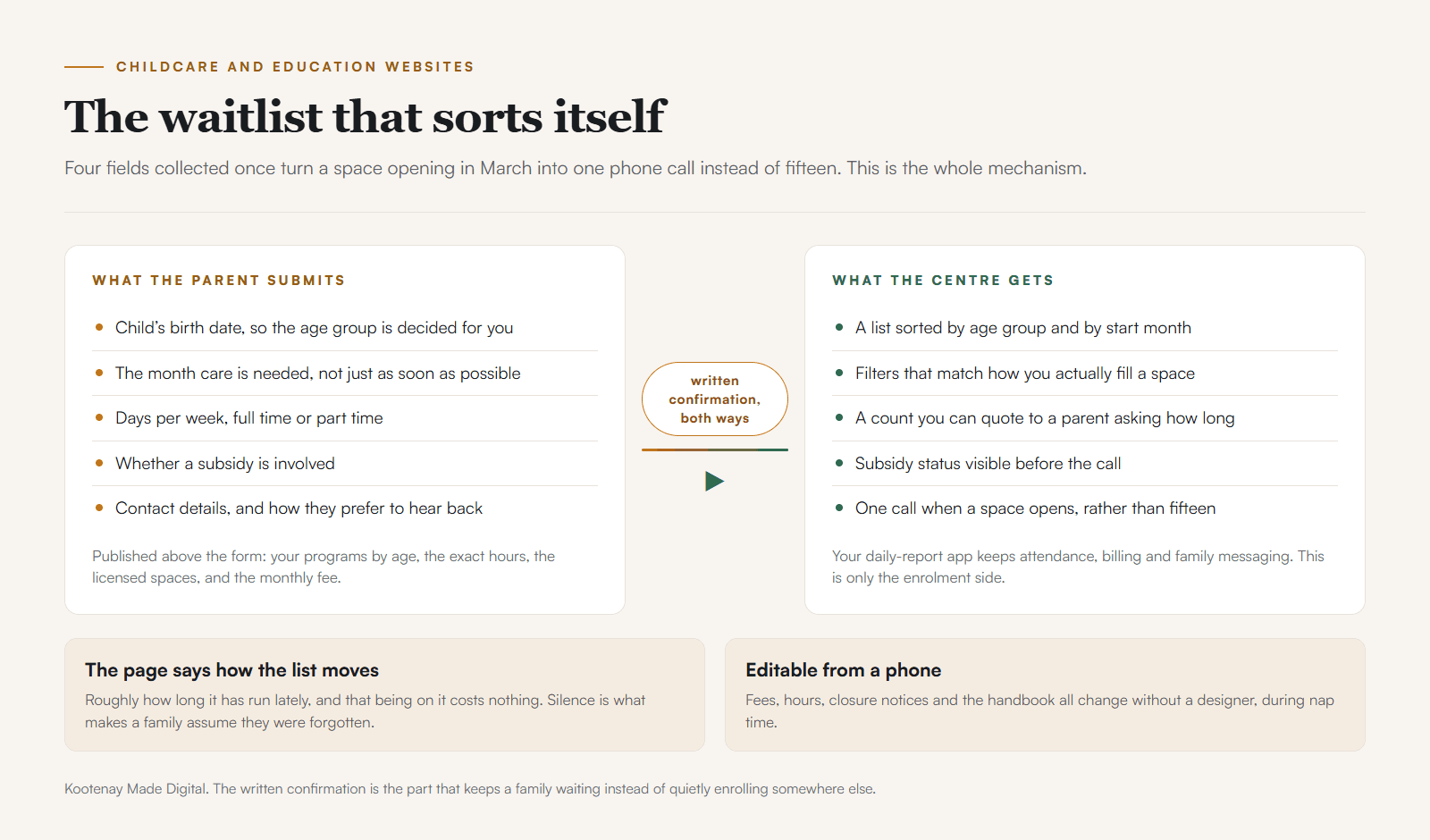
- 01A parent finds the programs page at eleven at night and sees that you take eighteen-month-olds.
- 02The fee is there, with a line on how the Affordable Child Care Benefit changes it. They keep reading.
- 03The waitlist form asks for the birth date, the month care is needed, days per week, and subsidy status.
- 04They get a written confirmation, so the list is real to them instead of a message left in the dark.
- 05You get a list you can filter by age group and start month, sorted the way you actually fill spaces.
- 06A space opens in March and you make one call rather than fifteen.
The page around the form does the rest. State how the list moves, roughly how long it has run lately, and that being on it costs nothing. A written confirmation instead of silence is what keeps a family waiting rather than quietly enrolling elsewhere.
The parent handbook, as pages rather than a PDF
Parents search these questions constantly, and almost nobody publishes the answers. Every one of them is a page, and every page is a search a competitor is not answering.
- Sick days
- What sends a child home, what keeps them home, and how long. The question every parent asks, and almost nobody publishes the answer.
- Food and allergies
- What you provide, what families bring, and how allergies are handled. Parents plan the week around this.
- Nap and rest
- How rest works by age group, and what happens with a child who has stopped napping.
- Clothing and outdoors
- What to send in January, what to send in July, and how much time the group spends outside in each.
- Late pickup
- The fee, the grace period, and the phone number to call. Say it once here rather than at the door.
- Closures
- Statutory holidays, professional days, and the snow-day rule. A notice you can post from a phone in ten seconds.
Written this way, the handbook stops being a document you hand over at enrolment and starts being the reason a family chose you. It also ends the conversation you currently have at the door with every new parent, repeated one family at a time.
The rooms, the educators, and the photo question
Trust in this sector is built from faces and rooms. A parent wants to see the space and know who will be in it before they book a tour, and neither of those needs a photograph of a child.
Photograph the entrance from the parking lot, the room in morning light, the shelves, the materials on the table, the yard, and the coat hooks. Hands at work photograph beautifully and identify nobody. A short page for each educator with their training, their certifications, and one line about their work with kids does more than a page of warm language.
Where a child does appear, it happens with written consent per family, and the site is built so pulling an image down takes a minute. A photo of a child is personal information belonging to a family, and British Columbia has its own privacy legislation covering how you keep it.
Registration windows, and why parents plan the fall in July
Music, dance, tutoring, and sport run on registration windows, and the whole year is decided in the two months before it starts. The studio whose schedule, ages, levels, and fees are live in advance takes the registrations.
Give each session its own page: fall registration, winter session, spring recital, summer camp. Put the dates and fees on it, take a registration or a deposit through the processor you already use, and open it weeks before you think you need to. In a valley where families plan around ski season and smoke season, early is the only version of on time.
Five mistakes I see on centre websites
Each of these costs an enrolment quietly enough that nobody traces it back. All five are decisions about what to publish rather than how the site looks.
- 01
Fees available only by phone
Families are budgeting to the dollar. A number nobody will say out loud fills your calendar with tours that end the moment the fee comes up.
- 02
A waitlist that lives in a notebook
You cannot sort it, count it, or use it when a space actually opens. Parents assume a message left in June was lost by August, and they enrol elsewhere.
- 03
A handbook PDF from four years ago
A parent reads the wrong policy and plans around it. Pages you can edit from a phone during nap time never go stale that way.
- 04
Stock photos of a bright classroom
A family is handing a small person to strangers. A room they have already seen beats any stock image, and rooms photograph well without a single face in them.
- 05
Registration pages that appear in September
Parents plan the fall in July. A studio whose schedule and fees are live in advance takes the registrations from the one still writing a post in September.
Where the sector stands in the Kootenays
This is one of the least-online categories in the region, which cuts both ways. Being findable is still an advantage here rather than a baseline.
On The Kootenay List, the register of Kootenay businesses I built and maintain, 44 of the 84 daycare & childcare businesses listed have no website at all, as of September 3, 2026. The breakdown by town sits in the Kootenay business web census.
Cranbrook and Castlegar carry the largest business counts in the region, and both have families arriving every year for work at the hospital, the college, the mill, or the mines. Those parents search before they arrive, from somewhere else, with a start date already set. A centre in Nelson, Creston, or Fernie is answering the same search from a smaller pool of programs, which makes the four answers matter more rather than less.
The childcare and education website design page carries the full build path, and the web design in Cranbrook page carries that town's numbers.
What it costs, and where to start
Programs, fees, the handbook, and a working waitlist form fit a Trailhead build at $2,000, typically delivered in 2 to 3 weeks. That is my starter tier, so there is no smaller step to point you at.
Several locations or several towns suit the Trailhead's Full Coverage version, which gives each community its own page: $3,200 once, or $800 today and $226 a month for 12 months, which is $3,512 all in. The Own It Monthly plan spreads the Trailhead alone at $2,000 once, or $500 today and 12 monthly payments of $142, which is $2,204 all in. Kootenay businesses get the 10% neighbours discount off any build. What you pay depends on what the centre actually needs, not on a package name.
If a site already exists, the free website check-up reads it and tells you which of the four answers is missing. If there is no site yet, start with a childcare website built for you and bring your programs, your fees, and your handbook. If you want it live before September registration, say the date and I will work the schedule backwards from it.
Sources and further reading
- Province of BC: Affordable Child Care Benefit
The provincial benefit that changes what a family actually pays, with eligibility and application handled by the province. Link to it rather than paraphrasing the rules. Read September 2026.
- Province of BC: rules for operating a licensed child care facility
What a licence covers and who monitors it. Licensed facilities are inspected by the regional health authority under the Community Care and Assisted Living Act. Read September 2026.
- Province of BC: licensed and unlicensed child care
How the province explains the difference to families. Useful for writing your own licensing section in words a parent already recognizes.
- Government of Canada: Canada’s Anti-Spam Legislation
The consent rules covering a newsletter to prospective families and the September registration email.
Frequently asked questions
We are full with a two-year waitlist. Why would we need a website?
Because the list is doing work the site should do. A form that sorts by age group and start month means one call fills a space instead of fifteen. The site also holds your licensing details, your handbook, and your hiring page, which is the harder problem in this sector right now.
Do we have to publish our fees?
You should. Fees are the first thing a parent looks for and the last thing most centres publish. Naming the monthly number and explaining how the provincial benefit changes it means the families who tour are the families who can enrol, which gives you back an afternoon a week.
Can the site handle photos of the children safely?
Only with written consent per family, and I build the site so removing a photo takes a minute. Plenty of centres run beautiful sites with no identifiable faces at all: the rooms, the materials, hands at work, the yard in the morning. That approach photographs better than most people expect.
Will it work with our daily-report app?
It sits beside it. Lillio, Brightwheel, Storypark, Jackrabbit and the rest keep doing attendance, billing, and family messaging. The website handles the people who are not your families yet, and hands them over once they enrol.
Can I update the handbook myself?
Yes, and you should be able to do it from a phone during nap time. Policy pages, fees, hours, and closure notices are all editable without a designer. A handbook that goes stale is worse than none, because a parent reads the wrong policy and plans around it.
We are a tutoring or music studio, not a daycare. Does this fit?
It fits well. The shape is the same: programs by age or level, real fees, a schedule that goes live before the season, and a registration form that captures what you need to place a student. The vocabulary changes and the structure holds.
How much does a childcare or school website cost?
Most centres and studios land on the Trailhead at $2,000, typically delivered in 2 to 3 weeks, with a 12-month payment plan available. Several locations or several towns suit the Full Coverage version at $3,200, or $800 today and $226 a month, $3,512 all in. Kootenay businesses get the 10% neighbours discount off any build.
Related pages
- Childcare and education websites
- Membership organization websites
- Web design in Cranbrook
- Web design in Castlegar
Kootenay Made Digital
I build websites, local presence, and calm AI setups for Kootenay small businesses. Plain language, published prices, and clear work that makes you easier to find and easier to choose.