


 hello@kootenaymade.ca
 Castlegar, BC. Serving the Kootenays and beyond.
 10 min read
Key takeaways
- Microsoft 365 Business Basic is CAD $9.50 per user per month on an annual subscription, checked September 2026.
- Google Workspace Business Starter is $7.00 USD per user per month. Google prices in US dollars even on its Canadian page.
- The domain comes first. Around C$16 a year at a Canadian registrar, in your own name, before any mailbox exists.
- SPF, DKIM and DMARC are three DNS records that tell receiving servers what is genuinely yours. Skipping them is why quotes land in junk.
- Every tool that sends mail as you, including the booking system and the invoicing app, has to be listed in SPF or it fails the check.

On this page
Why does a business email address at your own domain matter?
Because a stranger reads the address before they read the quote. An address at your own name says the business is real and settled. It also keeps the mailbox with the business when staff change, and it makes your CASL identification straightforward, since your identity is in the address itself.
This is for an owner still running the business out of a personal webmail account, usually because it worked fine for the first two years. It is not for a business already on Workspace or Microsoft 365 with the DNS records published, which is most of what the rest of this guide is about.
- A stranger comparing three quotes reads the address before the price, and a free webmail address quietly costs you the benefit of the doubt.
- Under CASL your commercial messages have to carry your business identity and contact details, and an address at your own domain is the simplest way to do that.
- When staff change, the mailbox stays with the business rather than walking out on somebody’s personal account.
- The address survives changing website platforms, because it belongs to the domain and not to the host.
- You can add sales@ or bookings@ later without anybody creating a new personal account for it.

The trust part is not abstract in a small town. Trail has 276 businesses on The Kootenay List as of September 3, 2026, 178 of them with no website. When a homeowner is comparing three quotes for the same job and one arrives from a personal address at a free provider, that quote starts a step behind, fairly or not.
The address is the cheapest signal of seriousness a business can buy, and most of the businesses I audit are still giving it away.
Google Workspace or Microsoft 365?
Take whichever one your business already works in. Google Workspace Business Starter is $7.00 USD per user per month. Microsoft 365 Business Basic is CAD $9.50 per user per month on an annual subscription. Both do email at your own domain properly, and the documents you already have decide it.
| What is being compared | Google Workspace | Microsoft 365 |
|---|---|---|
| Entry plan and price | Business Starter, $7.00 USD per user per month | Business Basic, CAD $9.50 per user per month, paid yearly |
| Currency on the vendor’s Canadian page | US dollars. Google states "all prices $USD" on its Canadian page | Canadian dollars, labelled CAD |
| Mailbox and storage | 30 GB pooled per user on Starter, 2 TB on Standard at $14.00 USD | 100 GB primary plus 50 GB archive per user |
| Desktop apps | Web and mobile apps. Docs, Sheets and Slides in the browser | Web and mobile on Basic. Desktop Word, Excel and Outlook start at the Standard tier |
| Best fit | A business already working in Gmail, Drive and Docs | A business already working in Outlook, Word and Excel |
| Commitment | Billed monthly, with a stated 16% saving on a one year commitment | Annual subscription paid yearly, auto renewing |
| User cap | Starter, Standard and Plus cap at 300 users | The business plans are sized for up to 300 users |
The honest summary is that either one works. If your quotes and spreadsheets live in Google Drive and your phone is already signed into Gmail, Workspace is the shorter path. If your invoices are Excel files and your accountant sends you Word documents, Microsoft 365 is. Choosing against your own habits to save a couple of dollars a month is a bad trade.
One caution on the Microsoft ladder. Business Basic at CAD $9.50 is web and mobile apps only. Desktop Word, Excel and Outlook start at the Standard tier, which was CAD $31.90 per user per month with Copilot bundled when I checked in September 2026. If you need the desktop apps, price that tier rather than the entry one.
The currency detail nobody mentions
Google prices Workspace in US dollars even on its Canadian page. The page states, in Google’s own words, that all plans are billed monthly and all prices are USD. So the $7.00 headline is a US dollar figure and your card gets the converted amount plus whatever your bank charges on a foreign transaction.
I am not going to invent a Canadian number by applying an exchange rate, because the rate moves and the figure would be wrong by the time you read it. What I will say is that comparing $7.00 USD against CAD $9.50 as though they were the same currency makes Google look cheaper than it is. Look at your last statement to see what a US dollar subscription actually costs you.
Microsoft publishes CAD directly on its Canadian page, which makes budgeting simpler. That is a real if unglamorous advantage, and it is the kind of detail that only shows up when you read the vendor’s own page rather than a comparison article.
How does mail actually reach the inbox?
The receiving mail server looks up three records published at your domain and runs three checks: is this server allowed to send as you, does the signature match, and what do you want done if either fails. Publish all three and your mail lands. Publish none and the server guesses.
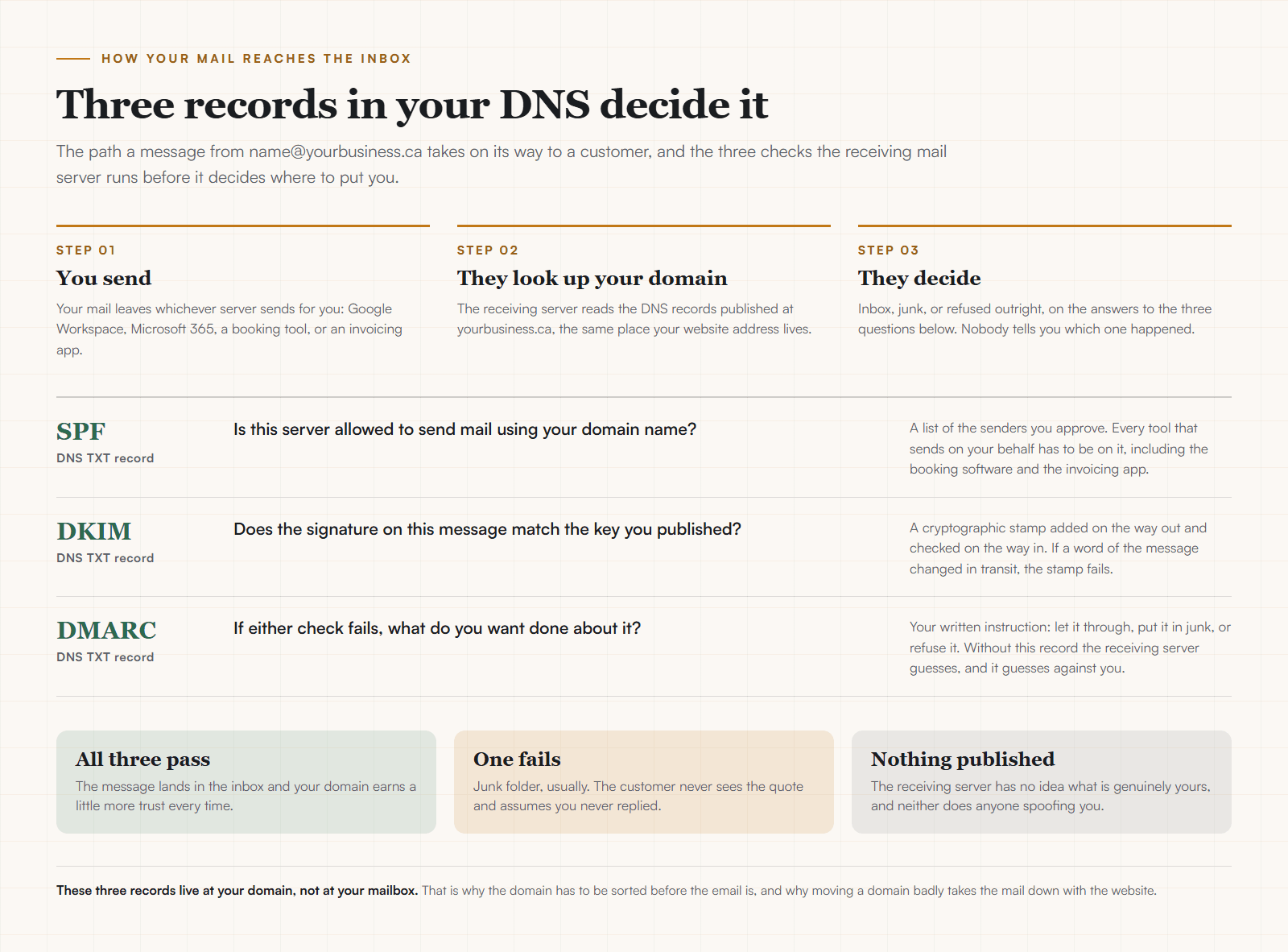
- SPF
- A published list of the servers allowed to send mail using your domain name. Every tool that sends on your behalf belongs on it, including the booking software, the invoicing app, and the newsletter platform.
- DKIM
- A cryptographic signature added on the way out and checked on the way in. If a word of the message changed in transit, the signature fails and the receiving server knows.
- DMARC
- Your written instruction about what to do when SPF or DKIM fails: let it through, put it in junk, or refuse it outright. It also lets you receive reports on who is sending mail as you.
Both providers hand you these records during setup and both document the process. The step that gets skipped is the fifth one: adding every other tool that sends mail as you. A booking system that sends confirmations from your address and is missing from your SPF record will fail the check on a share of messages, and the customer just sees silence.
This is configuration rather than protection, and it is worth being clear about the difference. Publishing these records describes to receiving servers what is genuinely yours. It does not make your mailbox secure, and no arrangement of DNS records does. What it does reliably is keep your quotes out of the junk folder.
Setting it up in the right order
Domain, then provider, then mailboxes, then records, then every other tool that sends as you, then the move. Doing these out of order is how people end up with a mailbox that works and mail that nobody receives.
- 01Register the domain first, in your own name, at your own registrar. Everything else depends on it and none of it works without it.
- 02Pick one provider. Google Workspace if the business already lives in Gmail and Docs, Microsoft 365 if it lives in Outlook, Word and Excel.
- 03Create the mailboxes you actually need. Start with one per person, plus a shared address for enquiries. Extra mailboxes are billed per user, so name them on purpose.
- 04Publish the SPF, DKIM and DMARC records the provider gives you into your domain’s DNS. This is the step people skip and then wonder why quotes land in junk.
- 05Add every other tool that sends mail as you: the booking system, the invoicing app, the newsletter platform. Each one needs to be in the SPF record or it fails the check.
- 06Move the old inbox across, set a forward from the free address for six months, and tell your regulars once.
Step one carries all the weight. The domain has to be registered in your own name at your own registrar, because the email records live in its DNS. A domain in a designer’s account means an email system in a designer’s account, and the guide to .ca or .com for a Canadian business covers the ownership rule and the registrar prices. If the website is still to come, the cleanest version is a website with email records set up at launch.
Moving off a free address without losing anyone
Set up the new mailbox first, forward the old address into it, and leave that forward running for six months. Tell customers once, change it on the vehicle and the business cards when they next get printed, and let the rest sort itself out.
Update the address everywhere it is published on the same day: your Google Business Profile, your website contact page, your invoices, your quote template, and any directory listing. A stale address on a profile you forgot about will keep sending you mail at an account you have stopped reading.
If you send anything that counts as a commercial electronic message, this is also a good moment to check your CASL position. Every message needs to identify you and carry valid contact details, and an unsubscribe mechanism if it is promotional. The CASL compliance guide covers the requirements in plain words.
What does this cost for a year?
A one person business on Microsoft 365 Business Basic pays CAD $9.50 a month, so CAD $114 a year, plus roughly C$16 for the domain. A two person shop with a shared enquiries alias is two mailboxes, so about CAD $228 a year. That is the whole bill.
Aliases are the trick worth knowing. An alias points at an existing mailbox and usually costs nothing, so sales@, bookings@ and accounts@ can all land in the same inbox without paying for three users. Create mailboxes for people and aliases for roles. If the bill already carries seats for people who have left, it is a good moment to audit your software subscriptions, or to book an independent review of the software you pay for.
For the wider picture of what running a small business online costs in a year, including the domain, the platform, and the pieces that surprise people in month thirteen, the website cost guide lays it out. If you are still choosing where the website itself will live, the website builder comparison is the companion piece, and website hosting explained covers the layer between the two.
Sources and further reading
- Google Workspace pricing, Canadian page
Read September 4, 2026. The page states "All plans billed monthly, all prices $USD", so Google does not publish Canadian dollar pricing here. Business Starter $7.00 USD per user per month with 30 GB pooled storage, Business Standard $14.00 USD with 2 TB, Business Plus $22.00 USD with 5 TB, and a stated 16% saving on a one year commitment.
- Microsoft 365 for business, Canadian pricing
Read September 4, 2026, prices labelled CAD on an annual subscription paid yearly. Business Basic CAD $9.50 per user per month, Business Standard with Copilot CAD $31.90, Business Premium with Copilot CAD $43.40, Apps for business CAD $14.20. Mailbox storage of 100 GB primary plus 50 GB archive per user.
- NamesPro.ca domain pricing
Fetched September 4, 2026 from a CIRA certified Canadian registrar. .ca C$15.68 a year, .com C$20.74 a year, 5% GST added. The domain is the prerequisite for an email address at your own name.
- Canada’s Anti-Spam Legislation, requirements for commercial electronic messages
The federal government’s CASL hub. Commercial electronic messages must identify the sender and carry valid contact information, which is the compliance reason a business address at your own domain is worth more than a free webmail one.
Frequently asked questions
Do I really need a business email address at my own domain?
If you send quotes, invoices, or anything a stranger has to trust, yes. An address at your own domain tells a customer the business is real and keeps the mailbox with the business when people change. It also makes the CASL identification requirement straightforward, because your business identity is right there in the address.
Google Workspace or Microsoft 365 for a small Canadian business?
Match whichever one your business already works in. If your documents live in Google Docs and Drive, take Workspace at $7.00 USD per user per month. If they live in Word, Excel and Outlook, take Microsoft 365 Business Basic at CAD $9.50 per user per month on an annual subscription. Both checked September 2026, and both do email at your own domain perfectly well.
How much does business email cost in Canada?
Microsoft 365 Business Basic is CAD $9.50 per user per month paid yearly. Google Workspace Business Starter is $7.00 USD per user per month, because Google prices in US dollars even on its Canadian page, so your card gets the converted amount plus whatever your bank adds. Both read September 2026. Add roughly C$16 a year for the domain itself.
Why does Google charge Canadians in US dollars?
That is how the page is published. Google’s Canadian pricing page states "All plans billed monthly, all prices $USD", read September 2026. It means the real cost moves with the exchange rate, and it makes the comparison against Microsoft’s CAD price less clean than it looks. Worth knowing before you compare the two headline numbers.
What are SPF, DKIM and DMARC in plain words?
Three records published in your domain’s DNS. SPF is the list of servers allowed to send mail using your name. DKIM is a signature proving the message was not altered in transit. DMARC is your instruction about what to do when either check fails. Without them, receiving mail servers guess, and they guess against you.
Can I keep using Gmail and just change the address?
Yes, and that is exactly what Google Workspace is. Same Gmail interface, same app, with your own domain on the address and the mailbox owned by the business. The free personal Gmail account stays yours and personal. Set a forward from the old address for six months while your regulars catch up.
How many mailboxes do I need?
One per person who sends mail, plus one shared address for enquiries. Both providers bill per user, so a two person shop with a shared info address is two or three mailboxes rather than eight. Aliases that point at an existing mailbox usually cost nothing, so use those for sales@ and bookings@ instead of creating accounts.
Related pages
- Professional services websites
- Trades and contractor websites
- Industrial and B2B websites
- Web design for Canadian businesses
- Web design across British Columbia
Kootenay Made Digital
I build websites, local presence, and calm AI setups for Kootenay small businesses. Plain language, published prices, and clear work that makes you easier to find and easier to choose.