

 hello@kootenaymade.ca
 Castlegar, BC. Serving the Kootenays and beyond.
 8 min read
Key takeaways
- Four separate layers can fail: the domain, DNS, hosting, and the site. They break differently.
- Email dying at the same moment as the website points at the domain rather than the hosting.
- CIRA documents up to 45 days of auto-renew grace, then a 30 day redemption period for a .ca.
- ICANN requires a 30 day Redemption Grace Period after a generic domain is deleted.
- If the registrant on the record is not your business, the domain is not yours yet.

On this page
Domain, DNS, hosting, site: what is the difference?
Four separate things have to work for a website to appear, and they are usually bought from different companies in different years by different people. Knowing which is which turns a panic into a phone call. This guide is for an owner whose site has gone dark today; if your site works and simply needs improving, the check-up is the better door.
- The domain
- The name people type. You rent it a year at a time from a registrar. If it lapses, the website and every email address on the name stop together.
- DNS
- The address book that points the name at a server. A wrong record here breaks the site while the domain and the server are both perfectly healthy.
- Hosting
- The machine holding the files. If it lapses, the name still resolves and the browser gets an error or a parking page instead of your pages.
- The site
- Your pages. A bad update, an expired certificate, or a plugin conflict breaks this while the three layers below it are fine.
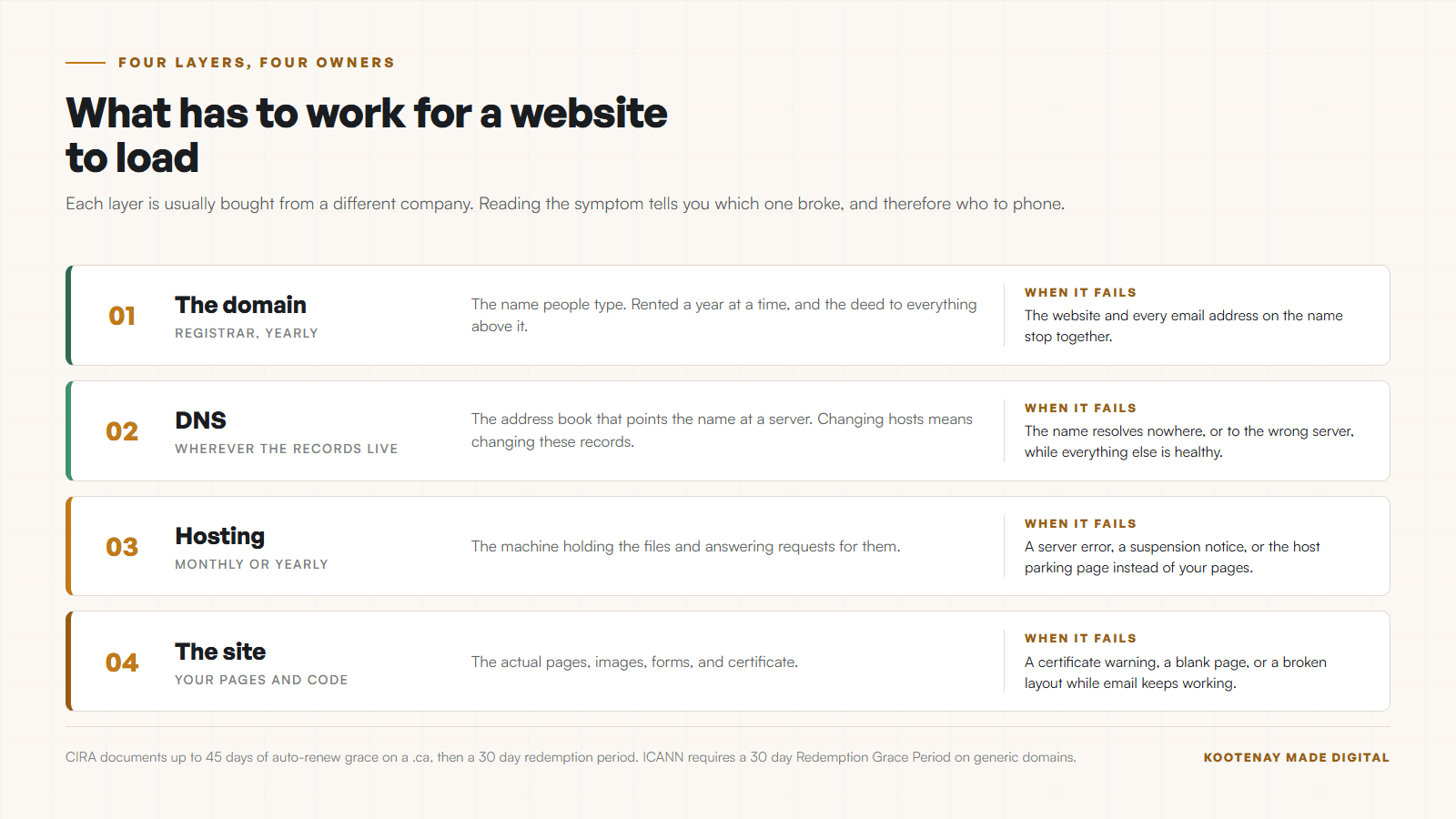
In a small town those four layers usually sit with four different people: a cousin bought the domain, the hosting came bundled with something, and a designer who has since left Castlegar built the site. When it breaks, the first job is working out who to call. If you would rather that never be a question again, a support plan with monitoring that catches a site going down means somebody is already watching, and a site that is down is never a queue item.
How do I tell which one broke in five minutes?
Five checks, in order, and most of the time you have your answer by the third. Do them before you phone anybody, because arriving with the symptom already narrowed saves an hour of being transferred.
- 01Try the address on cell data with wifi off, and on a second device. A problem only you can see is usually your own network or a cached page.
- 02Look up the domain in a public WHOIS search. It shows the expiry date and the current status. An expired or redemption status ends the investigation right there.
- 03Check whether your business email still works. Email dying at the same moment as the website points hard at the domain rather than the hosting.
- 04Read the error. A certificate warning, a 404, a blank white page, and a host parking page are four different problems with four different owners.
- 05Log in to your hosting account and check for an unpaid invoice or a suspension notice. Suspended hosting looks identical to a broken site from outside.
The email check is the fastest single test on this page. Your website and your email both hang off the same domain name. If both stopped at once, look at the domain first. If email works, the domain is fine and the problem lives above it.
If the email died at the same moment, it is the domain. Start there and skip an hour.
What happens when a .ca expires?
CIRA publishes the whole cycle, and it is more forgiving than most people fear. Two windows follow the expiry date. The second one is the last exit. Every figure below comes from CIRA’s own life cycle page, checked in September 2026.
- 01
The expiry date passes
CIRA automatically renews a .ca for one year and charges your registrar. You still have to renew with your registrar to keep it, and they can cancel that renewal if you do not.
- 02
Auto-renew grace period, up to 45 days
CIRA documents this period as controlled by the registrar and varying by their policies. During it, CIRA says the domain name may cease to function. This is where most people first notice.
- 03
Redemption grace period, 30 days
The domain is now deleted. CIRA states that any websites or email addresses associated with the name cease to function. You may ask your registrar to restore and renew it for one year, and CIRA calls this your final opportunity to renew.
- 04
Pending delete, then the TBR list
After redemption the name goes to the To Be Released list. CIRA runs a session every Wednesday at 19:00 UTC, only registrars can bid, and anything unclaimed becomes generally available minutes after it ends.
The sentence worth pinning to the wall is CIRA’s description of the redemption period: any websites or email addresses associated with the domain name will cease to function. That is the stage where the phone starts ringing. It is also the stage where one call to the registrar still fixes everything. CIRA’s own release pages put the whole window at 32 to 78 days after the expiry date before a name reaches the release list, which is a fair amount of rope if you notice early.
What about a .com?
Generic domains run under ICANN’s Expired Registration Recovery Policy. The shape matches .ca with different names on the stages, and the same 30 day redemption window at the end.
| What is being compared | What the policy requires | What it means for you |
|---|---|---|
| Warning notices | At least two before expiry: one about a month ahead, one about a week ahead. | Sent to whoever is listed as the registrant, which may not be you. |
| At expiry | DNS resolution must be interrupted for at least the last eight days the name is renewable. | The site goes dark before the name is gone. |
| The parking page | It must conspicuously say the registration is expired and give renewal instructions. | A parking page is a clue, not the end. |
| Redemption Grace Period | 30 days after deletion, during which the registrar that deleted it can restore it at your request. | Expect a restore fee on top of the renewal. |
Notices go to the registrant on the record, so if that is not you, you never see them. The restore fee during redemption is set by the registrar, which is why ICANN requires them to publish it.
Who actually owns your domain?
Whoever is named as the registrant on the record owns it. That is the whole test, and it catches businesses that have paid for their own website twice. Look yours up today rather than on the morning it goes dark.
- The domain is registered in your designer’s name or your nephew’s name rather than your business name.
- The renewal notices go to an email address at a company that no longer exists.
- The card on file expired two years ago and nobody saw the failed charge.
- Nobody knows which registrar it is at, because it was bought as part of a package.
- The person who set it up has moved away and does not answer.

None of these are usually malice. They are what happens when a favour becomes a business asset and nobody writes it down. As of September 3, 2026, The Kootenay List counts 45 businesses in Grand Forks with a website. Every one has a renewal date and a registrant name that somebody has to own. The fix while everybody is friendly is a transfer to your own registrar account, and the longer version of that argument is in who actually owns your website and domain. On every build I ship, the domain goes in the client name from the first day, for exactly this reason. If the designer is already gone, here is what to do when your web designer disappears.
How do I get it back?
Work from the outside in: prove who you are to the registrar, pay whatever the window costs, then fix the layer above it. Speed matters more than tidiness while a window is closing.
- 01Find the registrar. A public WHOIS search names it even when you have lost the login.
- 02Recover access through the registrar account recovery process, using the business documents they ask for.
- 03Renew or restore immediately, before you argue about anything else. The window closing is the only irreversible part.
- 04Check the DNS records once the name is back, because a lapse sometimes clears them, then confirm email is flowing and the site loads on a device that has never visited it.
- 05Only then transfer the name into an account in your business name, with your own card and your own email on file.
If the site itself broke rather than the name, the repair sits with whoever holds the files and the backups. That is the part of what website maintenance actually means that nobody reads until the day they need it, and hosting in Canada, explained covers who is holding what.
How do I make sure this never happens again?
Five habits, about twenty minutes to set up once. The first matters most: the domain belongs in your business name, at a registrar you can log in to, on a card that works.
- Register the domain in your business name, with your own email and your own payment method on file.
- Set the registration to renew automatically, then check once a year that the card on file still works.
- Turn on registrar lock so the name cannot be transferred without you.
- Put the expiry date in the same calendar as your insurance renewal.
- Keep the registrar login somewhere your bookkeeper can find it.
It is the practical core of the ownership argument in renting against owning your website in Canada.
The domain is the deed. Everything else is a building you can rebuild.
Sources and further reading
- CIRA: the .ca domain name life cycle
Checked September 5, 2026. Documents the auto-renew grace period of up to 45 days, the 30 day redemption grace period, the statement that websites and email cease to function during redemption, and the weekly Wednesday TBR session.
- ICANN: Expired Registration Recovery Policy
Checked September 5, 2026. Sets the rules for .com and other generic domains: at least two expiry notices, interrupted DNS resolution, a Redemption Grace Period of 30 days after deletion, and published redemption fees.
- CIRA: About To Be Released
Checked September 5, 2026. Explains how a deleted .ca reaches the public: a name appears on the TBR list between 32 and 78 days after its expiry date if the registrant does not redeem it, and only registrars can bid in the session.
Frequently asked questions
My website is down. How do I tell whether it is the domain or the hosting?
Check whether your business email on the same name still works. Email and website failing together points at the domain or DNS. A dead website with working email points at hosting or the site itself. Then look the domain up in a public WHOIS search and read the expiry date and status, which settles it in about a minute.
How long do I have to get an expired .ca back?
CIRA documents an auto-renew grace period of up to 45 days, set by your registrar, followed by a 30 day redemption grace period once the name is deleted. CIRA calls redemption your final opportunity to renew. After that the name goes to the To Be Released list and anyone can end up with it.
What about a .com?
Generic domains run under ICANN rules. Your registrar must send at least two notices before expiry, must interrupt the DNS while the name is still renewable, and registries must offer a Redemption Grace Period of 30 days after deletion. Restoring during redemption usually costs a restore fee on top of the renewal, and registrars are required to publish that fee.
Somebody else registered my domain for me. Is it mine?
Only if you are the registrant on the record. Look the name up in a public WHOIS search and read the registrant organization. If it names somebody else, your business is renting its own front door, and that is worth fixing while everybody is on good terms.
Can I just buy a new domain and start again?
You can, and it is sometimes the fastest route back online. The cost is everything pointing at the old name: your Google listing, printed cards, links from other sites, and every email address on it. Recover the original while it is still recoverable, and treat a new name as the last option.
Related pages
Kootenay Made Digital
I build websites, local presence, and calm AI setups for Kootenay small businesses. Plain language, published prices, and clear work that makes you easier to find and easier to choose.