hello@kootenaymade.ca
 Castlegar, BC. Serving the Kootenays and beyond.
 10 min
Key takeaways
- Nearly every pay-monthly website in Canada is a rental: stop paying and the site is gone, with nothing owned at any point.
- Over 3 years, a $99/month rental costs $3,564 and leaves you with nothing. A 12-month ownership plan on a $2,000 build costs $2,204 in total ($500 today, then 12 monthly payments of $142), and the site is yours forever.
- Renting is right for experiments and short-term projects. Owning wins the moment the website is part of how the business earns.
- Five questions expose any provider instantly, starting with: is the domain in MY name, and is there ever an end date?
- Ownership payment plans exist: 12 payments with no credit checks and no bank involved, and the code, design, and content transfer to you at the end.

On this page
What are the ways to pay for a website in Canada?
One distinction before the list. Renting a server is normal, and every website pays for hosting somewhere. Renting the site itself is the trap, and the hosting guide draws that line in plain English.
There are really three. You can rent from a builder platform, rent from a pay-monthly agency, or own the site, either by paying once or through a payment plan that actually ends. The monthly price tags look similar. The endings could not be more different.
- 01
Rent from a builder (Wix, Squarespace, GoDaddy)
You pay every month for as long as the site exists, and you do all the work yourself. Wix plans ran from about $18 to $160 a month in September 2026, billed a year at a time. The template, the platform, and effectively the site belong to them. Stop paying and it goes dark. There is no finish line.
- 02
Rent from a pay-monthly agency
A company builds the site and you pay $79 to $300+ a month for as long as you want it to exist. Better looking than DIY, but the ownership problem is the same. The subscription never ends, and cancelling usually means losing the site.
- 03
Own it: pay once, or a payment plan with an end date
A custom build you pay for once ($2,000 and up), or the same build on a fixed plan, like 12 payments, after which the code, design, and content are legally yours. The meter stops. This is the option most Canadian owners do not know exists.
The confusion is understandable, because the first two options advertise themselves with the same words the third uses: affordable, monthly, no big upfront cost. The difference is buried in what happens the month you stop paying, which is exactly where nobody points the flashlight.
Every website subscription answers one question differently. What do you hold after three years of payments? For a rental, the answer is nothing.
Can you rent or lease a website in Canada?
Yes, and most monthly website deals already are one, whatever the label says. Rent a website, lease a website, website rental, and pay monthly website all describe the same deal. You pay every month to use a site you never own. When the payments stop, so does the website.
Some companies use the word rental out loud. Others call it a subscription, a membership, or a monthly plan. The label changes and the test stays the same. What do you hold the month you stop paying? Squarespace and Wix work this way too. Your words and photos are yours, and the site itself runs on their system and stays there.
What does rent vs own actually cost over 3 years?
Over three years, a typical $99/month rental costs $3,564 and you own nothing. A 12-month ownership plan on a $2,000 custom build costs $2,204 total ($500 today, then 12 monthly payments of $142), ends after year one, and the site is yours for as long as you want it. The rental keeps charging; the plan stops.
| What is being compared | Pay-monthly rental | Ownership plan (Own It Monthly) |
|---|---|---|
| Monthly cost | $79 to $300+, forever | $500 today, then $142/mo for exactly 12 months, $2,204 total (Trailhead) |
| 3-year total | $2,844 to $10,800+ | $2,204, then $0 |
| What you own at the end | Nothing. Cancel and the site is gone | Everything: code, design, content |
| The domain | Sometimes theirs, read the fine print | Registered in your name from day one |
| Design quality | Template or semi-custom | Fully custom build |
| End date | Never | Payment 12 |
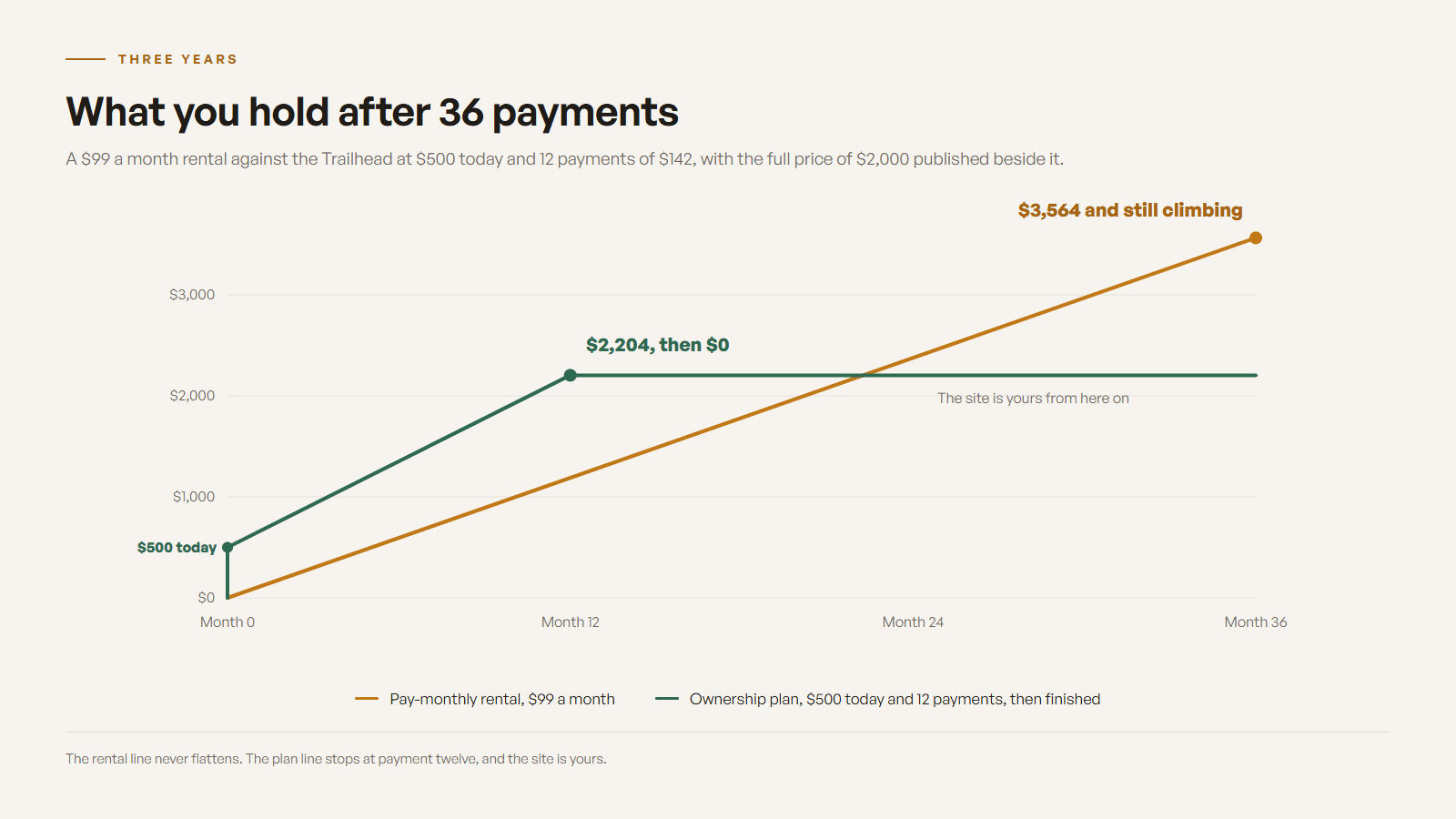
Builder subscriptions look cheaper per month, and in year one they usually are. But a builder also means you do all the work yourself, and the website cost guide shows how apps, transaction fees, and renewal increases stack the total quietly. The rental math only looks good if you never look past month one. For the tax side of either choice, read is a website tax deductible in Canada.
Why is almost every pay-monthly website a rental?
Because forever-revenue is a better business than finished projects. A rental customer who stays four years pays two or three times what the site was worth, and the provider holds the site the whole time. It is a great model for the seller. It is just rarely disclosed to the buyer.
Plenty of rental providers run honest businesses with real support, and their customers know the deal. The problem is the majority of owners who do not know there is any other deal. In my part of BC I meet business owners every month who assume monthly-forever is simply how websites work, because every option they have ever been shown, from Wix to the local pay-monthly shops, works that way.
As of September 3, 2026, 2,527 of the 5,836 businesses on The Kootenay List have no website at all.
The alternative model, a payment plan that ends in ownership, exists in scattered corners of the industry but is almost never marketed in Canada. That gap is the entire reason I published my plan numbers openly. Paying once is the other way to own your small business website outright.
When is renting a website actually the right call?
Renting wins when the website itself is an experiment: testing a business idea, a short seasonal project, a side hustle that may not survive the year. In those cases, a $30 builder subscription is the correct tool, and anyone who tells you otherwise is selling something.
- You are validating an idea and may shut it down within a year: rent.
- The project is short-term or seasonal: rent.
- You enjoy DIY, have the hours, and your customers do not judge polish: rent.
- The website is how customers find, judge, and choose your real business: own.
- You plan to be in business in three years: own, because the rental math has already lost by then.
How does a website payment plan with ownership work?
The same way a work truck on a fixed payment plan works. The payments are steady, there is a real end date, and the truck is yours at the final payment. My version is called Own It Monthly, and the mechanics below are the ones I would tell you to demand from anyone offering something similar.
- 01Pick the package (for example, a $2,000 Trailhead). The plan starts with 25 percent at signing, which is $500 on the Trailhead, then 12 monthly payments of $142 ($2,204 total).
- 02Sign one plain-English page and make the starting payment. The build starts as soon as it clears.
- 03The site is typically built custom in 2 to 3 weeks and launches the day you approve it, never gated behind the payment schedule.
- 04Monthly payments run on card autopay, the first one a month after signing. Pay it off early any time at the remaining balance, with no penalty.
- 05At payment 12, ownership of the code, design, and content transfers to you outright. The domain was in your name from day one.
Two details matter more than the rest. First, the site goes live when it is built, usually inside three weeks, never held back by the payment schedule. Second, the domain is registered in your name from day one, so even the worst case never involves your business name being held hostage. Full numbers for every package are on the Own It Monthly page, including the pay-once price beside every plan, because you should always see both.
How do I own my website instead of renting it?
Get the domain, the files, and the hosting account into your own name. If you rent today, you can move them in this order without the site going dark, and keep the Google visits it already earns.
- 01Move the domain into your own name first. It is the address your customers and Google already know, and it is the one piece you can take anywhere.
- 02Copy your text and download your photos. Most builders let you take your words and images with you, even though the design stays behind.
- 03List the pages that bring in visits and calls, so the new site keeps them at the same addresses or forwards the old ones.
- 04Rebuild on files you own, in a hosting account in your name. This is the step that ends the rent.
- 05Keep the old site running until the new one is finished and checked. Then point the domain at the new site and cancel the rental.
Not sure what you control right now? The guide to who owns your website walks through checking the domain, the hosting, and the files, one at a time.
What should I ask any pay-monthly website provider?
Five questions separate rentals from ownership in under a minute. Ask them before signing anything monthly, including with me.
- Who owns the domain name, and is it registered in MY name from day one?
- What exactly happens the month I stop paying? Does the site survive in any form?
- Can I export my content, and does the design and code ever become mine?
- What is the true 3-year total, including apps, fees, and renewal price increases?
- Is there an end date, ever, where I stop paying and keep the website?

A provider with good answers will love that you asked, because it means you understand what you are buying. A provider who gets vague on question two or five just answered a different question: whether you should sign at all.
Sources and further reading
- Wix Premium Plans (Canada)
Current builder subscription pricing. Note there is no tier, at any price, where the site becomes yours.
- RealtyNinja pricing
A well-run Canadian example of the vertical rental model: $79+/month for as long as you want the site to exist.
- KIJO: Pay monthly websites vs one-off websites
An agency-side breakdown showing how pay-monthly totals overtake one-off builds within a couple of years.
- Own It Monthly at Kootenay Made Digital
The ownership-based payment plan this guide describes, with every number published.
Frequently asked questions
What is a website rental or pay monthly website?
Renting a website, leasing a website, and a pay monthly website all describe the same deal. You subscribe to a site instead of buying it. A builder platform or an agency hosts and maintains it, you pay monthly, and the arrangement continues indefinitely. If you stop paying, the website goes offline and you keep little or nothing.
Do I ever own a Wix or Squarespace website?
No. You own your content (your text and images), but the site itself runs on their platform and templates. There is no tier where the website becomes yours, and you cannot take a Wix or Squarespace site with you when you leave. That is the core trade of every builder subscription.
Is renting a website ever the right choice?
Yes. If you are testing an idea, need something live this week for a short-term or seasonal project, or may not be in business next year, renting is the cheaper and smarter call. Rent for experiments. Own the moment the website becomes part of how the business makes money.
What does a website payment plan with ownership look like in Canada?
The version I run is called Own It Monthly. It puts a custom-built site on 12 monthly payments, with ownership transferring outright at the final payment. The Trailhead package is $2,000 paid once, or $500 at signing and $142 a month for a year ($2,204 total). There are no credit checks and no bank involved. The domain stays in your name from day one, and early payoff is allowed any time without penalty.
How much more does a payment plan cost than paying once?
On my plans, roughly 9 to 10 percent, and both totals are always shown side by side. For example, $2,000 once, or $2,204 in total with $500 at signing and 12 monthly payments of $142. Compare that to a rental, where three years at $99 a month is $3,564 with nothing owned at the end.
What happens if I miss a payment on an ownership plan?
On a fair plan, the site pauses rather than disappears, and it comes back the moment you catch up. Mine also includes one 30-day hardship pause per plan, no questions asked. What you should never accept is a plan where a single missed payment erases the website entirely.
How do I own my website instead of renting it?
Move the domain, the website files, and the hosting account into your own name. If you rent today, move the domain first, copy your text and photos, rebuild on files you own, and forward the old page addresses to the new ones so Google keeps sending visitors. Keep the rented site running until the new one is ready, then cancel.
Related pages
- Web design for Canadian businesses
- Web design across British Columbia
- Best Website Builder for a Small Business in Canada (2026)
Kootenay Made Digital
I build websites, local presence, and calm AI setups for Kootenay small businesses. Plain language, published prices, and clear work that makes you easier to find and easier to choose.