

 hello@kootenaymade.ca
 Castlegar, BC. Serving the Kootenays and beyond.
 8 min read
Key takeaways
- Passwords first, in this order: email, domain registrar, hosting, site admin.
- Google Search Console names the problem category, which turns guessing into reading.
- A real warning lives in Search Console or the browser. A payment demand by email is a template.
- Nobody targeted you. Automated scanners try every site for one known hole.
- Rebuild rather than clean when the site is old, unbacked, plugin-heavy, or already hacked once.

On this page
What do I do in the first hour?
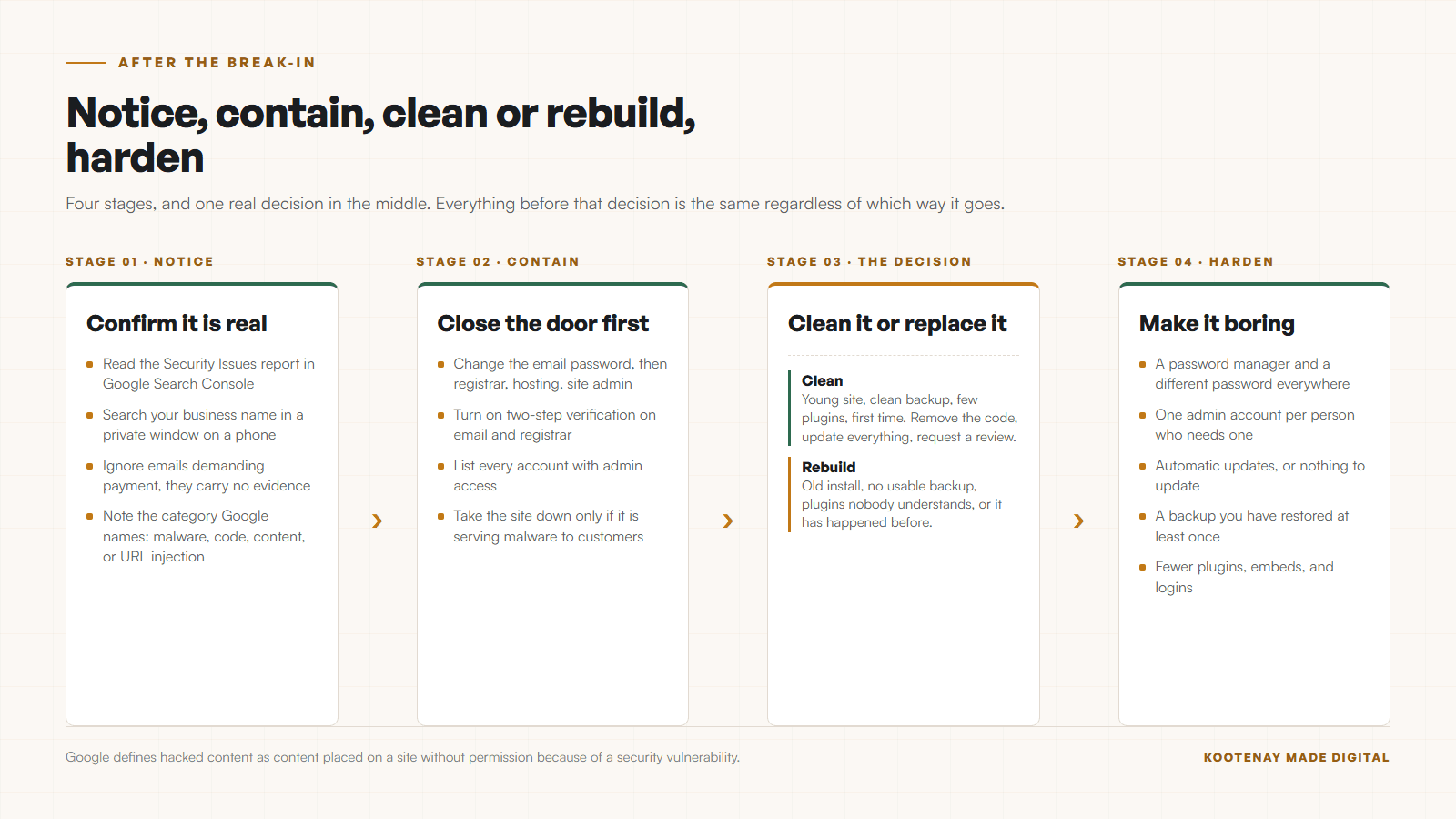
Six moves, in order, and the order matters. Passwords before cleanup, because whoever got in can walk back through the same door while you are busy tidying. This guide is for an owner whose live site is behaving badly today; if the site is only slow or ugly, you want the check-up rather than this page.
- 01Change the password on your email first, then your domain registrar, then your hosting, then the site admin. Email is first because every password reset in your life arrives there.
- 02Turn on two-step verification everywhere it is offered, starting with the email and the registrar.
- 03Open Google Search Console and read the Security Issues report. It names the category of the problem in Google words, which saves you a lot of guessing.
- 04Search your own business name in a private window on a phone. Hacked redirects often fire only for visitors arriving from search results.
- 05List every account with admin access to the site. Old staff, an old designer, a plugin developer, a marketing agency from four years ago.
- 06Take the site down only if it is serving malware or a fake login page to your customers. A spam page nobody visits can wait an hour while you get the passwords sorted.
Email comes first for a reason nobody likes hearing. Every password reset you are about to perform arrives in that inbox. If somebody is sitting in your email, they undo your afternoon in four clicks.
Passwords before cleanup. Otherwise you are tidying a room somebody still has a key to.
Is this a real hack or a scary email?
Most of the panic I get called about turns out to be a template email demanding payment. A genuine problem announces itself inside Google Search Console or as a browser warning when the page loads. Check those two places before you believe anybody.
- A real warning appears inside Google Search Console under Security Issues, or as a browser warning page when you load the site. It never arrives only by email from a stranger.
- A real warning names the category: malware, code injection, content injection, URL injection, deceptive pages.
- A scam email pressures you to pay quickly, usually in cryptocurrency, and offers no evidence you can check yourself.
- A scam email often claims to have recorded you. Delete it. It is a template sent to millions of addresses.
- If you are unsure, check Search Console yourself rather than clicking any link in the message.

The tell is evidence. Google shows you a category, a count, and often example URLs from your own site. A blackmail email shows you a scary paragraph and a wallet address. One of those you can verify yourself in two minutes.
What does Google mean by hacked content?
Google defines hacked content as content placed on a site without permission because of a hole in the site security, and it sorts the results into four buckets. Knowing which bucket you are in tells you where to look, because each one hides in a different place.
- Code injection
- Malicious code, usually JavaScript, injected into pages you already had. This is the one that redirects visitors somewhere ugly.
- Page injection
- Whole new pages added to your site carrying spam or a phishing form. You will not see them from your own menu.
- Content injection
- Hidden links and hidden text added to real pages using CSS or HTML, so search engines see something your visitors do not.
- Redirects
- Code that sends people somewhere else based on how they arrived. Google documents redirects that trigger on the referrer, the user agent, or the device, which is why the site looks fine when you type the address yourself.
The redirect bucket is the one that makes owners feel crazy. Google documents redirects that fire based on the referrer, the user agent, or the device. You type your address into your laptop and everything looks perfect. Somebody taps your listing from a phone search and lands on a pharmacy page in another country.
How do small sites actually get hacked?
Four ways cover nearly all of it, and none of them involve a person deciding to come after your business. Google names stale software first in its own prevention guidance, and every small-business site I have looked at after the fact matched one of these four.
- 01
Software nobody updated
Google names forgotten forums and blogs specifically. A WordPress install with a plugin last touched in 2021 is the classic small-business entry point, and the plugin is usually one somebody added for a feature the site stopped using.
- 02
A reused password
The same password on the site admin, the email, and a shopping account that leaked two years ago. No clever exploit required. Somebody simply logged in.
- 03
Admin accounts nobody closed
The designer who built it, the co-op student, the agency you left. Every one of those logins still works until somebody removes it, and nobody ever does.
- 04
A machine, not a person
Almost none of this is aimed at you. Automated scanners knock on every site on the internet looking for one known hole. Being small in Nakusp is not camouflage.
There is a Kootenay version of the third one that I run into constantly. The site was built by somebody who has since moved to the coast, the registrar login was in their name, and nobody has been able to log in for years. That is a domain ownership problem wearing a security costume, and it is worth reading who actually owns your website and domain before you touch anything else.
The scale is worth stating. As of September 3, 2026, The Kootenay List counts 511 businesses in Nelson with a website out of 714 listed. Every one of those sites is being scanned by the same automated traffic as a site in Toronto. Small town, same internet.
Do I clean it or rebuild it?
Cleaning is right when the site is young, backed up, lightly built, and this is the first time. Rebuilding is right when the install has been accumulating plugins for five years and nobody can tell you what half of them do. Answer the six questions below and the call makes itself.
| What is being compared | Cleaning is reasonable | Rebuilding is the honest call |
|---|---|---|
| How old is the site? | Under two years and actively maintained. | Five years old, plugins abandoned, nobody updating. |
| Do you have a clean backup? | Yes, from before the date the trouble started. | No backup, or the backup is already infected. |
| How many plugins? | A handful, all current, all in use. | Twenty, half of them unmaintained. |
| Has it happened before? | First time. | Second or third time on the same install. |
| What does the site earn you? | A brochure that rarely changes. | Bookings, quotes, or orders that pay the bills. |
| The honest call | Clean it, patch it, harden it. | Rebuild it on something with less surface area. |
The repeat row is the one people argue with. A second hack on the same install means the first cleanup missed something or the hole was never closed. Paying twice to clean the same site costs more than replacing it, and the third time is not a surprise. The version where it does not happen a third time is patching that runs on a schedule instead of when somebody remembers, which is what ongoing support is for.
How do I get the warning off my search results?
Clean the site, close the hole, then use Request Review inside the Security Issues report. Google asks you to describe the exact problem, the steps you took, and the outcome. Google documents that a review takes several days or weeks, so submitting before the site is actually clean costs you a second wait.
- 01Remove the injected code, the added pages, and the hidden text. Check the file dates on the server for anything modified around the day it started.
- 02Update everything: the platform, the theme, every plugin. Delete anything unused. Disabling it is not enough.
- 03Change every password again, now that the software is current, and remove admin accounts nobody needs.
- 04Verify the site in Search Console if it is not already, and read the Security Issues report to confirm the count has cleared on your end.
- 05Submit Request Review with a plain description of what happened, what you changed, and what the result was.
Write the review request like a note to a neighbour. Google is reading it to decide whether you understood the problem. Vague requests come back.
How do I stop this happening again?
Five habits cover most of it, and four are free. The theme running through them is surface area: every plugin, embed, and old login is another thing somebody has to keep patched forever.
- A password manager, with a different password everywhere, and two-step verification on email and the registrar.
- One admin account per person who actually needs one, and a calendar reminder to remove the ones who leave.
- Automatic updates on whatever the site runs, or a platform where there is nothing for you to update.
- A backup you have restored at least once, so you know it works.
- Fewer moving parts. Every plugin, theme, and embed is another thing somebody else has to keep patched.
On the builds I ship, this is handled by having very little to attack. The pages are built and deployed as static files, there is no site admin login on the public internet, and the domain sits in the client name from day one. If you want the maintenance side spelled out, that is what website maintenance actually means, and the platform side is in the honest alternatives to WordPress and hosting in Canada, explained.
Security for a small business is mostly subtraction. Fewer parts, fewer doors.
Sources and further reading
- Google Search Central: what is hacked content
Checked September 5, 2026. Defines hacked content as content placed on a site without permission due to security vulnerabilities, and names the four categories: code injection, page injection, content injection, and redirects.
- Google Search Central: how to prevent malware infection
Checked September 5, 2026. Names the prevention steps: good passwords, staying up to date with software updates and patches, secure transfer protocols, careful third-party content, and watching log files.
- Google Search Console: the Security Issues report
Checked September 5, 2026. Lists the issue categories Google reports, and documents the Request Review step and the review taking several days or weeks.
Frequently asked questions
Should I take my website offline right away?
Take it down if it is serving malware, a fake login form, or a redirect that lands your customers somewhere dangerous. Otherwise leave it up for the hour it takes to change your passwords and read the Security Issues report. Pulling the site also removes the evidence you need and costs you every visit while it is dark.
How do I know whether the warning email is real?
Real warnings live inside Google Search Console under Security Issues, or appear as a browser warning when the site loads. They name a category such as malware or code injection. An email demanding payment, especially in cryptocurrency, is a template sent to millions of addresses. Check Search Console yourself rather than clicking anything in the message.
How long until Google removes the warning?
After the site is clean you select Request Review in the Security Issues report and describe the problem, what you did about it, and the outcome. Google documents that reviews take several days or weeks. The clock only starts once the site is clean, so a rushed request usually costs you time rather than saving it.
Can I just restore a backup and move on?
Only if the backup predates the break-in and you also close the hole that let somebody in. Restoring a backup onto the same unpatched software with the same passwords gets you the same result within weeks. Restore, then update everything, then change every password, then remove the old admin accounts.
Is WordPress less safe than a custom site?
WordPress itself is not the problem. The plugin count is. Every plugin is code from a stranger that somebody has to keep patched, and a typical small-business install carries a dozen. A site with fewer moving parts gives an automated scanner less to try. That is the argument in my guide on alternatives to WordPress.
Related pages
Kootenay Made Digital
I build websites, local presence, and calm AI setups for Kootenay small businesses. Plain language, published prices, and clear work that makes you easier to find and easier to choose.