


 Castlegar, BC. Serving the Kootenays and beyond.
When the town needs to be trusted, the site has to deliver.
Municipal website design that earns resident trust before the emergency tests it.
Residents do not come to admire the homepage. They come to pay before the tax due date, check a boil-water notice, pull council agendas and minutes, or reach the right person without learning the org chart. I design and build municipal websites from Castlegar, BC, so the public notice always outruns the rumour.

What residents need from a civic site, in the moment they need it
I treat the municipal website as public trust infrastructure. It is where residents go in a calm month to pay before the tax due date, and where they go in a tense one to learn whether the water is safe or the road is open. I build it resident-first: plain-language service paths, an unmistakable emergency and public notice centre, findable council agendas and minutes, compassionate support routing, accessibility to WCAG 2.2 AA, FOIPPA-aware data handling, and room for whatever service the community needs next. A clear civic site quietly tells residents their local government is competent.
- 01
Residents arrive with a task, not patience
They need a permit, a payment before the tax due date, a meeting date, a water notice, a road closure, a recreation schedule, or a phone number. The page wins when the answer appears before the irritation does. Every extra click becomes a phone call to the front counter.
- 02
Trust is operational, and it is fragile
A clear civic site quietly signals competence. A confusing one makes even accurate information feel unreliable, exactly when it matters most: during a boil-water advisory, a wildfire evacuation, a contentious rezoning, or the week before taxes are due. Residents judge the whole municipality by the site.
- 03
Accessibility is a duty, not a feature request
A meaningful share of residents rely on screen readers, captions, keyboard navigation, high contrast, or plain language. For a local government covered by the Accessible British Columbia Act, removing those barriers is an obligation. A site that locks people out is a failure of public service, not just bad design.
- 04
Small teams need clarity they can maintain
Municipal staff cannot babysit a fragile site between budget meetings and emergencies. The system needs reusable service pages, predictable content families, plain-language templates, and editing patterns that protect the experience long after launch.
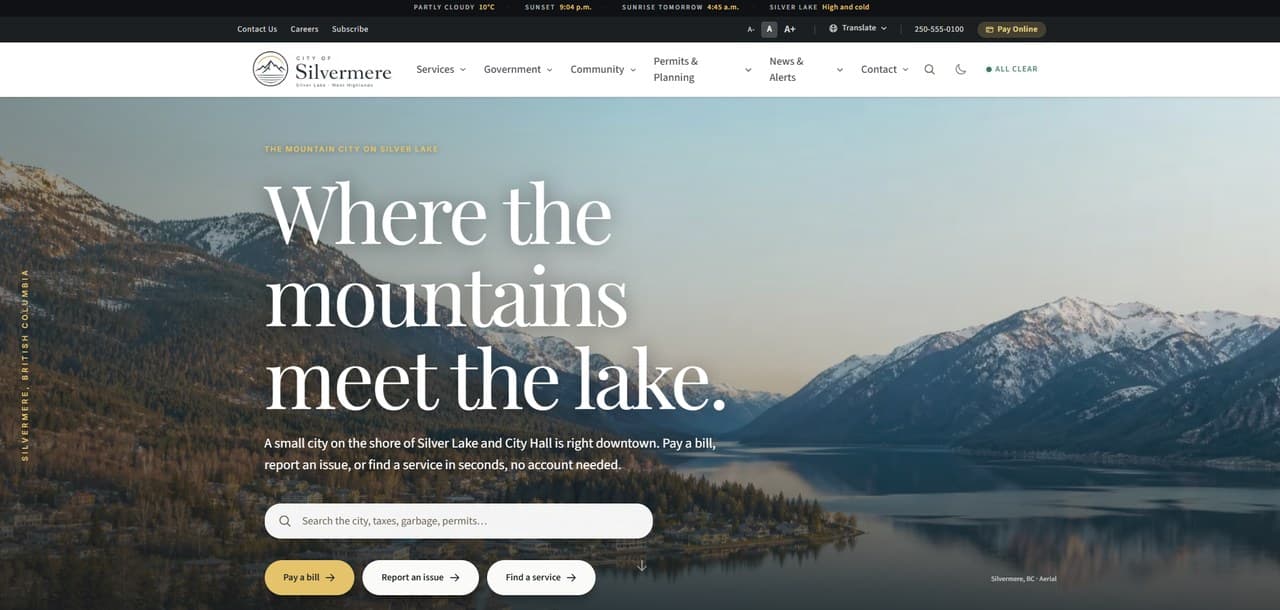
See the City of Silvermere concept in the wild.
Concept build from my portfolio, no real affiliation
City of Silvermere is the fictional municipal build that proves the model: resident task architecture for the services people actually need, an unmistakable emergency and public notice centre, transparent council agendas and minutes, bylaw records, permits, forms, and online payments, and searchable documents, all wrapped in an accessible, plain-language experience.
- Resident task architecture for the top public services
- Emergency and alert centre for advisories and closures
- Council, bylaws, budgets, and transparency
- Permits, forms, and online payments
- Searchable documents and plain-language answers
- WCAG 2.2 AA and FOIPPA-aware by default
City of Silvermere is a fictional concept build created to demonstrate the category. No real municipality, resident data, council, or service outcomes should be implied.
The civic layer I build around the systems staff already run
- 01
Resident task architecture
The site gets built around what people actually need to do: pay, apply, report, register, book, search, contact, attend, read public notices, and find support. High-frequency tasks get the shortest path, not the deepest menu.
- 02
Council agendas, minutes, and bylaws
Council agendas and minutes, recordings, bylaws, budgets, reports, public hearings, and elections get organized so citizens can follow the process without knowing internal language. Open, findable records are how a council shows its work and keeps public confidence.
- 03
Permits, forms, and payments
Clear, accessible routes for building permits, business licences, property tax and utility payments ahead of the tax due dates, pet licences, service requests, and recreation registration. Payments hand off to secure, PCI-compliant processors, so the municipality is never holding card data it should not touch.
- 04
Community support hub
Compassionate routing for residents who do not know which department or program to search: crisis lines, housing, food, mental health, seniors, youth, newcomers, Indigenous resources, veterans, warming and cooling centres, and local partners. First-class paths, not a footer link.
- 05
Searchable self-service layer
Bylaws, forms, guides, fees, master plans, and the questions residents actually ask become a searchable, plain-language self-service layer that reduces call volume without hiding the human contact path for those who need it.
The standard that comes with every build I ship.
- Resident-first sitemap and high-frequency task architecture
- Custom civic homepage anchored by the emergency and public notice centre
- Council agenda, minutes, recording, bylaw, budget, and report structure
- Permits, payments, recreation, and service-request routing to secure systems
- Support hub for crisis, housing, mental health, seniors, youth, and newcomers
- Accessibility built to WCAG 2.2 AA: keyboard, screen reader, contrast, captions
- Plain-language content patterns and reusable templates for small teams
- URL inventory, redirect map, and launch QA so records and notices do not vanish
- RFP-ready scope, accessibility statement, and maintenance documentation for procurement

A resident who cannot find the answer phones the office instead
A small comms team absorbs each gap on this list personally. The resident pays in a wasted trip or an anxious hour, and staff pay in a phone that will not stop ringing. The right column ends both.
The advisory is posted inside a news archive
Costs them
A resident who needs to know whether the water is safe on a Friday afternoon scrolls a list of announcements and ends up trusting a comment thread instead.
Costs you
A duty phone tied up repeating the same advisory, while a rumour that moved faster than the notice has to be corrected in public.
FixA permanent emergency and public notice centre at one stable URL that residents, local radio, and social channels can all point to.
The tax page is written for the department
Costs them
Someone trying to pay before the tax due date lands in a finance section named after internal processes and gives up rather than pay the wrong thing.
Costs you
Counter traffic every year in the week before the deadline, and penalty disputes explained one resident at a time afterward.
FixTask paths named the way residents say them, with due dates on the page and a clean handoff to the payment processor.
The same form explained again at the counter
Costs them
A resident makes a second trip because a field was ambiguous and nothing on the page said what to bring the first time.
Costs you
Front-desk time spent narrating a PDF out loud, and intake arriving incomplete often enough that staff build a workaround around it.
FixAccessible web forms that state what you need before you start, tested against a real completion so the page answers before the desk has to.
Council records are hard to find and harder to read
Costs them
A resident following a rezoning cannot locate the agenda, the minutes, or the hearing date, so an open process feels closed to them.
Costs you
Requests and phone calls for documents already published, and a council answering for a filing structure rather than a decision.
FixCouncil agendas and minutes, bylaws, budgets, and hearing dates organized into searchable plain-language families with permanent links.
Forms collect more personal information than the service needs
Costs them
A resident reporting a pothole is asked for a birthdate, hesitates, and decides the report is not worth handing that over.
Costs you
Data flows the corporate officer cannot document, a privacy impact assessment nobody scoped, and a FOIPPA question with no tidy answer.
FixEvery field justified against the service it supports, data flows documented, and the PIA points flagged before a new service goes live.
The emergency and public notice centre
In the Kootenays the site gets tested every year: wildfire smoke turns into an evacuation alert, the spring freshet rises, a boil-water advisory lands on a Friday afternoon, or Kootenay Pass closes and every phone in the office rings at once. Residents will not dig through a news archive in those moments. They go to one page, and that page has to already be the place they trust.
So I build the emergency and public notice centre as the most important page on the site: a permanent, plain-language home for advisories, closures, and evacuation information, with the statutory public notices, hearing dates, and tax due dates living beside it. The habit of checking gets built in the calm months, not during the crisis.
- Water advisories, road and facility closures, wildfire and flood updates, evacuation alerts
- Statutory public notices and public hearing dates in plain language
- Signup routes into the alert systems the community already runs
- A stable URL that residents, local radio, and social channels can all point to
FOIPPA, accessibility, and the duty to publish
A site in this category is judged on more than looks. These are the obligations and reassurances I build in by default, so the business stays credible and protected.

Accessible British Columbia Act and WCAG 2.2 AA
Local governments are among the public sector organizations covered by the Accessible British Columbia Act, with accessibility committees and plans expected since 2023. I build to WCAG 2.2 Level AA, the recognized benchmark, so keyboard users, screen reader users, and people who rely on captions, contrast, and plain text can complete real tasks. I also include a working feedback path so residents can report barriers.
FOIPPA and resident privacy
Since the November 2021 amendments, FOIPPA no longer imposes a blanket rule that personal information stay in Canada. Public bodies may disclose it outside Canada under prescribed conditions, and privacy impact assessments are a standing obligation. I minimize what the public site collects, document where form data flows, and flag exactly where a PIA belongs before a new service goes live.
Plain language and public notice obligations
Municipalities carry statutory duties to publish public notices, bylaws, and hearing information clearly. I structure notices, council records, and service pages in plain language so they are findable and readable, which serves both the legal obligation and the accessibility one. The right notice should never be buried three menus deep.
Secure payments and PCI DSS
When residents pay property taxes, utilities, or licence fees, card data is handled by PCI DSS compliant payment processors and gateways, not stored on the municipal site itself. That keeps the security and liability burden with specialized providers and protects the municipality from breach exposure on transactions it should never hold directly.
CASL for civic email and alerts
Canada’s Anti-Spam Legislation can apply to municipal electronic messages, especially anything tied to commercial activity. I build alert and newsletter signups with clear consent, accurate sender identification, and a working unsubscribe path, so residents trust the emergency and update channels and the municipality stays on the right side of the rules.
Records, retention, and a clean migration
Bylaws, minutes, notices, and council records often carry retention obligations and long-term public value. A rebuild needs a URL inventory, redirect map, and document strategy so permits, bylaws, public notices, and high-traffic records do not disappear or break links overnight. Continuity of the public record is part of the trust.
Want this standard on your site?
One conversation, no pitch deck. Tell me where the business is stuck and I will tell you what I would build.
41 of the 110 Government & Public Services on The Kootenay List have no website, as of September 3, 2026. The ones that do are the ones a customer can find.
What a build like this costs.
A smaller operation here often needs a focused presence site rather than a platform: the Trailhead, $2,000, or $500 today and $142 a month on Own It Monthly ($2,204 total). That is a real answer, not a downgrade.
Full-scale platforms run from $10,000, scoped per project
The Empire · typical timeline phased, from 8 weeks · billed by milestone
Municipal scope is Empire scope: resident task architecture, an emergency and public notice centre, council records, payments routing, and WCAG 2.2 AA accessibility, scoped per community and phased so the highest-value pieces ship first.
The honest answer depends on what you actually need, not on a package name. Start with the free check-up or the contact form, and I will book a proper 45-minute consultation with you, no pressure either way.
Comparing options right now? What a website should cost breaks down how to read any quote, and who actually owns your website covers what you keep if you ever leave, on any platform, including mine.
The systems staff already rely on does the plumbing. KMD wins the decision.
The goal is not to replace every civic system the municipality has invested in. It is to replace the public website layer with a clearer, accessible front door so residents, council, and community partners can actually find and use those services.
Most municipal teams already run capable back-office tools for tax and utility payments, GIS mapping, recreation registration, agenda and minutes management, alert distribution, and records. Those systems are not the problem. The problem is the public website wrapped around them: confusing navigation, buried notices, broken accessibility, and content that only makes sense to staff who already know the org chart.
What the category tool covers
- Emergency and notice distribution for water advisories, road closures, wildfire and flood updates, evacuations, and facility closures
- GIS maps, property tax and utility payments, recreation registration, facility booking, pet licences, permits, and service request intake
- Agendas, minutes, recordings, bylaws, budgets, reports, public hearing notices, and document libraries
- Plain-language routing so residents never need to know department names, software names, or internal process labels to get help
- A custom public site that can grow around local staff capacity, new programs, new notices, and rising public expectations
Where the upgrade actually pays off.
- 01
Use custom code to remove the ceiling: when the community needs a service hub, application flow, map embed, or searchable bylaw library, the site gets built for it instead of fought against a locked template.
- 02
Make human support civic infrastructure: crisis lines, housing, food, mental health, seniors, youth, newcomers, and Indigenous resources deserve first-class, plain-language paths, not a footer link.
- 03
Build accessibility and continuity in from day one: WCAG 2.2 AA, FOIPPA-aware data handling, and a redirect plan cost far less as foundations than as retrofits after a complaint or a broken-link audit.
Related guides.
- What a Small City or Municipal Website Should Include
- What Ongoing Website Maintenance Actually Means
- Website Accessibility in Canada: WCAG, AODA, and the Accessible BC Act
- What to Expect When Working with a Web Designer
- Should Your Small Business Website Have an AI Assistant?
- When Your Website Becomes Business Infrastructure
- What a Great FAQ Section Actually Does for SEO and Conversions
Questions councils, CAOs, and corporate officers ask me
How long does a municipal website take, including council approvals?+
Plan for the build itself plus your own approval rhythm: committee review, council touchpoints, and staff content sign-off usually shape the schedule more than the development does. I structure the project around your meeting calendar with review-ready milestones, so approvals happen on schedule instead of stalling the launch.
What does a municipal website redesign cost in BC?+
Municipal website design in BC is real scope: resident task architecture, the emergency and public notice centre, council records, payments routing, and WCAG 2.2 AA accessibility. That is my Empire tier, starting at $10,000 and scoped per community, delivered in phases from 8 weeks so the highest-value pieces go live first. I quote against your actual service list, not a template count.
How do you handle FOIPPA and records retention?+
FOIPPA was amended in November 2021: the old blanket in-Canada storage rule is gone, disclosure outside Canada is allowed under prescribed conditions, and privacy impact assessments are a standing obligation for public bodies. I collect as little personal information as possible through the public site, document data flows so a PIA is straightforward, and treat bylaws, minutes, and public notices as records: a URL inventory and redirect map keep the public record intact through the rebuild.
How do you meet the Accessible British Columbia Act on a municipal site?+
I build to WCAG 2.2 Level AA: keyboard and screen reader navigation, real contrast, captions, and plain language, plus a working feedback path so residents can report barriers. Local governments are covered public sector organizations under the Act, so accessibility is treated as a foundation of the build, never a retrofit after a complaint.
Do you respond to municipal RFPs?+
Yes, through the standard BC channels including Bonfire and BC Bid. Many BC communities can also procure under their direct-award thresholds, which is often faster than a full RFP for a project this size. Either way, I supply what procurement needs: a fixed scope, an accessibility statement, references, and a maintenance plan your corporate officer can file. The full procurement posture, published governance, and a downloadable capability statement live on my public sector page.
Can a smaller municipality or regional district afford a custom civic site?+
That is the point of phasing. The build can start with the public site, the emergency and public notice centre, resident self-service, and accessibility, then grow into forms, alerts, payments, maps, or integrations as budget cycles allow. A village office in the Kootenays should not need an enterprise suite to serve residents well.
What happens to the payment, recreation, GIS, and alert systems staff already run?+
The systems that work stay. I replace the confusing public website layer around them, then give residents clean, accessible routes into tax and utility payments, recreation registration, alert signups, GIS maps, and document libraries. Card payments hand off to PCI DSS compliant processors, so the municipality never stores payment data it should not hold.
Can the site handle emergency communication residents will trust?+
Yes. The emergency and public notice centre is treated as the most important page on the site: one obvious, stable home for water advisories, closures, wildfire and flood updates, and evacuation alerts, with signup routes into the alert systems the community already runs. Trust gets built in the calm months so it is there when the pressure hits.

Who builds this
I am Brett, the person behind Kootenay Made Digital. I plan, design, and build every site myself from Castlegar, BC, so the person you email is the person doing the work.
Founder, Kootenay Made Digital · Castlegar, BC
Put the next public notice where residents will actually find it
Most communities land in a phased Empire build: the emergency and public notice centre goes live first, council records and payments follow, and the site keeps growing with the community it serves.
No website yet?
Start My First WebsiteAlready have one?
Get a Free Check-Up