


 hello@kootenaymade.ca
 Castlegar, BC. Serving the Kootenays and beyond.
City of Silvermere
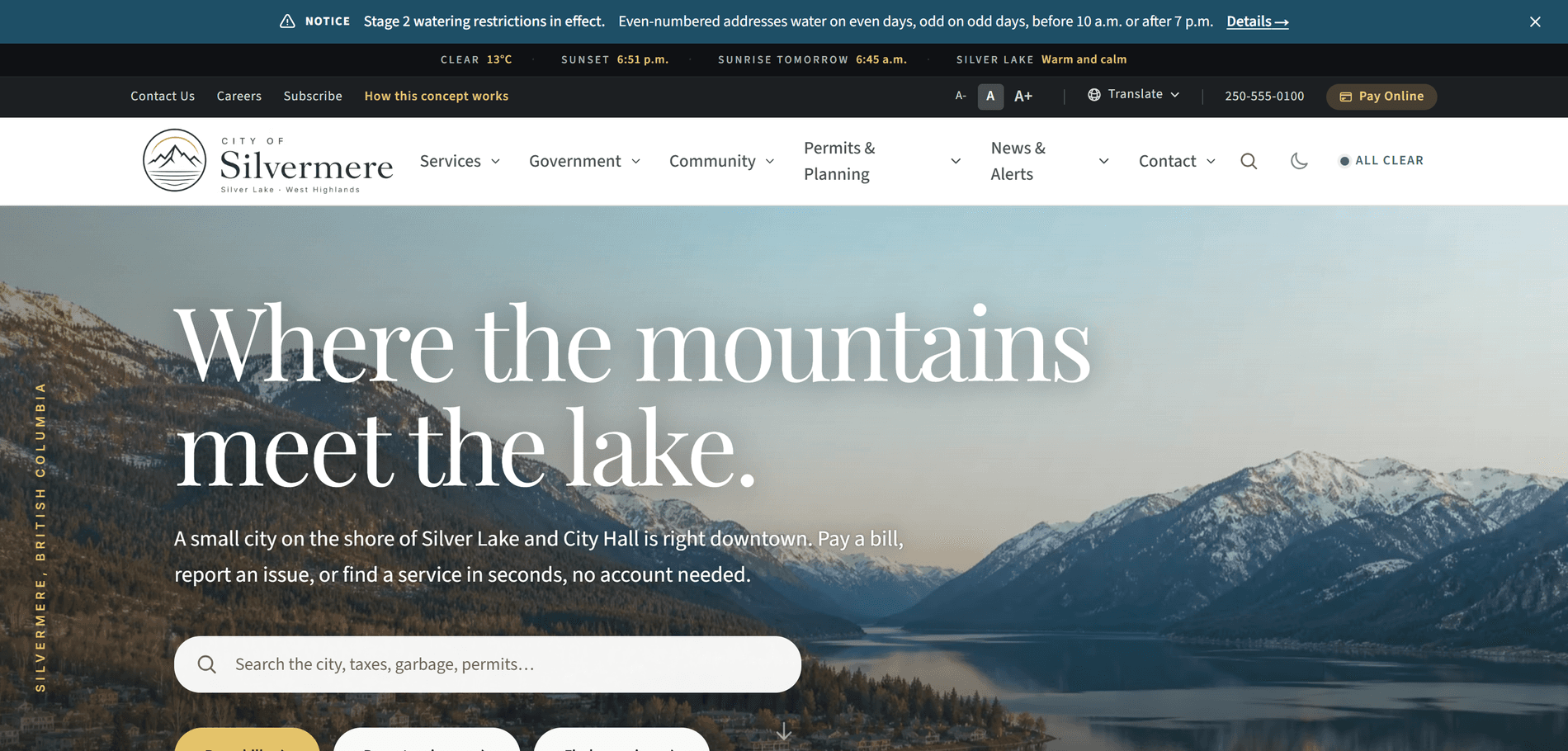
A city website organized around what residents come to do, and ready for wildfire season.
177
Pages and routes
53
Bylaw pages
5
Collection zones in the garbage day lookup
100
Lighthouse accessibility on all 10 templates
Residents do not know which department owns their problem.
Calls the website should have answered.
When a resident cannot find how to pay a bill, report a pothole or learn their garbage day, they phone City Hall. Each call is a question the site could have answered.
And it costs the businessThe calls bunch up in the week property taxes are due and land on whoever is at the counter, pulling staff off permit files.
Council records three clicks deep.
Agendas, budgets and bylaws buried in a drawer of PDFs make a council look less open than it is. Residents trust what they can find.
And it costs the businessBuried records create their own work. The clerk fields information requests for documents already published and re-sends a budget file that has been online all along.
One edit at a time on the worst night.
In a wildfire or a flood, the communications officer changes banners, pages and menus one by one, on a site that slows as everyone looks at once.
And it costs the businessMinutes spent on website edits during an evacuation come out of the time the team has for the updates themselves.
Built around the tasks residents arrive with.
Top tasks lead the homepage.
Pay a bill, report an issue and find a service come first, followed by the five things residents come for and the questions City Hall hears most.
Request forms that know the category.
Every example issue links into the request form with the category already chosen, so a report reaches the right queue the first time.
One switch for emergency posture.
Emergency Mode puts an alert on every page, moves emergency into the main menu and drops photos and maps so pages stay light under load.
Staff keep the content current.
A working prototype, shown in person, lets department staff draft, approve and schedule updates in a content system that feeds the site.
The thinking behind the build
City of Silvermere is a fictional small city on a mountain lake in BC, built to show what a resident-first municipal website looks like. Every page is organized around what a resident came to do, from paying a tax bill to finding a warming centre. On top of that sits the layer a BC city needs in wildfire season: one switch for emergency posture, and an evacuation page that works offline.
A resident with a barking dog, a tax question or a building permit does not know which department owns it, and should not have to. A site organized by department pushes that sorting back onto the front counter, one phone call at a time. Silvermere starts from the resident's end. The homepage leads with pay a bill, report an issue and find a service, then the five things people come for and the questions City Hall hears most.
The everyday tasks each got a working tool. Every example issue on the request hub links into the form with the category already chosen, so a report reaches the right queue the first time. Search puts the task ahead of the pages, so typing "dog licence" returns the licence action first. The garbage day lookup covers five collection zones, moves pickups for BC statutory holidays and downloads a year of dates to a resident's calendar.
The signature move is Emergency Mode. On the worst night of a fire season, the communications officer throws one switch. An alert takes over the top of every page, served so it shows even if scripts fail. Emergency moves into the main menu, photos and maps drop away so pages stay light under load, and the emergency page goes to the top of search. Once visited, that page keeps working offline, because the resident who needs it may be on a highway shoulder with no signal.
Council and records sit where residents can find them. Meeting pages, agendas, the budget, reports, policies, FOI and 53 bylaw pages are one menu away, and the next meeting date is worked out around statutory holidays. Events and council dates feed a calendar subscription, so nothing on the site presents last season as upcoming. A support hub puts crisis lines first, then help arranged by situation: housing, mental health, newcomers, seniors and family violence.
The site grades itself in public. A site-health page publishes dated Lighthouse results for ten page templates on phone and desktop, and every template scored 100 for accessibility in the August 11, 2026 scan. The same page says what that score cannot prove, since automated tools catch only part of WCAG and the rest needs a person. The site is built toward WCAG 2.2 AA, with text size controls, a dark theme and a translate menu in the header.
For a real municipality, the question is who keeps it current. A working prototype, shown in person, pairs this front end with a content system that department staff run. Authors draft, an approver publishes or schedules, and an alert published there reaches every page of the site in seconds. Silvermere is labelled as a concept on every page, with invented people, bylaws and phone numbers, so the patterns can be tested without being mistaken for a real city.
What a resident finds before they call City Hall.
Search that answers first
A resident who types "dog licence" gets the licence action ahead of every page that mentions dogs.
Garbage day in two clicks
Pick a neighbourhood and see the next four pickups, with statutory holiday moves built in and a year of dates for the calendar.
The evacuation page with no signal
Once visited, the emergency page stays on the phone and opens in airplane mode, styled and readable.
Everything that shipped.
I built a complete fictional city site of 177 pages, covering services, council, planning and permits, community support and emergencies. The homepage leads with top tasks. Request forms arrive with the category already chosen, search answers the task first, and a garbage day lookup covers five zones with calendar downloads. Emergency Mode turns the whole site to evacuation posture with one switch, and the emergency page works offline. A public site-health page publishes the site's own accessibility and speed scores. Every person, bylaw and phone number is invented, and the site says so on every page.
Highlights
- Emergency Mode: one switch puts an alert on every page and strips photos and maps so pages stay light
- An emergency page that stays on a resident's phone once visited and opens with no connection
- Alerts in three severity levels that show without scripts, and an evacuation alert that cannot be dismissed
- Search that returns the task first, with routed next steps when a search finds nothing
- Request forms linked from every example issue, with the category already filled in
- A garbage day lookup for five zones, with holiday moves and a year of dates to download
- Council meetings, agendas, the budget, FOI and 53 bylaw pages, with a calendar feed for events
- A public site-health page with dated Lighthouse scores for ten page templates, phone and desktop

Pages and surfaces
- Home
- Services hub: taxes, utility rates, water, sewer, roads, snow, garbage and recycling
- Bylaw services, animal control, pet licences and reporting a bylaw concern
- Public safety: fire, RCMP, bear smart and emergency preparedness
- Pay a bill
- Report an issue (request hub)
- Government hub: council, committees, meetings and appearing before council
- 7 council member pages
- Budget, elections, FOI, policies and reports
- 53 bylaw pages
- Planning and permits: building, development, inspections and current applications
- Housing, business licences, downtown, investment, tenders and small-business support
- Capital, climate, community plan and housing strategy projects
- Community pages: history, library, cemetery, seniors, veterans, new parents and Indigenous resources
- 5 attraction pages, 5 recreation pages, transit and the Lakelight festival
- Support hub and 8 resource pages, from housing and mental health to warming centres
- News, alerts, media, newsletter and alert subscriptions
- Contact, departments, staff directory, careers, volunteering and feedback
- Emergency page that works offline
- Events calendar with a calendar feed
- Documents, common questions, search and New to Silvermere
- Site health, How this concept works, accessibility, privacy, credits and sitemap
Real code. Real routes. Production ready.
- Alerts and Emergency Mode are built into the page as it is served, so they show even when a script fails
- A narrow offline helper stores only the emergency page and its styles, so it opens with no signal
- Council dates and collection days are worked out around BC statutory holidays, so the calendar needs no hand edits
- Lighthouse accessibility 100 on all ten page templates, phone and desktop, in the site's own published scan
- Built toward WCAG 2.2 AA, with text size controls, a dark theme and a translate menu in the header
- The concept notice sits on every page, with a tag that keeps the site out of search results
Stack
How it was built
Silvermere is a fictional municipality, and the site says so on every page. Every person, service, bylaw, address and phone number is invented, and the site is kept out of search engines. For a real municipality, the same system runs on your real services, your real council and your real records. Counts read from the live site on October 5, 2026.
Residents should find the answer before they call.
The same top-task homepage, request forms and Emergency Mode can be built around your services and your council. Start with the free check-up and I will show you where residents get lost on your current site. No website yet? Tell me what residents call about most and I will show you where to begin.
No website yet? Start your first one here
Built as The Empire, from $10,000. Builds this size bill by milestone, paid as agreed stages go live.
In this industry yourself? Read the municipal website design playbook.
More work
10 / 23