hello@kootenaymade.ca
 Castlegar, BC. Serving the Kootenays and beyond.
 11 min read
Key takeaways
- A builder is a sane start for a new or simple business. A clear small site beats a custom cathedral built on fog.
- Custom starts making sense when the site must support search, trust, service pages, performance, bookings, or long-term ownership.
- Compare more than launch price: count monthly fees, paid apps, your time, migration limits, and the cost of rebuilding later.
- Custom code does not rank by itself. It gives you control that only pays off when the site is planned and maintained.
- Decide by the customer path and the job the site must do, then pick the platform that fits.
- Switching off a builder is a planned migration. Map the redirects first and the rankings you earned come with you.

On this page
Wix vs custom website: which should you choose?
Choose a website builder like Wix when the business is new or simple, the budget is tight, and you mainly need a clean public presence you can edit yourself. Choose a custom website when the site has to support local search, real trust, service pages, performance, bookings, or long-term ownership.
The builder argument usually gets loud fast. One side says Wix and Squarespace are toys. The other side says custom websites are overpriced vanity. Both sides are selling certainty, because certainty is easier than diagnosis. At the far end of that scale, where the site is running bookings, memberships and payments rather than describing them, the honest answer is The Empire.
The better question is practical: what does the website need to do for the business this year, and what will it need to do when the business grows? A one-person startup in Castlegar testing a service does not face the same decision as a Nelson clinic, a Rossland tourism operator, or a Kootenay product brand planning ecommerce.
The platform is not the strategy. It is the machine the strategy runs on. Pick the machine after you know the trail.
When is a website builder like Wix good enough?
A builder is good enough when the business is early, the offer may still change, and the site only needs to make basic information public: who you are, what you do, hours, photos, and a contact path. If several of the signs below are true, a builder can be the right first move while you learn what customers actually need.
- The business is brand new and the offer may still change next month.
- The site only needs a page or two: who you are, what you do, hours, and a contact path.
- You want to manage every edit yourself and accept a less distinctive design.
- Customers already arrive through referrals, markets, walk-ins, or social, so the website is not the main growth engine yet.
- Budget is better spent first on photos, offer clarity, your Google Business Profile, or signage.
That is especially true when the alternative is waiting six months for the perfect site while customers cannot find basic information. A clean temporary presence buys time. It also reveals which pages, questions, and photos customers really use before a larger build happens. The discipline is not letting the temporary platform quietly become permanent infrastructure.
When is a custom website worth it?
A custom website is worth it when the site has to do real work: rank in local search, win trust before a booking, carry detailed service or product pages, hit performance targets, or support bookings, ecommerce, and integrations. Custom does not mean hand-carved pixels. It means the site is planned around your business instead of squeezed into an editor.
- Customers compare you against serious local competitors before they call, book, visit, or buy.
- You need focused service pages, town pages, seasonal pages, or product pages that support local search.
- The site needs custom booking, ecommerce, quote forms, event logic, integrations, or analytics.
- Your brand needs to feel specific and established, not like it came off the same template shelf as everyone else.
- You want cleaner ownership, easier migration, tighter performance control, and room to grow without fighting the platform.

The custom site is not automatically better because it is custom. It is better when the added control is used to remove customer doubt, improve speed, strengthen search structure, support the brand, and make the next step obvious. A contractor needs service pages that support quote quality. A clinic needs trust before booking. A tourism business needs seasonal details and route clarity. Read the website cost guide for how scope drives price.
Wix vs custom website: cost, SEO, speed, and ownership compared
Builders win on up-front cost and speed to launch. Custom wins on design control, search structure, performance, and ownership. The real comparison is not cheap versus expensive. It is rented convenience versus a controlled asset, and the right answer depends on how long you plan to live in the result.
| What is being compared | Website builder | Custom website |
|---|---|---|
| Up-front cost | Lower. You trade cash for your time, template limits, and future cleanup. | Higher at launch, but plan, design, copy, and structure are handled deliberately. |
| Monthly cost | Platform fee plus paid apps and premium templates that stack over time. | Hosting and maintenance, often lower once the build is done and owned. |
| Design control | Fast layout changes inside platform rules, weaker for distinctive systems. | Built around your brand, offers, proof, and customer path. |
| Search structure | Basic SEO tools exist, but deeper page architecture gets awkward. | Services, locations, FAQs, metadata, schema, and internal links planned from the start. |
| Performance | Carries platform code, apps, and scripts that are hard to remove fully. | Images, code, scripts, and hosting can be tuned around the real site. |
| Ownership | You own the content, but the finished site leans on the platform and its export limits. | You can own the codebase, design system, content structure, and hosting path. |
| Growth ceiling | Works until you need more specific pages, features, or brand precision. | Becomes a growth asset: service pages, ecommerce, booking, and automation over time. |
Notice that ownership and exit cost are the factors most businesses ask about too late. The domain may be yours, but the finished site experience depends on the builder, its editor, and its rules. If prices rise, features change, or the business outgrows the editor, leaving can feel less like moving furniture and more like rebuilding from the foundation.
Wix, Squarespace, WordPress, Shopify, or custom: which platform fits?
Wix and Squarespace are hosted builders best for simple, early-stage sites. Shopify is purpose-built for ecommerce. WordPress can be a builder or a planned semi-custom build. A fully custom build fits when the business problem demands control over structure, speed, and ownership. Match the platform to the job, not the logo.
- Wix
- Drag-and-drop builder with the most layout flexibility of the hosted builders. Quick to launch, lots of apps, but heavier code and real export limits.
- Squarespace
- Design-led builder that often feels cleaner for simple sites. Still a closed platform, so you trade some control for polish and convenience.
- Shopify
- Purpose-built for ecommerce. The right call when selling products is the core job, with checkout, inventory, and shipping handled for you. KMD Shopify stores start at $5,500.
- WordPress
- Can be either. A template plus a heavy page builder behaves like a builder. A planned build with custom design and clean hosting can be a strong semi-custom option.
- Custom build
- Designed around your business, not squeezed into an editor. More control over structure, speed, schema, and ownership. KMD custom sites start from $2,000.
Six factors usually settle the call. Weigh them before you commit to any platform.
- 01
Business stage
New, testing, or referral-only businesses can start lighter. Established businesses that need steady leads usually need more control.
- 02
Discovery path
If customers find you through Google, Maps, town searches, or seasonal queries, page structure and technical control matter more.
- 03
Brand distinctiveness
If you need to look premium, local, and trusted next to template-heavy competitors, design freedom becomes a real business tool.
- 04
Operational needs
Booking, ecommerce, quotes, menus, events, portals, and integrations can push a simple builder past its comfort zone.
- 05
Ownership and exit
If you may need to change hosts, add features, or protect the asset long term, portability matters before the first invoice.
- 06
Performance standard
If mobile speed, Core Web Vitals, clean code, and fewer third-party scripts matter, custom gives more room to tune the site.
How much does a Wix site vs a custom website cost?
A Wix or Squarespace site usually costs a low monthly fee plus paid apps and premium templates, so the early price is small but recurring. A custom website costs more at launch and less to run, and you own more of the asset. At Kootenay Made Digital, custom presence sites start from $2,000 and Shopify stores at $5,500.
If the up-front number is the hurdle, Own It Monthly spreads the Trailhead build without hiding it: $2,000 once, or $500 today and 12 monthly payments of $142, which is $2,204 all in. The honest way to compare is still total cost over a few years, not launch price alone. Builders front-load convenience and back-load platform fees, paid apps, and the rebuild you pay for if the business outgrows the editor. Custom front-loads the plan, design, and structure, then tends to cost less to run. Larger builds with bookings, payments, memberships, or portals are scoped after I map your operations. See the full picture in my services and recent portfolio.
Here is one that exists rather than one I made up. Family Designs & Creations in Castlegar runs on a Trailhead: eight pages, four custom-order paths, real product photography, and the 41 Facebook recommendations Kim had already earned, surfaced on the site itself. At $2,000 paid once, that is about $33 a month spread across five years, and at the end of the five years she still has it. A builder subscription over the same window never reaches an end, and the site stays the platform’s. Case study checked September 2026.
What should I fix first if I already have a builder site?
If you already have a builder site, do not jump straight to a rebuild. First find out whether the problem is the platform or the execution. Many builder sites are weak because the offer is vague, photos are stale, Google details disagree, and service pages are thin. Fix the customer path first, then let the evidence decide.
- 01
Public facts
Make the business name, phone, hours, service area, address, Google profile, and website details agree before touching design.
- 02
Primary action
Pick the one action the site should create: call, quote, book, order, or get directions. Make it obvious on mobile.
- 03
First-screen clarity
Rewrite the hero so a stranger knows what you do, who it is for, where you work, and what to do next.
- 04
Proof placement
Move reviews, photos, credentials, and local trust markers close to the decisions they support.
- 05
Service detail
Turn vague service lists into useful buying pages with scope, process, locations, and expected next steps.
- 06
Performance and mobile
Compress images, remove unnecessary apps, check tap targets, and test the real path on a phone.
Start with the customer path. Can someone understand the offer, trust the business, find the service area, see proof, and complete the main action from a phone? If yes, the builder may still have life. If every serious improvement requires another workaround, paid app, or apology, the platform itself is becoming the cost, and that is the signal to migrate, and the switching sequence below maps it step by step. Before comparing anything, get the real number: the Wix pricing breakdown in CAD totals the plan, the apps, and the per-sale fees. When you are ready, use the Contact page for an honest read.
How do you switch off Wix without losing your rankings?
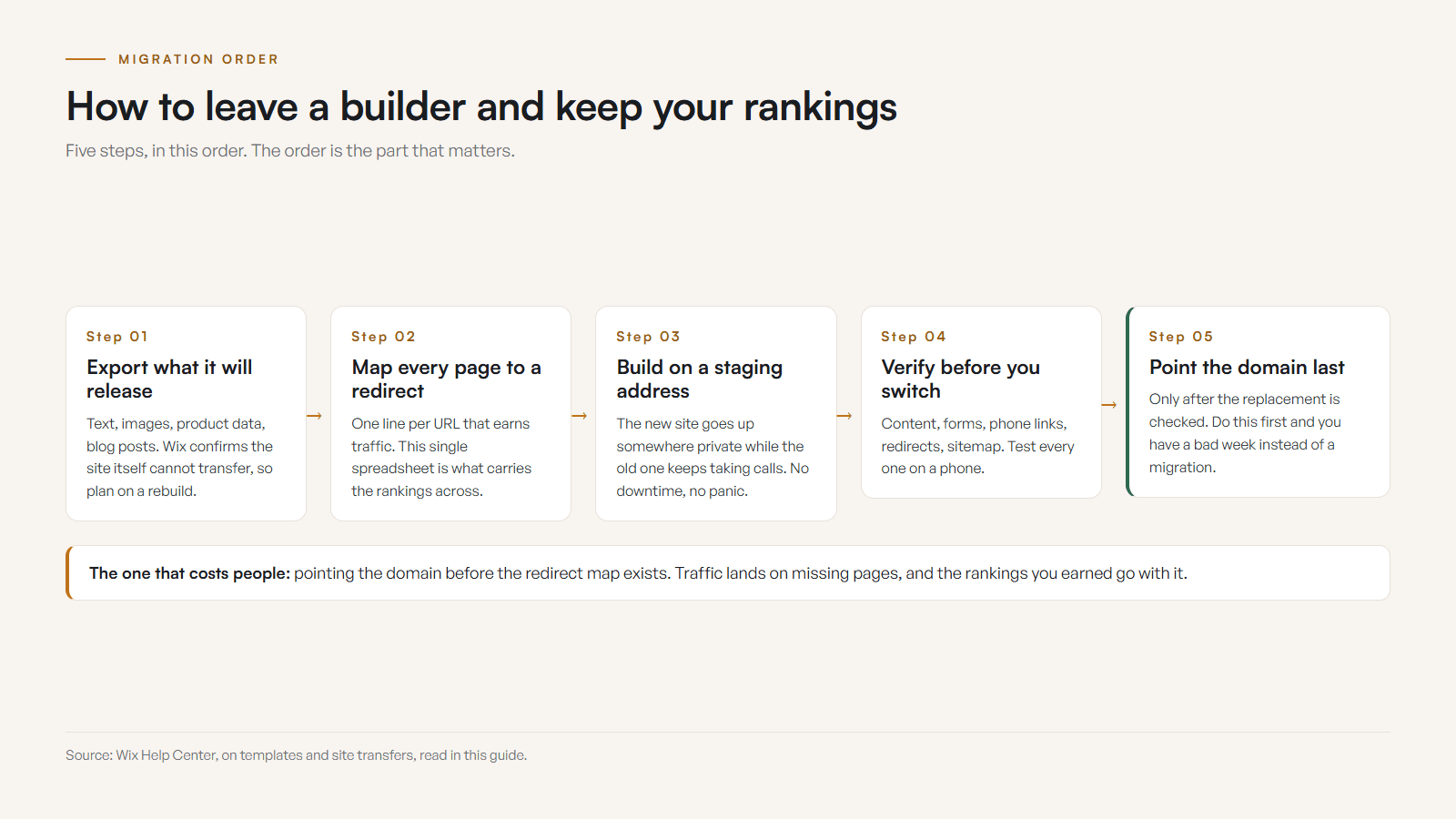
Switching is a planned migration rather than a panic. You export what Wix will release, map every page and redirect so Google carries your rankings across, build the new site, then point the domain once the replacement is verified. Done in that order you keep your content, your traffic, and your evenings.
Two documented facts usually decide when the move is worth making. Wix confirms in its own help centre that an existing site cannot be switched to a different template: you create a new site and move the content by hand, so a redesign on Wix is already a rebuild you pay for. And Wix runs the backend, which means a slice of the speed work stays out of reach no matter how carefully you tune the rest. Wix Payments also takes roughly 2.9% plus 0.30 CAD on every card transaction, and it only exists from the Core plan upward.
- 01Export what Wix will give you: blog posts, product CSVs, images, and your contact list.
- 02List the pages, forms, integrations, and features you actually use, and the ones you have been wishing for.
- 03Run a free scan so you have your current speed, SEO, and conversion baseline written down before anything moves.
- 04Map the sitemap and the redirects so every ranking URL lands on its replacement instead of a dead end.
- 05Build the new site, point the domain, and keep the Wix site live until the replacement is verified.
Before
A growing Kootenay operator sat on a mid-tier Wix plan, paying every month, fighting a slow mobile score they had no way to reach, and stuck on a template that had stopped fitting the business they had become.
After
The rebuild gave them a fast site they own outright, full control of structure and schema, room to add online booking, and a one-time cost in place of a fee that climbed every year.
That before and after is a composite of the pattern I see, with no numbers attached to it. The timing question is simpler than it looks. The right moment to switch arrives when the monthly fee buys you less than a site you own would, and the way to find out is to price both. Talk to me about it and I will tell you which way it falls for you. Running on something else? The same switch math applies to aging WordPress sites and to the GoDaddy website builder, and my guide on how to switch website platforms without losing SEO covers the move from any of them.
How do I decide between a builder and a custom website?
Start from the job the site must do. Name the one action the website has to create, map how customers find and choose you, list the operational jobs, count the true cost of each option, check the exit, then pick the platform that fits. These six steps make the call practical instead of emotional.
- 01Write down the one action the website must create for customers this year, and what it will need to do once the business grows.
- 02Map the customer path: how people find you, what they need before they call, and whether they compare local competitors.
- 03List the operational jobs: bookings, ecommerce, quotes, events, integrations, or analytics the site has to support.
- 04Count the true cost of each option: launch price, monthly fees, paid apps, your time, and the cost of rebuilding later.
- 05Check the exit: what you can export, who owns the domain, and how hard it would be to leave the platform.
- 06Choose the platform that fits the job, then build it around the customer path instead of the cheapest landing-page promise.
Choose a builder if the site is simple, the business is early, DIY control matters, and the growth stakes are low. Choose custom if the website has to support a serious customer journey, local search, strong proof, performance, booking, ecommerce, and long-term control. The platform is the machine, not the strategy.
How does this play out for Kootenay businesses?
In the Kootenays, the right platform changes by customer path, season, town, and how much trust the sale needs. Tourists compare from phones, service areas span multiple towns, and many customers check Google Maps before anything else. That is why the recommendation has to start with the customer path, not the platform logo.
- Contractors and trades
- Castlegar, Trail, Rossland, Nelson, and Cranbrook crews need service areas, before-and-after proof, quote expectations, and mobile call paths. Custom usually wins once proof and service pages matter.
- Tourism and accommodations
- Kootenay Lake cabins, Rossland operators, and guide businesses need availability, route details, policies, weather updates, and seasonal pages. A builder works only if the path stays simple.
- Restaurants and cafes
- Menus, patio status, hours, ordering, and current photos need fast updates. A builder may suit a simple spot, while custom helps when ordering, events, and search become central.
- Clinics and wellness
- Practitioner bios, services, booking rules, accessibility, and patient FAQs need a calm trust path. Custom makes sense when credibility and conversion matter most.
- Retail and makers
- A small maker can start with a Shopify theme. A serious local product brand needs collections, pickup, shipping, and analytics planned properly.
A simple builder may be plenty for a tiny maker with one market schedule. It may be a trap for a regional contractor trying to rank across Castlegar, Trail, Rossland, Nelson, and Cranbrook. The right website platform is the one that fits the business stage, customer path, trust requirement, and growth plan. Anything else is picking tools by vibes, and vibes have terrible migration documentation.
Sources and further reading
- Google Search Central: SEO Starter Guide
Google emphasizes clear pages, descriptive titles, helpful content, and logical links. Custom builds can plan all of this; builders allow a subset.
- Google Search Central: page experience
Page experience covers Core Web Vitals, HTTPS, and mobile usability. These basics matter whether your site is builder-based or custom.
- Wix Help Center: exporting or embedding your site
Wix documents the real boundaries around exporting or embedding a site elsewhere, which matters when you think about future portability.
- Switching your site template (Wix Help Center)
Wix confirms an existing site cannot be switched to a different template. You create a new site and move the content across by hand, which is what makes a Wix redesign cost more than it looks.
- Site performance: about Core Web Vitals (Wix Help Center)
Wix manages the backend, so a portion of the speed work sits outside the site owner’s hands. Core Web Vitals feed Google page experience.
- Squarespace Help: importing and exporting content
Squarespace documents what can and cannot be exported, so migration is possible in parts but is not the same as taking a finished site anywhere unchanged.
Frequently asked questions
Is Wix good enough for a small local business?
It can be when the business is new, the offer is simple, the budget is tight, and the site only needs to make basic information public. It gets weaker once you depend on local search, bookings, ecommerce, custom design, strong proof, or future portability.
Does a custom website always rank better on Google?
No. Custom code does not magically rank. A custom site gives more control over structure, speed, content, metadata, internal links, and schema. Those controls only help when the site is actually planned and maintained well.
Can I move a Wix or Squarespace site to a custom website later?
You can move the business to a custom website later, but expect a rebuild rather than a clean transfer. Some content may export, but design, layout, apps, styling, and platform-specific features usually need to be recreated by hand.
Should I start on Wix and rebuild later?
That is reasonable if you are still testing the offer and need speed more than long-term control. It is less wise when you already know the business needs search visibility, real trust, service pages, booking, or a polished brand presence.
What is the best alternative to Wix for a small business?
For a growing local business that wants to own its site and compete in search, a custom build is the strongest alternative. It trades a subscription for a one-time project you keep, with faster pages, deeper control of markup and schema, and room to add bookings or payments later without starting over on a new template.
Will I lose my Google rankings if I switch off Wix?
Not if the move is planned. I map the existing pages, set up a redirect for every URL that earns traffic, and carry the sitemap over, so the rankings you have already earned land on the new pages. Faster pages and cleaner structure usually help them from there.
Why is my Wix site slow on mobile?
Wix gives you visual freedom and that convenience arrives as extra JavaScript. Wix also runs the backend, so a portion of the speed work is outside your control. On a weak Kootenay mobile signal that shows up in both rankings and conversions.
How much does a custom website cost in the Kootenays?
It varies with scope. At Kootenay Made Digital, custom presence sites start from $2,000, Shopify stores at $5,500, and larger infrastructure builds are scoped after I map your operations. A free check-up is the easiest starting point.
Related pages
- Retail and ecommerce websites
- Wellness and clinic websites
- Trades and contractor websites
- Web design for Canadian businesses
- Web design across the West Kootenay
Kootenay Made Digital
I build websites, local presence, and calm AI setups for Kootenay small businesses. Plain language, published prices, and clear work that makes you easier to find and easier to choose.