hello@kootenaymade.ca
 Castlegar, BC. Serving the Kootenays and beyond.
 9 min read
Key takeaways
- A great food website answers menu, hours, location, photos, and the next action before a hungry guest loses patience.
- Use a real text menu that reads on a phone, not a PDF or a photo of a printed page.
- The website, Google Business Profile, ordering tool, and social profiles must tell the same current story.
- Kootenay context matters: ski weekends, lake traffic, highway routes, patio season, smoke, and closures all change what guests need to know.
- Fix the operational leaks first. A clear menu and clean mobile action path beat a pretty site that hides the answer.

On this page
What does a great restaurant or cafe website need?
A great food website lets a stranger decide where to eat, how to get there, what to expect, and what to do next without calling for basic facts. The non-negotiables are a phone-readable text menu, current hours, clear location and parking, real photos, one obvious action, and a Google profile that matches.
Food websites often fail because they try to feel charming before they become useful. A gorgeous hero photo helps, but it cannot rescue a missing menu, stale hours, a hidden parking note, a broken order link, or a confusing reservation flow.
In the Kootenays those details matter even more. People plan around mountain drives, highway routes, ski days, lake days, smoke conditions, patio season, winter hours, ferry timing, and market schedules. If the website makes them guess, a competitor gets the click. A great food website is judged by whether a tired person can find the menu on a cracked phone while standing beside a car in a parking lot.
Hungry people do not read like scholars. They decide like people who want dinner.
Is a restaurant website worth it, or is Instagram enough?
Instagram is worth keeping, but it is not enough on its own. Social builds appetite and shows the vibe; a website is the stable place to check the menu, hours, special hours, location, ordering, and reviews in one trip. The two do different jobs, and search and Google listings still point to a site.
Think of social as the window display and the website as the front door. A feed buries last week's hours under new posts, cannot hold a clean text menu, and disappears for guests who do not use that app. The website carries the deeper detail and stays findable when someone searches your town and "lunch" or "patio."
| What is being compared | Social profile only | Website plus social |
|---|---|---|
| Best at | Appetite, vibe, daily updates | Decisions: menu, hours, location, action |
| Finding the menu | Buried under recent posts | One readable, current text menu |
| Hours and closures | Easy to miss or out of date | Front-page special hours that match Google |
| Showing up in search | Limited and app-dependent | Indexed pages plus Google profile alignment |
| Ordering or booking | A link in bio at best | A clear, labelled mobile action path |
| Who it reaches | People on that app | Anyone searching, including visitors |
For more on getting found by searchers in the first place, the local SEO guide for Kootenay businesses covers what actually moves rankings, trust, and calls.
What does a food website have to do for a hungry guest?
A food website has four jobs at once: answer the appetite, clear the route, prove the place is current, and make the next step obvious. Each one maps to a different guest standing in a parking lot with a phone, so each has to be handled before the page feels pretty.
- 01
Answer the appetite
A hungry searcher needs the menu, prices, hours, and whether the place is worth crossing town for, fast and on a phone.
- 02
Clear the route
Address, directions, parking, the entrance, the pickup window, or the food truck stop should be obvious before anyone has to call.
- 03
Prove it is current
Real photos, recent reviews, local sourcing, and dated specials show the business is open, active, and worth choosing now.
- 04
Make the next step obvious
Reserve, order, call, get directions, or request catering. One clear action beats five competing buttons on mobile.
Different guests arrive in different modes. Someone hungry right now needs the menu, hours, and a phone number. Someone planning the weekend needs reservations, group fit, and patio status. Someone passing through on Highway 3 needs directions, speed of service, and a reason to leave the route. Good restaurant and cafe website design in BC answers all of them without making any of them dig.
Restaurant website checklist: menu, hours, location, and proof
Use this as a quick diagnostic. If four or more of these are weak, the site is making guests work harder than dinner should require. Each item maps to a real question a hungry, mobile guest asks before they choose you or someone easier.
- A text menu that reads cleanly on a phone with current prices or honest price ranges.
- Regular hours plus special hours for holidays, patio season, ski season, and closures.
- Address, map link, parking, entrance, pickup point, or food truck location up front.
- One obvious mobile action: reserve, order, call, get directions, or request catering.
- Real, current photos of the food, room, patio, storefront, counter, or market table.
- Dietary notes, allergen cautions, kids options, and accessibility details near the menu.
- Recent reviews, local sourcing, and community proof placed beside the decision point.
- A Google Business Profile that matches the website for hours, menu link, and phone.

The menu and hours answer the practical question. The proof answers the emotional one: is this place worth choosing? Real food photos show what people are buying. Interior and exterior shots help visitors recognize the place. Dietary details reduce risk for families and groups. Local sourcing gives a Kootenay food business something national chains cannot fake, so name your suppliers and keep the claims accurate. Breweries and taprooms run this same play with tasting rooms and events, which is why what a brewery website should include gets its own guide.
What does a great food website look like by business type?
The essentials stay the same, but the emphasis shifts by business type, town, season, and how people arrive hungry. A patio in Nelson, a food truck at a market, and a caterer serving weddings each lead with a different first answer. Here is what to prioritize for common Kootenay food businesses.
- Restaurants and patios
- Nelson patios, Castlegar family spots, Trail dinner rooms, Rossland ski-season dining, and Cranbrook highway stops need menu clarity, reservation rules, parking, current photos, reviews, patio status, and special hours that match Google.
- Cafes and bakeries
- Cafes in Creston, Nelson, Nakusp, and Castlegar need opening time, the coffee and food menu, grab-and-go options, seating, accessibility notes, and morning-light photos that make the breakfast decision easy.
- Food trucks and market vendors
- Markets, lake events, brewery nights, and rotating stops need current location, schedule, menu, payment options, a weather plan, a catering contact, and a same-day update channel that does not replace the website.
- Catering and private events
- Caterers serving weddings, retreats, and staff parties need package clarity, minimums, towns served, delivery or staffing rules, dietary handling, an inquiry path, sample menus, and proof from real events.
- Specialty food and local products
- Roasters, preserves, farms, and butchers need sourcing proof, product availability, pickup or shipping options, a wholesale path, the market schedule, and seasonal sell-out notes. Taprooms and tasting rooms carry the same load in brewery, cidery, and winery website design.
- Tourism route food stops
- Highway 3, Highway 6, Highway 3A, lake traffic, ferry traffic, and ski weekends need hours, directions, parking, speed of service, patio status, and smoke or weather notices that give travellers a reason to detour.
What are the most common restaurant website mistakes?
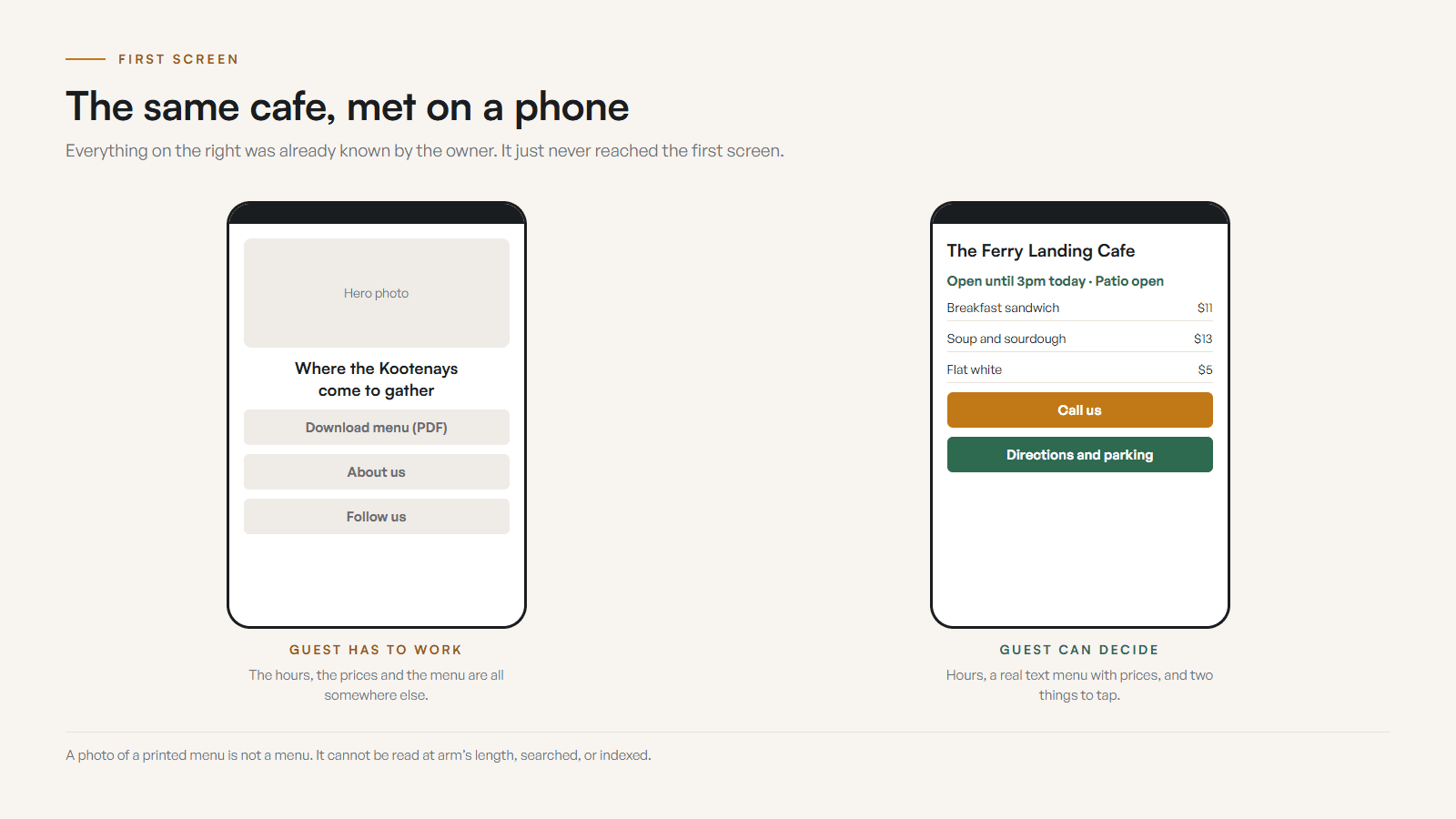
The most common mistakes are a photo-only or PDF menu, stale hours, a buried phone number, no dietary notes, generic stock photos, and a Google profile that points to old information. Each one quietly sends a hungry guest to a competitor who made the decision easier.
The public version of your business does not live in one place. A guest may see the Google listing first, then scan photos, check reviews, tap the website, open the menu, and compare the order path. If those signals disagree, the guest does not investigate. They leave. Keep Google Business Profile aligned with the website for name, hours, special hours, phone, address, menu link, and ordering link, then let the website carry the deeper detail Google cannot hold cleanly.
Before
A West Kootenay cafe had a photo-only menu, winter hours still showing in spring, no parking note or dietary cues, stock pastry photos, a buried phone number, and a Google profile pointing to an old menu link. Visitors could find the business, but choosing it took too much work.
After
The rebuilt page led with current hours, a text menu, patio status, real food and exterior photos, parking, dietary notes, tap-to-call, directions, and review proof, all matching a clean Google profile. The business looked current before the guest had to think.
Composite example based on common food business website problems. No performance numbers are claimed, because invented metrics are not proof.
What should a food business fix first?
Do not start with the prettiest redesign. Stop the decision leaks first. Fix reality alignment, then the menu, arrival, action path, photos, proof, and Google in that order. These seven steps remove the loudest blockers before you spend money on a full rebuild.
- 01Align reality: update hours, special hours, the menu date, phone, address, and the links on Google and social so guests see one current story.
- 02Fix the menu: replace the PDF-only or image-only menu with readable text, clear sections, price context, and dietary notes linked from the homepage.
- 03Clear arrival: make the address, directions, parking, entrance, pickup window, or food truck location obvious on mobile.
- 04Pick one action: choose the primary step (reserve, order, call, get directions, or request catering) and make it impossible to miss.
- 05Refresh photos: swap stale stock images for current shots of the actual food, room, patio, storefront, or seasonal feature.
- 06Add proof: place recent reviews, local sourcing, dietary notes, and accessibility details beside the choice point.
- 07Clean up Google and schema: align Google Business Profile fields and add LocalBusiness or menu structured data only where it matches the visible page.
If weather, smoke, staffing, or roads change, a great website has a pattern ready: a small homepage notice for closures and sold-out nights, matching Google special hours, plain language about what changed and what to do instead, and a habit of removing the notice when it expires so the business never looks unattended. When you are ready, my process and website services can tighten the whole guest path, or you can send the specifics of your spot through the Contact page.
Sources and further reading
- Google Business Profile help
Guidance on keeping business information, hours, special hours, photos, products, services, and menu links current and accurate.
- Google Search Central: page experience
Google points food site owners toward Core Web Vitals, HTTPS, mobile display, and avoiding intrusive elements that block hungry searchers.
- Google Search Central: LocalBusiness structured data
Documents local fields like address, telephone, opening hours, menu, servesCuisine, price range, and reservations where they match the visible page.
- Schema.org Menu
Defines Menu, MenuSection, and MenuItem markup for food businesses that want a visible text menu represented in structured data.
Frequently asked questions
Does my restaurant need a website if Instagram is active?
Yes. Instagram builds appetite, but it is not the decision hub. A restaurant website gives searchers a stable place to check the menu, hours, special hours, location, parking, reservations, ordering, dietary notes, photos, and reviews in one trip.
What should a restaurant or cafe menu look like online?
Use real text, not only a PDF or photo. The menu should load fast, read cleanly on a phone, show prices or useful ranges, flag dietary notes, separate sections clearly, and stay aligned with the menu linked from your Google Business Profile.
Should a food business show prices online?
Usually yes. Prices help guests decide before they arrive, especially visitors comparing options from a phone. If prices change often, show current ranges, featured items, or a date-stamped menu update rather than hiding everything behind a call.
How should special hours and closures be handled?
Treat special hours as front-page information. Add holiday hours, patio-season changes, event closures, smoke or weather closures, and sold-out notes to the website, then update Google special hours so the public story matches everywhere.
How important are photos for a restaurant website?
Very important. Use current photos of the actual food, room, patio, storefront, counter, food truck, or market table. Real photos answer trust and vibe questions faster than copy, and stale seasonal shots quietly cost you the booking.
Should reservations or online ordering be built into the website?
If reservations, takeout, catering, or delivery are part of the business, the path should be obvious on mobile. The site can link to a trusted third-party tool, but the handoff should be clean, labelled clearly, and easy to find.
Related pages
- Restaurant and cafe websites
- Craft beverage websites
- Farm and agriculture websites
- Web design in Nelson
- Web design in Castlegar
- BentoBox Alternative: A Restaurant Website That Actually Gets Found
- What Should a Brewery Website Include?
Kootenay Made Digital
I build websites, local presence, and calm AI setups for Kootenay small businesses. Plain language, published prices, and clear work that makes you easier to find and easier to choose.