hello@kootenaymade.ca
 Castlegar, BC. Serving the Kootenays and beyond.
 8 min read
Key takeaways
- A contractor site has to say the trade, service area, job fit, and next step before the visitor starts guessing.
- Real project photos with captions beat polished stock images, because homeowners are judging risk, not design.
- Kootenay context is part of trust: snow, smoke, mud, slope, rural access, older homes, and town-specific service areas.
- The quote path should qualify the lead without turning the first contact into homework.
- Fix the first screen, service area, proof, and quote path before paying for a full redesign.

On this page
What makes a great website for a contractor?
A great contractor website answers a homeowner's private question fast: can this person solve my problem, in my area, without turning the project into a gamble? It names the trade, states the service area, shows real local work, reduces risk with honest proof, and makes requesting a quote simple on a phone.
A homeowner in Trail with a roof leak, a Nelson family planning a bathroom renovation, and a Rossland property owner worried about winter access are all running the same test. The site is not selling a simple online purchase. It is asking someone to trust a crew around their home and money, so it has to reduce that risk before the first call.
That is why vague copy hurts trades businesses. A line like quality craftsmanship across the Kootenays sounds pleasant, but it does not answer the buyer's real questions: what trade, which towns, what job size, what proof, and what happens after I ask for a quote. Those answers are not boring details. They are the trust system.
- A first screen that names the trade, service area, ideal job, and next step in one read.
- Real project photos with field-note captions, not stock images of strangers in hard hats.
- Separate service pages for each serious line of work, each with its own proof and quote path.
- A service area stated on the page: which Kootenay towns, how far you travel, and what the season changes.
- A short quote form plus a tap-to-call number, with a clear note on what happens next.
- Reviews, licensing, insurance, and warranty proof placed near the decision, shown only where accurate.

What does a contractor website actually need to do?
A contractor website has four jobs: prove clarity, show local work, reduce perceived risk, and make the next step easy. Every page should move the right homeowner closer to a quote and quietly filter out the wrong ones. Design that does not serve those four jobs is just decoration on the job site.
- 01
Clarity
Within five seconds a stranger should know the exact trade, the towns you serve, the kind of job you want, and how to start. Anyone who has to guess usually leaves.
- 02
Local proof
Real photos from Castlegar, Nelson, Trail, Rossland, Creston, Nakusp, or Cranbrook, with town-specific captions, make the business feel present instead of pasted onto a template.
- 03
Reduced risk
Insurance, licensing, warranties, permits, safety habits, and response expectations matter most when a homeowner is deciding whether to let a crew onto the property.
- 04
Easy next step
The call, quote form, or photo-upload path has to feel obvious on a phone. If contact feels hard, trust quietly drains out of the page before anyone gets in touch.
Make the visitor feel oriented, protected, and one step closer to a useful quote. Everything else is sawdust.
Brochure site vs. a site that gets leads: what is the difference?
A brochure contractor site looks fine and explains very little. A lead-getter answers the buyer's real doubts where they appear: clear trade, named towns, proof on each service, honest pricing context, and a short quote path. The difference is not how expensive it looks. It is whether it reduces a cautious homeowner's risk.
| What is being compared | Brochure site | Site that gets leads |
|---|---|---|
| First screen | A slogan and a logo | Trade, service area, ideal job, next step |
| Services | One vague list | A useful page per serious service |
| Proof | A random gallery wall | Captioned local photos by service |
| Service area | Buried in the footer | Named towns, travel, and season |
| Pricing | Call for a quote, nothing else | Starting points and quote factors |
| Quote path | A long form on one page | Short form plus tap-to-call |
| Mobile | Heavy galleries and tiny buttons | Fast, readable, obvious action |
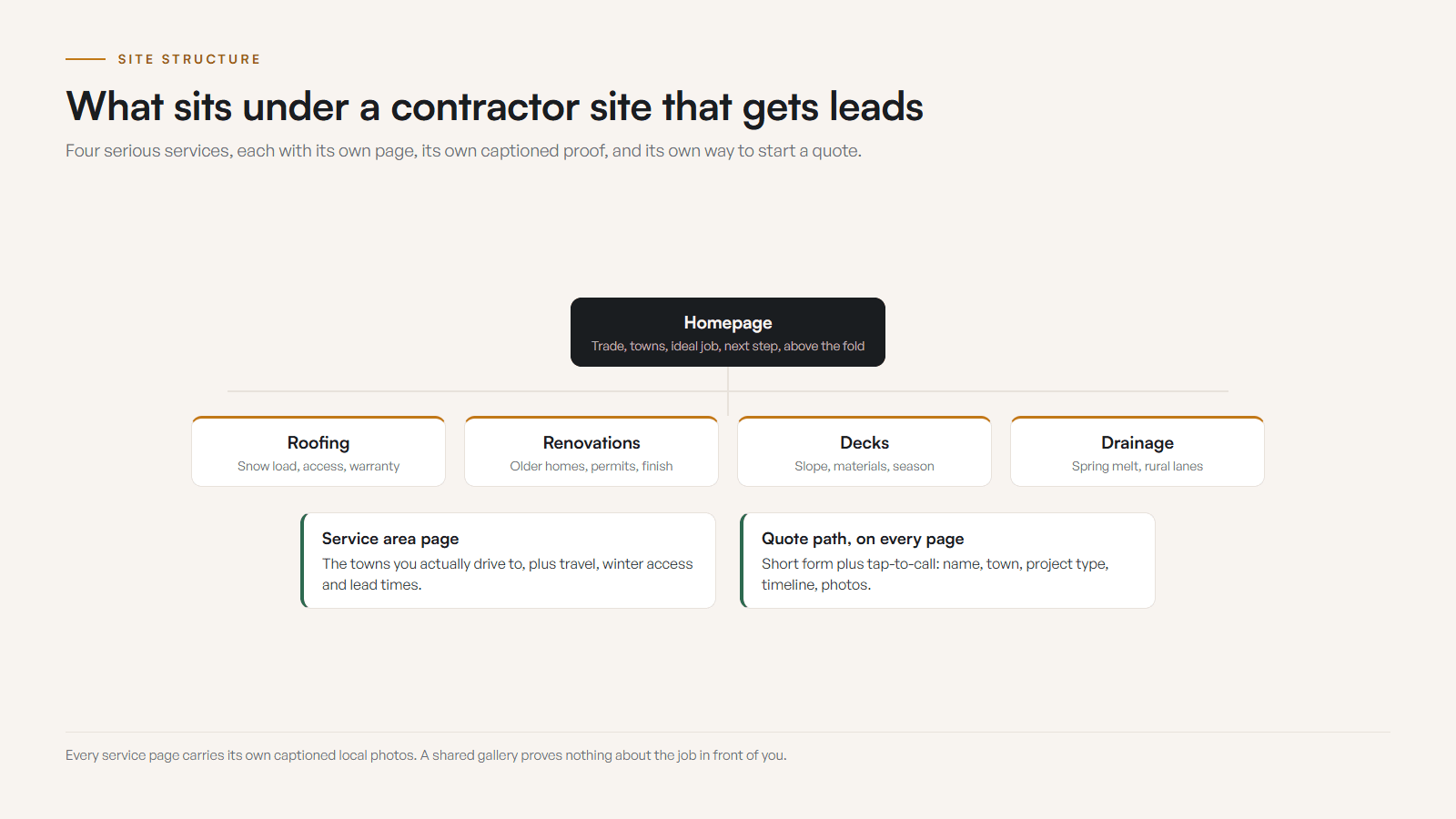
Most contractor sites are not bad on purpose. They were built to look professional and never asked to do the trust work. Closing that gap is the same instinct behind service pages that create better calls: put the answer where the doubt is.
How should a contractor handle service area and seasons?
State your service area, then let the seasons shape it. Name the towns you serve, say how far you travel, and explain how winter, mud, smoke, slope, and rural access change the job. Clear service-area language improves trust and lead quality at once, and it spares you a week of bad-fit inquiries.
Kootenay service areas are rarely abstract. A contractor might serve Castlegar but only take larger projects in Nelson. A roofer might handle Rossland but need different lead time before winter. An excavation crew may care about rural access, driveways, slope, delivery, or mud season. Say it on the page, because a homeowner who has to hunt for towns served assumes the answer might be no.
- 01
Town coverage
Name the towns you actually serve, from Castlegar and Trail to Nelson, Rossland, Creston, Nakusp, Cranbrook, Fruitvale, Robson, Genelle, Salmo, or rural routes, only when they are real.
- 02
Travel reality
Say how distance, mountain roads, winter access, steep driveways, rural lanes, parking, and material delivery affect the job, when they actually do.
- 03
Project fit
Separate emergency work, small repairs, full builds, renovation scopes, seasonal maintenance, and premium projects so leads self-sort before they reach you.
- 04
Lead time
Make spring rush, summer exterior windows, fall closing dates, winter limitations, and booking cutoffs visible before the inquiry, not after.
- 05
Proof by place
A Trail basement, Rossland entry, Castlegar deck, Nelson heritage home, or Nakusp cabin gives context that generic, place-free proof simply cannot.
This is the same principle behind ranking for service towns without turning the site into town-stuffing sludge: name real places where they affect the work, and never stuff towns into copy just to look local.
What does a great contractor site look like by trade?
The pattern is the same across trades: clear scope on top, real proof underneath, and a quote path that fits how that buyer decides. What changes is the proof and the language. A roofing page should not read like a landscaping page, and a rural cabin job should not ignore access, weather, and material delivery.
- Renovators and builders
- Room transformations, older-home surprises, layout constraints, material choices, permit or inspection steps where relevant, and finish quality. Heritage homes and basements need context, not just pretty final photos.
- Roofers and exterior crews
- Roof type, storm and snow-load realities, flashing, gutters, access, cleanup, warranty context, and seasonal booking pressure. Winter exposure and hillside access can become proof.
- Landscaping, excavation, drainage
- Slope, mud, standing water, rock, grading, retaining walls, driveways, acreage, and access. Rural roads and spring melt deserve plain explanation, not vague promises.
- Electrical, plumbing, HVAC
- Service types, response windows, diagnostics, maintenance, clean routing, and official licensing proof where it applies. Regulated work should feel safe and verifiable.
- Painters and finish trades
- Prep, protection, edges, surfaces, colour or material choices, durability, cleanup, and occupied-home care. Detail photos matter because the buyer is judging precision.
- Handyman and rural specialists
- Job sizes, minimums, service radius, scheduling, and what to send before a quote. Cabins, lake properties, and mountain driveways need access and weather notes up front.
A realistic before and after
Illustrative example, no invented numbers. The point is the shape of the change, not a metric.
Before
A trades business had one vague services page, a gallery of unlabelled photos, no stated service area, and a long quote form on a slow mobile page. Homeowners could not tell which towns it served or whether their job was a fit, so many simply did not call.
After
The rebuild led with the trade and towns, split the work into useful service pages with captioned local proof, stated seasonal lead times, and shortened the quote form beside a tap-to-call number. The same traffic produced clearer, better-qualified inquiries.
What should a contractor quote form ask?
Ask for just enough to route the inquiry: name, contact, town, project type, a short description, timeline, and optional photos. Keep deep intake for the follow-up. A homeowner standing in the driveway with a phone may only know the roof is leaking, so a short form plus a tap-to-call number will usually beat a giant intake form.
- Name and one way to reach them, phone or email.
- Town or address area, so travel and fit are clear early.
- Project type, picked from your real services.
- A short description in the homeowner’s own words.
- Rough timeline or urgency.
- Optional photos, or a note on how to send them.
Contractor quote forms are easy to overbuild. The business wants every detail. The homeowner may only know the stairs feel unsafe or the yard turns into soup every spring. A strong site creates a low-friction first move and qualifies intelligently, then explains what happens next in one or two plain sentences. The deeper photo half of this is covered in how before-and-after photos help contractors win more work.
What are the most common contractor website mistakes?
The biggest mistakes are quiet leaks: leading with a slogan, using fake stock photos, hiding the service area, lumping every service into one vague list, making proof too generic, overbuilding the quote form, ignoring mobile, and overclaiming credentials. None of them look dramatic, but together they make a contractor seem riskier than they are.
- 01
Starting with a slogan
Building excellence since 2009 does not say what trade you are, where you work, or whether you take this kind of job. Lead with clarity, not a tagline.
- 02
Using fake stock photos
A smiling model with a clipboard will never beat real work from Castlegar, Nelson, Trail, Rossland, Creston, Nakusp, or Cranbrook.
- 03
Hiding the service area
If someone has to hunt for towns served, travel limits, or rural availability, they assume the answer may be no and move on.
- 04
Lumping every service together
One vague services page makes roofing, decks, renovations, repairs, and drainage all feel thinner and less proven than they are.
- 05
Overclaiming credentials
Licensing, insurance, permits, warranties, and safety claims must be precise. Vague trust badges are not a substitute for real, verifiable proof.
What should a contractor fix first if the website is weak?
You rarely need a dramatic rebuild on day one. Fix where trust leaks first: the first screen, then the service area, then real service pages, then proof, then the quote path. Most of this is a sequence problem, not a budget problem, and the early fixes are the ones a homeowner feels first.
- 01Open the site on a phone and judge it like a cautious homeowner. Mark the first unclear moment: trade, town, service, proof, price context, or quote path.
- 02Rewrite the first screen and service-area language so the trade, towns, ideal job, and main action are clear before scrolling.
- 03Turn your top revenue services into useful pages with scope, proof, process, pricing context, FAQs, and a quote path.
- 04Choose your strongest local photos, add field-note captions, place them on matching service pages, and remove fake or stale imagery.
- 05Shorten the quote form, add tap-to-call, state response time, allow photos, and align Google Business Profile photos, hours, and service area.
Good contractor sites compound, because every new job creates better proof, better captions, and better service-page answers for the next homeowner. When you are ready to turn that into a clean lead path, my website services and process are built for exactly this, and a free check-up will show you the leaks first. The full playbook for how I build these, page by page with pricing context, lives on the contractor and trades website design page. The real cost is not the fix. It is every qualified homeowner who quietly decided not to call.
Sources and further reading
- Google Search Central: SEO Starter Guide
Google explains how clear titles, headings, helpful content, crawlable links, and useful structure help people and search systems understand a contractor site.
- Google Search Central: creating helpful content
Google frames strong pages around people-first usefulness, real experience, and satisfying answers, which is exactly how trade buyers read a site.
- Google Business Profile help: photos and videos
Guidance on the photos and videos that help customers understand services, exterior and interior views, and business details that reinforce the website.
- BC Housing: find a licensed residential builder
Where residential builder licensing applies, point visitors to verifiable proof instead of vague badges. Credential claims should be accurate and current.
Frequently asked questions
What should a contractor homepage say first?
Say the trade, the service area, the kind of work you want, and the next step. A homeowner should not have to scroll past a slogan to learn whether you do roofing, renovations, decks, excavation, electrical, plumbing, or another service in their town.
How important are real project photos for contractors?
They are one of the strongest trust signals on the site. Homeowners want to see real work, real materials, real finish quality, and real property conditions. Stock images can make a contractor look polished and less believable at the same time.
Do contractors need separate service pages?
Usually yes, when services have different buyers, proof, pricing context, seasonal timing, or search intent. Roofing, renovations, decks, siding, excavation, painting, electrical, plumbing, HVAC, and landscaping each deserve their own useful page if they are serious lines of work.
Should a contractor website show prices?
Show enough pricing context to reduce bad-fit inquiries. Exact pricing works for fixed repairs or packages. Custom work can use starting points, minimum project sizes, quote factors, and what happens before a formal estimate is prepared.
What should a contractor quote form ask?
Ask for name, phone or email, town, project type, a short description, timeline, and optional photos. Anything beyond that should earn its place. If the form feels like paperwork before the first conversation, it is probably costing you leads.
Is a Google Business Profile enough for a contractor?
No. A strong profile helps discovery, calls, reviews, and map trust, but the website still has to explain services, proof, quote process, service area, FAQs, and project fit. The profile and the site should tell the same current story.
Related pages
- Trades and contractor websites
- Industrial and B2B websites
- Web design in Castlegar
- Web design in Trail
- What Should an Auto Repair Shop Website Include?
Kootenay Made Digital
I build websites, local presence, and calm AI setups for Kootenay small businesses. Plain language, published prices, and clear work that makes you easier to find and easier to choose.