

 hello@kootenaymade.ca
 Castlegar, BC. Serving the Kootenays and beyond.
 9 min read
Key takeaways
- A healthy project follows a clear trail: discovery, proposal, content, design, build, revisions, launch, and support.
- Your job is not to write code. It is to provide business facts, customer insight, proof, priorities, and clear feedback.
- The biggest delays come from missing content, vague feedback, hidden scope, and unclear approval.
- A good designer explains technical choices in plain English and protects mobile, accessibility, search, forms, and launch.
- Get a written proposal with scope, timeline, ownership, revisions, and a support path before any build starts.

On this page
What does a web designer actually do for a small business?
A web designer translates your business into a website customers can understand, trust, and use. That means visual design, yes, but also content structure, mobile behaviour, search foundations, accessibility basics, working forms, and the dull launch details that keep the site from breaking in public.
The designer is not there to make you speak technical. The real partnership is simple: you know the business, the customers, the objections, and the work. The designer knows how to turn that into a digital path people can follow without getting lost.
A good project is structured, practical, and surprisingly calm. At every stage you should know what is happening, what decision is needed, what is waiting on you, and what will be true when the site goes live. If that clarity is missing, that is the first thing to fix.
You bring the business knowledge. The designer should carry the technical weight.
What should I prepare before hiring a web designer?
Prepare your business facts, best photos, logo files, service list, strongest proof, and the one main action you want visitors to take. You do not need a polished brief. You do need enough raw material that the designer is not inventing your services, your hours, and your customer questions from scratch.
For a local business, good prep is rarely fancy. It is often a folder of photos, a notes document with services, a list of customer questions, a few links to sites you like, your Google profile link, and honest answers about what the current site fails to do. Here is the short checklist.
- Business facts: name, tagline, phone, email, address, service area, hours, and any seasonal or appointment rules.
- A plain explanation of what you do, who you help, and which work or products matter most.
- Main services, packages, menus, treatments, rooms, or booking types with enough detail to explain the value.
- Logo files, brand colours if they exist, social links, your Google Business Profile link, and any printed materials in use.
- Real photos: storefront, team, work, products, rooms, food, vehicles, views, job sites, or the customer experience.
- Proof: reviews, testimonials, before and after examples, certifications, associations, guarantees, or local partnerships.
- The top questions customers ask before they buy, book, call, visit, or request a quote.
- The one main action a visitor should take, and any tools the site must connect to, plus your budget and deadline.

If the photo line worries you, do not stall the whole project over it. Budget and photos are the two things owners most often get stuck on, and both can be planned around once they are out in the open.
What happens during a web design project, stage by stage?
A website project moves through six stages: discovery, proposal and scope, content gathering, design direction, build and test, then launch and support. Each stage has a different job, and skipping one usually shows up later as confusion, delay, or rework. Here is what each stage covers.
- 01
Discovery
The first serious map of the project. You and the designer agree on the real job of the site, the customer, the offers, the pages, the local context, and what success looks like after launch.
- 02
Proposal and scope
The conversation becomes a written plan: pages, deliverables, timeline, price, payment schedule, responsibilities, revision rules, what is excluded, and what happens after launch.
- 03
Content gathering
Logos, photos, service details, proof, contact facts, hours, and FAQs get collected. This is the stage that quietly decides how fast the rest of the project moves.
- 04
Design direction
The visual system takes shape: homepage direction, layout, tone, call-to-action placement, proof, and mobile rhythm. The first pass gives you something concrete to react to.
- 05
Build and test
Approved design becomes the real site. Forms, responsive layouts, links, metadata, accessibility basics, page speed, and images all get checked before anyone celebrates.
- 06
Launch and support
The site goes live with a handoff, ownership clarity, an update path, and a plan for the seasonal or business changes that always come after launch.
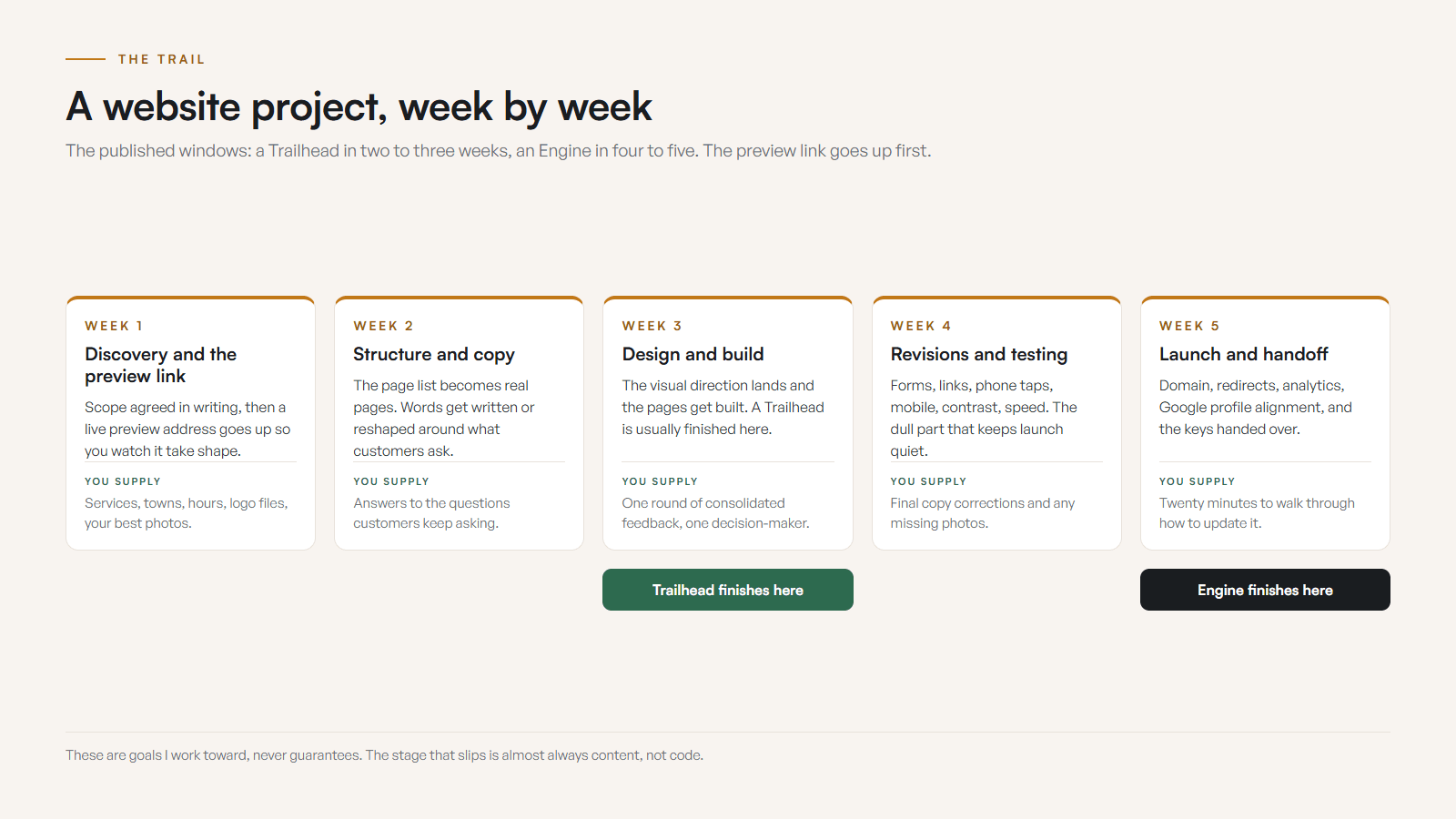
Some numbers, so the stages are not abstract. Every build I run ships a live preview link inside the first week, so you watch the site take shape instead of waiting for a reveal. A Trailhead is three custom page designs, typically delivered in two to three weeks. An Engine is seven designs and twenty written guides in about four to five weeks. Family Designs & Creations in Castlegar shows what a Trailhead turns into: eight pages in total, because legal and contact pages do not count against the design allowance, plus four custom-order paths and real product photography. Windows and case study checked September 2026.
Discovery is where the project becomes a map. Design is where the map gets visual. Build is where the site becomes real. Launch is where your public details must agree. Support is where the site survives contact with the actual business: restaurants change hours, contractors add services, guides adjust seasonal trips. A sane support path keeps the site current instead of slowly turning into a fossil. My process page walks through the same trail in more detail. Before you sign the proposal, check it against what a web design contract should say.
DIY website vs hiring a web designer: which is right for you?
A do-it-yourself builder can work when the business is simple, the content is ready, and your time is free. Hiring a designer pays off when you need the site to convert, when local trust and search visibility matter, and when your hours are better spent running the business than wrestling a page builder.
| What is being compared | DIY builder | Hiring a designer |
|---|---|---|
| Upfront cost | Low monthly fee | A project price, from $2,000 for a starter site |
| Your time | High, often many evenings | Mostly content, feedback, and decisions |
| Strategy | You decide structure and copy | Discovery shapes the structure and message |
| Mobile and accessibility | Up to you to get right | Handled and checked by the designer |
| Search foundations | Easy to miss | Built in: titles, headings, links, local facts |
| Launch and support | You own every fix | Handoff, ownership clarity, and a support path |
| Best when | Simple needs, lots of free time | Trust, conversion, and growth matter |
Neither choice is wrong on its own. That starter build is $2,000 once, or $500 today and 12 monthly payments of $142, $2,204 all in on the Own It Monthly plan. If you are weighing the platforms specifically, my Wix vs custom guide goes deeper. If you are not sure you even need a new site yet, start with the five signs you need a new website.
How does feedback and revisions work with a web designer?
Good feedback names the problem and the business reason, not just the feeling. Most small projects run on two focused revision rounds, with one decision-maker and consolidated notes. Vague feedback like make it pop slows everything down. Specific feedback moves the project forward fast.
Feedback is where many projects get weird. The goal is not to win a taste debate. The goal is to make the website more accurate, more useful, and more persuasive for the right customer. Five habits keep revision rounds clean.
- 01Gather notes from every stakeholder first, then remove duplicates and send the designer one clean list.
- 02Name the problem and the business reason, not just the feeling. Say what is wrong and why it matters to a customer.
- 03Separate taste from function. A section can be your least favourite and still be doing its job.
- 04Frame comments around what visitors need to understand, so the project does not become a fight over favourite colours.
- 05Flag anything that adds a page, feature, or full rewrite as a scope decision, so timing and price stay clear.
An example of the difference. Weak feedback: make it pop. Strong feedback: the page feels too formal for my trail guide business, and the book now button disappears on my phone. The second version tells the designer exactly what to change and why.
What should a Kootenay web designer ask about my business?
A local website should account for your town, your season, your service area, and how people actually choose. A Trail clinic, a Rossland guide, a Nelson restaurant, and a Castlegar contractor do not need the same website dressed in different boots. The designer should ask how customers find you and what they worry about before they call.
Local context is not decoration. It is how the site becomes useful. Here is the kind of context that should shape the build for common Kootenay business types.
- Trades and home services
- Service area, quote process, before and after proof, seasonality, drive time, job size, and the towns you actually serve.
- Restaurants and cafes
- Hours, accurate menus, patio status, reservations, takeout, parking, holiday updates, and current photos that make people visit.
- Tourism, rentals, and guides
- Dates, availability, meeting points, weather or smoke policies, road access, what to bring, and confidence on a weak mobile signal.
- Clinics and wellness
- Services, practitioner fit, privacy expectations, a calm booking path, accessibility, location details, and clear intake steps.
- Retail and product brands
- Inventory, pickup, shipping, market schedule, product photos, local proof, and seasonal or gift demand shaping the structure.
- Regional service businesses
- Castlegar, Nelson, Trail, Rossland, Creston, Cranbrook, and Kootenay Lake customers do not all take the same route to trust.
What should happen on launch day?
Launch day should include final content checks, mobile checks, form and link tests, analytics checks where relevant, domain and SSL confirmation, Google profile alignment, rollback awareness, and a clear support path. A site is not finished just because it is live. The handoff is what protects you afterward.
- Final content and proofreading pass across every page and call to action.
- Mobile checks on a real phone: can a thumb call, book, map, and read without hunting.
- Form tests and link tests, plus analytics or conversion checks where relevant.
- Domain, HTTPS, and SSL confirmation, with backup or rollback awareness in place.
- Google Business Profile and social details aligned to match the new site.
- A written support path: who handles edits, how requests are sent, and what response to expect.
The handoff should also explain what happens next. Who handles text changes? Who updates hours? What if a form breaks, or you need a smoke closure notice, holiday hours, or a last-minute booking change? Launch without support clarity is just a grand opening with the keys tossed into the snow. No website yet? I can build the first one and hand it over with this launch checklist done. Already have one? Run a free check-up after go-live and I will confirm the work is finished.
What are the red flags when hiring a web designer?
The biggest red flag is missing structure: a fuzzy scope, no written proposal, unclear ownership, and an unnamed support path. Pretty design that ignores calls, forms, mobile, accessibility, and local search is the second. If a quote skips these, you are buying fog, not a website.
- Nothing in writing about the scope, so nobody knows what is actually being built.
- Unclear ownership of the domain, hosting, accounts, and the finished files.
- The mobile plan, the content plan, and the revision boundary are all missing.
- The launch checklist and the support path are both missing, so nobody owns the day it breaks.
- Design that looks pretty but ignores calls, forms, Google visibility, accessibility, and the local customer journey.
If a project ever feels stuck, do not start by changing fonts. Find the blocked decision. Is the scope unclear? Are the photos missing? Is the main call to action undecided? Are three people giving conflicting feedback? Is nobody sure who owns the domain? Fix the decision leak first, and the design work gets calmer after that. When you are ready, start the conversation and bring the business truth with you.
Sources and further reading
- Google Search Central: SEO Starter Guide
Google frames useful sites around crawlable pages, clear titles, descriptive headings, helpful content, and internal links, which is what a good designer builds toward.
- Google Search Central: page experience
Core Web Vitals, HTTPS, mobile usability, and avoiding intrusive elements are launch-day concerns your designer should own, not jargon you have to decode.
- Google Business Profile help
A launch handoff should not stop at the website. Hours, phone, photos, and links should stay aligned with your public Google profile.
- WCAG 2.2 quick reference
Accessibility basics affect real customers: contrast, labels, keyboard access, focus states, form errors, and readable content.
Frequently asked questions
What should I prepare before working with a web designer?
Prepare your business facts, best photos, logo files, contact details, service list, rough page list, strongest proof, and the main action you want visitors to take. You do not need a polished brief. You do need enough truth for the designer to build around.
How long does a small business website project usually take?
A simple site can move in a few weeks when scope, content, and feedback are ready. Larger builds take longer because there are more pages, integrations, photos, and revisions. The proposal should state the expected timeline and what can slow it down.
How many revision rounds should I expect?
The proposal should state this clearly. Many small business projects work well with two focused rounds, but the number matters less than the habit: consolidated feedback, one decision-maker, and knowing what counts as a revision versus a new request.
What if I have no photos?
Tell the designer early. The fix may be a quick photo plan, a focused shot list, temporary placeholders, or simple direction for staff. Real photos usually build more local trust than stock, especially for Kootenay shops, clinics, trades, and tourism operators.
Do I need to understand hosting, DNS, SSL, or SEO?
No. You should not have to manage the technical layer. You should understand the plain-English choices: who owns the accounts, what gets launched, how visitors contact you, how updates happen, and which standards the designer is checking.
What are the red flags when hiring a web designer?
Watch for a missing scope, no written proposal, unclear ownership, a vague mobile or content plan, an open-ended revision count, a skipped launch checklist, an unnamed support path, and design that looks pretty but ignores calls, forms, accessibility, and local search.
Related pages
- Professional services websites
- Municipal websites
- Remote web design worldwide
- How to Choose a Web Designer in the Kootenays
Kootenay Made Digital
I build websites, local presence, and calm AI setups for Kootenay small businesses. Plain language, published prices, and clear work that makes you easier to find and easier to choose.