hello@kootenaymade.ca
 Castlegar, BC. Serving the Kootenays and beyond.
 9 min read
Key takeaways
- A Facebook page is a channel you rent. A website is an asset you own.
- Facebook is strong for updates, events, photos, and keeping known locals warm.
- A website wins for search visibility, proof, service detail, bookings, and trust from strangers.
- The clean setup is usually all three: Facebook, your website, and Google Business Profile doing different jobs.
- At Kootenay Made Digital, a custom presence website starts from $2,000.

On this page
Facebook page or website: which does a small business need?
Most growing local businesses need both, doing different jobs. A Facebook page keeps existing followers warm with updates, events, and photos. A website is the home base strangers, searchers, and ad traffic use to understand your offer, see proof, and contact you. The mistake is treating a rented social feed as your whole foundation.
Facebook is a channel you use. A website is an asset you own. One helps people hear from you. The other helps people understand you, trust you, find you through search, and contact you without crawling through a feed. For a Castlegar shop, a Nelson cafe, or a Trail contractor, that social warmth is real. It just is not the same thing as infrastructure.
Facebook is rented social space. Your website is the base camp you control for search, proof, bookings, and trust.
What is a Facebook page actually good for?
Facebook is good at movement and familiarity. It keeps people who already know you aware of new hours, events, markets, photos, and quick updates. Meta positions Pages as a way to share information, post updates, message customers, and build a social audience. That is a real job, especially around seasonal timing.
For local businesses, that usefulness clusters around timing: farmers markets, summer visitor season, Red Mountain weekends, holiday hours, snow closures, flash sales, and community events. Facebook is strongest for keeping familiar people warm. It is weakest at explaining everything to someone brand new who is comparing options before they ever message you.
- Community updates: new hours, event reminders, recent photos, product drops, and local notes followers may share.
- Events and markets: pop-ups, music nights, fundraisers, workshops, and seasonal launches that move through sharing.
- Fresh proof: recent project photos, menu items, shop arrivals, and behind-the-scenes posts that show the business is active now.
- Quick messages: simple questions over Messenger, though it should not be the only serious path for quotes or bookings.
What can a website do that a Facebook page cannot?
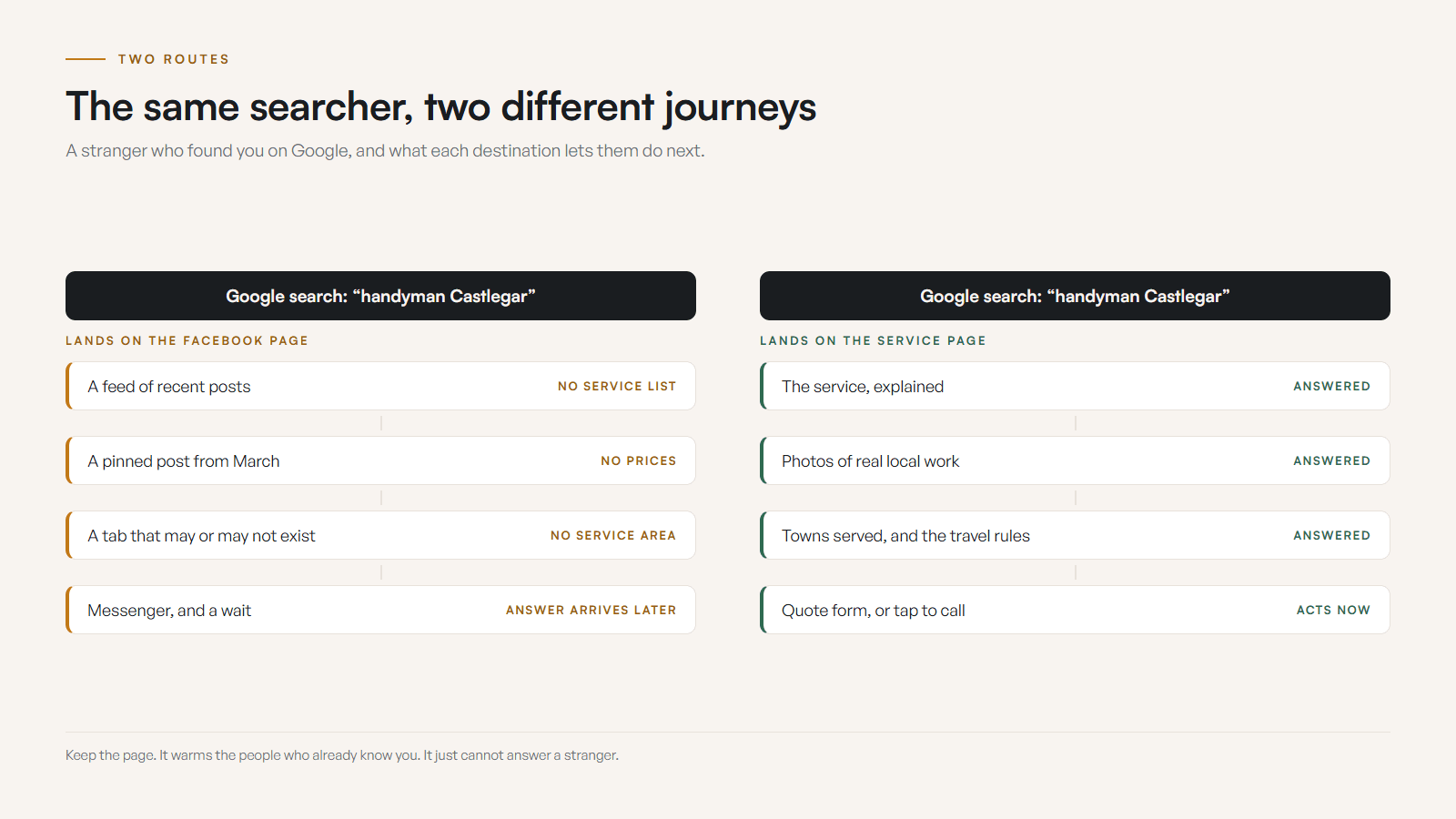
A website gives you controlled structure a feed cannot: service pages, menus, booking rules, FAQs, proof, location detail, and contact paths that stay put. That structure is what lets strangers understand you and what lets Google rank you. A social page is built around the feed, not around a clear path to a decision.
Visitors should not have to piece together what you do from pinned posts, old comments, and tabs that change every year. Here are the jobs a website does that Facebook structurally cannot.
- 01
Search visibility
A website can target service and town intent like electrician in Trail, custom cakes in Nelson, or physio in Castlegar. Google ranks pages, titles, links, and content you control, not someone else’s feed.
- 02
Trust proof
Reviews, project photos, staff bios, process notes, warranties, credentials, and local partnerships belong where a first-time visitor finds them in seconds.
- 03
Service detail
Service pages explain what is included, who it is for, what it costs or how quotes work, which towns you serve, and what happens next.
- 04
Ownership
You control the domain, structure, content, analytics, calls to action, and presentation. Facebook controls the rented room and can change it any time.
- 05
Booking and contact paths
Calls, forms, booking links, quote flows, maps, menus, and reservations sit exactly where the visitor needs them, on mobile, every time.
None of that means abandoning the page. Family Designs & Creations in Castlegar kept its Facebook presence and built the site around it. Kim had 41 recommendations sitting on Facebook, reachable only by people already inside that app, so the build surfaced all 41 on the site itself, beside the four custom-order paths and her own story. The page keeps doing the warm work. The site makes the proof reachable by a stranger arriving from Google. Case study checked September 2026.
Facebook page vs website: what is the difference?
A Facebook page is rented social space built for reach and familiarity. A website is owned space built for search, trust, and conversion. Facebook keeps known people warm. A website turns unknown searchers into inquiries. The difference is ownership, control, and whether strangers can understand and trust you fast.
| What is being compared | Facebook page | Website |
|---|---|---|
| Who owns it | Meta. You use it under their rules | You own the domain, content, and structure |
| Best at | Updates, events, warming known locals | Search, proof, service detail, bookings |
| New customers | Must already follow or stumble in | Found through Google by service and town |
| Structure | A feed of posts and tabs | Home, services, proof, location, contact paths |
| Local search | Rarely the strongest answer | Service and location pages built to rank |
| Ad traffic | Lands in a general feed | Lands on a focused, matching page |
| Platform risk | Reach, access, and rules can change | A stable base you control |
| KMD fit | Keep as a channel | Trailhead presence site, $2,000 |
This is not Facebook or website. The sane system gives each channel a job: Facebook warms the room, your Google Business Profile gets you found locally, and the website proves the offer and closes the loop.
Do you need a website yet, or is Facebook enough?
You likely still need a website when strangers compare you before calling, when services need explaining, when bookings or quotes matter, when you run ads, or when you serve several towns. Facebook plus a polished Google profile can carry a referral-only or fully booked business for a short stretch, but only temporarily.
Run through the checks below. If several are false, Facebook is doing a job it was never built to do, and the gaps are quietly costing you calls.
- A stranger can tell what you do, where you work, and how to contact you without logging into Facebook.
- Your Facebook page, Google Business Profile, website, phone, hours, and service area all match.
- Someone in Castlegar, Nelson, Trail, Rossland, Creston, Nakusp, or Cranbrook can find your service details in a Google search.
- Each core service has a page that explains it, not just a stream of old posts.
- People can see proof before they call: reviews, project photos, process, credentials, or local examples.
- Someone can book, request a quote, call, email, or get directions from a clear mobile path.
- An ad or boosted post can land on a focused page, not dump people into a social feed.
- The business still looks credible if Facebook reach drops, messages glitch, or the page gets restricted.

The word doing the dirty work is temporarily. If the business needs steady discovery, serious comparison, booking clarity, professional trust, or ads that pay off, the website moves from nice-to-have to foundation: a seasonal operator taking summer reservations needs a real campground website instead of a Facebook page. Not sure yet? My guide on whether you actually need a website in 2026 walks through it.
What does the right Facebook and website mix look like by business type?
The pattern is the same across business types: Facebook handles timely social warmth, the website handles trust and conversion, and Google Business Profile handles local discovery. What changes is the emphasis. A Rossland bike shop, a Trail clinic, and a Nakusp cabin rental do not need the same channel mix.
- Shops and makers
- Facebook for new stock, market tables, and holiday drops. Website for product categories, gift cards, pickup or shipping rules, the maker story, and evergreen gift searches.
- Contractors and trades
- Facebook for recent projects and availability. Website for service pages, towns served, quote process, warranty language, proof, and credentials for quiet comparison shoppers.
- Clinics and professional services
- Facebook sparingly for updates. Website for services, practitioners, booking rules, policies, accessibility, directions, and trust before a sensitive first contact.
- Restaurants and cafes
- Facebook for daily features and patio updates. Website for menu, hours, reservations, catering, dietary notes, gift cards, and seasonal visitor traffic, which is the whole job of restaurant and cafe website design.
- Tourism and events
- Facebook for event momentum and last-minute notes. Website for dates, tickets, route and parking notes, weather or smoke plans, and cancellation rules.
- Service businesses across towns
- Facebook to stay familiar in one community. Website to explain service areas across Castlegar, Nelson, Trail, Rossland, Creston, Nakusp, and Cranbrook.
How much does a first website cost for a local business?
At Kootenay Made Digital, a custom presence website starts from $2,000. The right size depends on how many services and towns you cover, not on how many pages you can pile on. A sharp small site beats a vague large one, so the real budget question is clarity, not page count.
Many local businesses can start strong with a homepage, service detail, local proof, service area, FAQ, and a clear contact path. That is the Trailhead presence build: $2,000 once, or $500 today and 12 monthly payments of $142, $2,204 all in on Own It Monthly. If local visibility is the bigger problem, a growth and SEO site adds the depth Google needs to rank you across towns. The danger is never a small site. The danger is a vague one that answers nothing and looks like every other feed.
What should I fix first if I only have a Facebook page?
Do not start with a giant redesign if the immediate leak is obvious. Lock the facts, write the offer, gather the proof, and build the path, then upgrade the design around that foundation. You can close the worst trust leaks in a single afternoon before a full rebuild.
- 01Lock the facts. Confirm your name, phone, email, hours, address or service area, booking link, Google profile, and Facebook details all match.
- 02Write the offer. Draft a plain-language service list, who it is for, towns served, starting price or quote expectation, and what happens after contact.
- 03Gather proof. Pull recent reviews, project or menu photos, credentials, and local partnerships into one folder.
- 04Build the path. Create or tighten a homepage, service detail, FAQ, and contact path. If the full site is not ready, ship one clean landing page first.
- 05Connect the channels. Link the website from Facebook and Google Business Profile, and point ads and posts to the right page, not the home feed.
Once the facts, offer, proof, and path are clean, a small website turns your social presence, Google profile, and customer proof into a controlled home base that feels local and ready to convert. If you want a straight read on where the gaps are, run the free check-up and I will map them with you. If local search is the priority, tell me which towns you serve and I will scope it.
Sources and further reading
- Meta for Business: Facebook Pages
Meta positions Pages as a way to share information, post updates, message customers, and build a social presence, which is a channel, not a full website.
- Google Business Profile help
How to manage the listing that drives local discovery in Search and Maps: hours, photos, services, reviews, and customer actions.
- Google Search Central: SEO starter guide
Google explains how it understands pages, titles, links, images, content, and site structure you own, the things a Facebook feed cannot give it.
- Google Search Central: creating helpful content
Google recommends people-first content that answers real questions clearly, which is exactly where service pages beat scattered social posts.
Frequently asked questions
Is a Facebook page enough for a small business?
Temporarily, if referrals are strong, you are fully booked, and people only need a quick way to message you. It becomes risky once strangers from Google, tourists, or comparison shoppers need to trust you before they call.
What is Facebook actually good for?
Updates, photos, events, quick messages, community reminders, and social proof that keeps existing followers warm. It is a channel. It is not the best place to explain every service, rank for local search, or control the full contact path.
Will a website help with Google Maps?
Your Google Business Profile is the core Maps asset, but a clear website linked from that profile strengthens the local picture. The profile, website, reviews, categories, and business details should all tell the same story.
Can Facebook posts show up in Google search?
Sometimes a public post or page can appear, but it is not a reliable substitute for pages you control. A website lets you build focused service pages, location pages, FAQ content, and contact paths built for search and conversion.
When does a small business actually need a website?
When people compare you before calling, when services need explanation, when bookings or quotes matter, when you run ads, when you serve multiple towns, or when losing a rented platform would hurt the business.
How much does a first website cost?
At Kootenay Made Digital, custom presence sites start from $2,000. The right size depends on how many services and towns you cover. A sharp small site beats a vague large one, so the budget question is clarity, not page count.
Related pages
- Restaurant and cafe websites
- Salon and barbershop websites
- Trades and contractor websites
- Web design across the West Kootenay
Kootenay Made Digital
I build websites, local presence, and calm AI setups for Kootenay small businesses. Plain language, published prices, and clear work that makes you easier to find and easier to choose.