hello@kootenaymade.ca
 Castlegar, BC. Serving the Kootenays and beyond.
 9 min read
Key takeaways
- A cheap website quote is not automatically bad. A vague quote is the real problem.
- The highest-risk gaps are fuzzy scope, missing content work, weak mobile testing, no local search setup, and unclear ownership.
- A safe low quote names the tradeoffs. An unsafe one makes everything sound included until you ask directly.
- The business should own the domain, with hosting and admin access explained in writing before launch.
- Compare providers by asking the same questions, not by staring at the bottom line.

On this page
Is a cheap website quote a red flag?
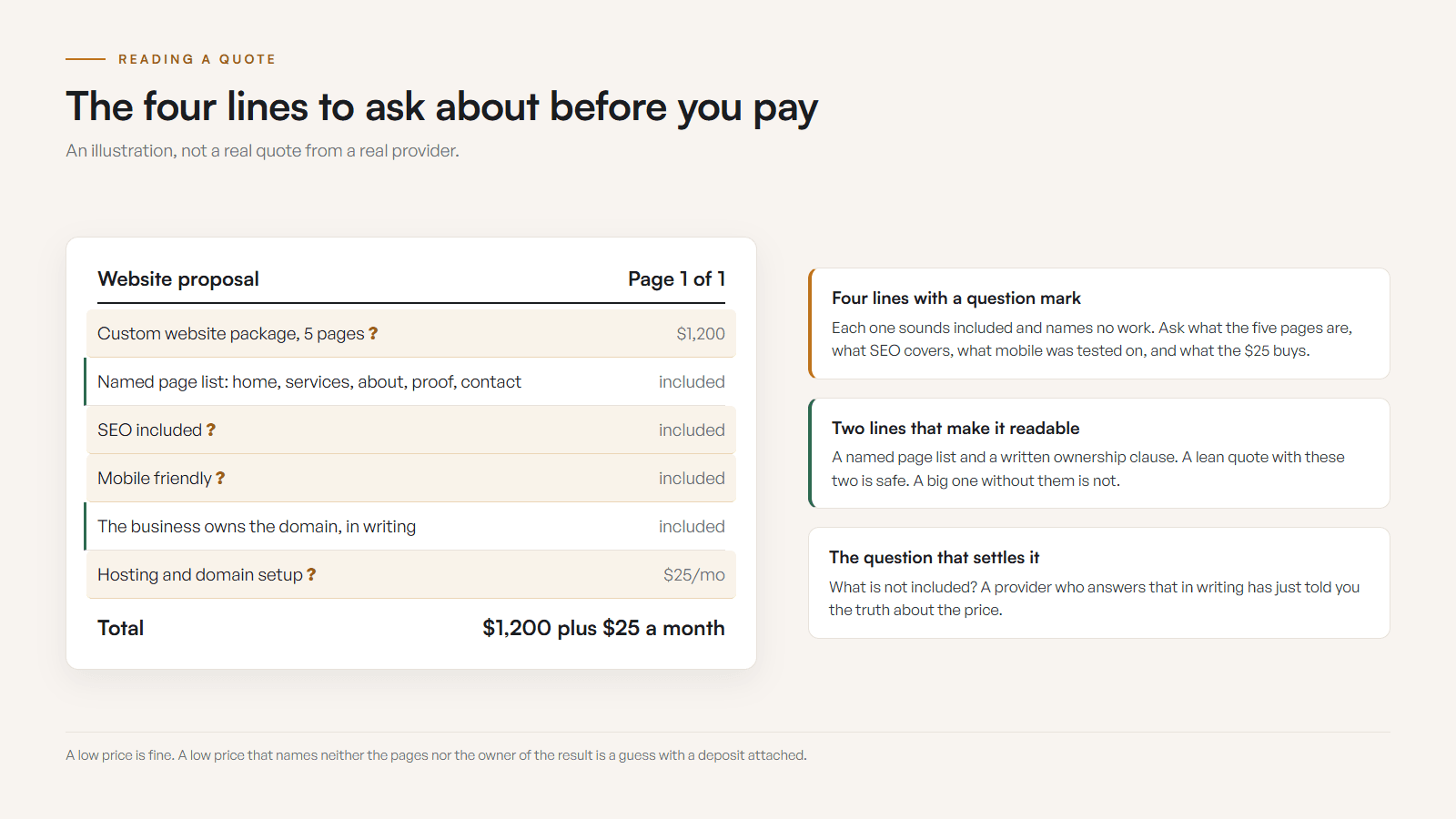
Not on its own. A website quote can be low for two very different reasons: the project is small and the provider is honest about it, or the work that makes a site useful was never included. Cheap is safe when the scope is clear. Cheap plus vague scope is where the trouble starts.
Everyone likes saving money. The problem is that a low number can hide a small, well-scoped starter site, or it can hide copy, mobile polish, local search basics, proof, launch support, training, hosting clarity, and domain ownership that quietly fell off the truck between the sales call and the invoice.
This guide is not about scaring you away from affordable web work. It is about making sure affordable does not become expensive after the site launches, underperforms, or gets trapped in someone else's account. If you want the wider pricing picture first, my website cost guide covers what different builds actually cost.
Low price is fine when the scope is honest. Low price plus vague scope is where the trap doors start clicking open.
What are the red flags in a cheap website quote?
The risky quotes rarely wave a flag. They sound normal. The warning signs hide in what the proposal leaves out: the business goal, questions about your customers, mobile and search detail, and ownership language. If several of the signs below are true, slow down and ask before you pay.
- The quote names a price and a page count but never the business goal of the site.
- No one asked about your customers, services, towns, leads, bookings, or proof before quoting.
- Mobile, tablet, and basic accessibility are assumed rather than named as real work.
- Search basics are vague: no titles, descriptions, headings, local details, or indexing mentioned.
- Domain and hosting ownership is missing, so you cannot tell who controls the keys.
- Revisions, timeline, training, and after-launch support are absent or buried in fine print.
- Everything sounds included until you ask one careful question, then the price moves.

Fuzzy scope usually means future surprise costs. No questions about the business usually means generic output. No ownership language usually means a painful handoff. No mobile or search language usually means the site can look finished while failing the way customers actually use it.
Cheap vs. safe: which website quote is actually the risk?
A cheap quote and a safe quote are not opposites. A lean quote can be perfectly safe, and an expensive quote can still be vague. The dividing line is honesty about scope and ownership. The table below shows how the same low price reads as safe or unsafe depending on what the quote actually says.
| What is being compared | Unsafe cheap quote | Safe lean quote |
|---|---|---|
| Scope | Custom website package, no page list or exclusions | Named pages, sections, and what is out of scope |
| Discovery | Quoted with no questions about the business | Asks about customers, services, towns, and proof |
| Content | Silent on who writes copy or sources photos | States who writes, edits, and supplies images |
| Mobile and access | Mobile friendly as a vibe | Tested forms, breakpoints, and accessibility basics |
| Local search | No titles, headings, or Google alignment | Titles, local details, and indexing named |
| Ownership | Domain and hosting left unspoken | Business owns the domain, hosting terms written down |
| After launch | Launch is treated as the finish line | Training, support, and fixes spelled out |
What should a safe website quote include?
A safe quote does not need to be huge. It needs to tell the truth. It should cover the outcome and scope, who handles content and proof, the design and build approach, local visibility, and how ownership and handoff work. Those five areas turn a price into a real decision instead of a guess.
- 01
Outcome and scope
The goal of the site, primary audience, page list, included sections, excluded work, and what counts as out of scope so nothing is a surprise later.
- 02
Content and proof
Who writes the copy, who supplies photos, how reviews and testimonials are used, and how local examples get gathered before launch.
- 03
Design and build
Template or custom approach, responsive breakpoints, browser testing, form setup, page speed expectations, accessibility basics, and a launch checklist.
- 04
Local visibility
Titles, descriptions, headings, URL structure, internal links, local business details, Google alignment, and indexation checks for a Kootenay audience.
- 05
Ownership and handoff
Domain, hosting, CMS access, analytics, logins, transfer path, training, and a clear list of what the business controls directly after payment.
Here is my own version, published where anyone can read it. Every build I ship gets the same security standard at every price. That means a content security policy, strict transport security with preload, frame and form restrictions, and public forms validated and rate limited on the server. Where the domain carries email, SPF, DKIM and DMARC are configured at launch. The domain is registered in the client’s name with registrar lock and two-factor turned on. I hold no security certification and I sell no audits, so what you get is a description of the work you can check yourself by inspecting the response headers of any site I built. A quote that says secure hosting included and stops there has told you none of it. Standard checked September 2026.
A safe quote can still be lean. It may say: this is a starter site, the page count is limited, you supply photos, I use a proven layout, SEO is basic setup only, and monthly support is separate. That is honest, and it gives you a clean decision. An unsafe quote does the opposite, using broad phrases like full SEO, custom design, and complete website that sound premium but cannot survive a practical question.
Worth turning that test around once you are done reading the quote in front of you. The reason a price that grows after you commit feels like a betrayal is the same reason Canadian law treats it as a misleading representation when you do it to your own customers. If your website advertises a rate and your checkout adds a mandatory fee to it, that is the pattern covered in hidden fees and Canada's drip pricing rules.
Who should own the domain and hosting?
The business should own the domain, full stop. Hosting can be managed by a provider, but the terms should be in writing: who pays, who has access, how backups work, and how the site moves if the relationship ends. If a quote avoids this conversation, raise it before you pay a deposit.
Domain, hosting, DNS, CMS access, analytics, forms, and backups are not glamorous. They are also the difference between a site you own and one you are borrowing from someone who may stop answering emails. Here is what a clean ownership setup looks like.
- Domain
- You should know the registrar, account owner, renewal date, billing method, admin email, DNS access, and transfer path. Losing a domain is not a design issue. It is a hostage situation with invoices.
- Hosting
- Managed hosting is fine when terms are clear. Ask who pays, who has access, how backups work, what happens if support ends, and whether the site can move without a rebuild.
- Admin access
- Know which accounts exist: CMS, analytics, forms, email sending, map embeds, booking tools, and plugins. Decide who holds shared access before launch.
- Handoff proof
- A safe quote names what you receive at the end: a login list, training notes, hosting details, domain instructions, a maintenance plan, and who to call when something needs attention.
How do I compare two website quotes fairly?
Compare the answers, not just the prices. Two quotes can share a title and contain wildly different work. The fair way is to put both providers on equal footing: same page list, same content responsibilities, same launch checklist, then ask the same questions in writing and score the answers.
- 01Write your site goal in one sentence: better calls, better bookings, cleaner trust, seasonal readiness, product sales, or local search visibility.
- 02Ask each provider to price the same page list, content responsibility, launch checklist, and support terms so you are comparing equal scopes.
- 03Build a simple table with columns for scope, content, mobile, SEO, ownership, hosting, revisions, timeline, and support.
- 04Send the same questions by email so the answers are written down, especially the domain and hosting terms.
- 05Score each answer as clear, partial, or vague. Clear beats cheap, partial can be fixed, and vague after a direct question is a warning flare.
The cheaper quote may still be the right choice. But you only know that after both providers answer the same questions in writing. If an answer gets slippery or defensive, you found the risk before it found your wallet. For a sense of what reasonable scope looks like, my website services pages lay out what each build covers.
Does a cheap quote work for a Kootenay small business?
It can, if the provider understands the actual customer path in towns like ours. A Castlegar contractor, a Nelson cafe, a Rossland tourism operator, and a Trail clinic all have different buying moments. A safe quote shows the provider thought about service area, seasonality, local proof, and how customers decide here.
For a Kootenay business, the missing pieces in a cheap build are rarely abstract. A contractor loses calls when service pages are thin. A cafe loses visitors when hours and menu disagree with Google. A tourism operator loses bookings when mobile visitors cannot find weather, parking, or cancellation details. Here is what a safe quote should account for by business type.
- 01
Contractors and trades
A cheap quote is risky if it ignores service pages, before and after proof, town coverage, quote quality, project photos, seasonal booking pressure, and mobile calls from jobsite referrals.
- 02
Restaurants and cafes
The site needs current hours, menu, patio or takeout details, map links, photos, dietary notes, and Google alignment. A pretty one-page site that hides these will leak hungry people fast.
- 03
Clinics and wellness
The quote should cover practitioner trust, service explanations, booking clarity, accessibility, privacy-sensitive content, and a calm mobile path for new patients.
- 04
Tourism and seasonal operators
Ask how the site handles dates, availability, road context, smoke or weather updates, cancellation rules, photos, and visitors comparing from a phone in weak signal.
- 05
Retail and makers
The site may need product categories, pickup or shipping details, market dates, seasonal stock, local story, and content that supports social posts without turning every update into homework.
- 06
Professional services
Bookkeeping, law, consulting, and real estate need authority, process clarity, lead qualification, compliance-sensitive language, and enough proof to make the first inquiry feel safe.
That does not mean the proposal needs a forty-page strategy epic. It means the provider should ask about service area, seasonality, reviews, Google Maps, booking, phone calls, and what customers need to believe before they act. You can see how I approach that on my process page.
What price is too cheap for a small business website?
There is no universal danger number. A one-page starter, a template setup, and a full business website are three different jobs at three different prices. The safer question is whether the quote explains the scope, the ownership, and the support clearly enough to compare.
At Kootenay Made Digital, custom starter sites begin at $2,000, and that price names what is included rather than hiding it. If the up-front number is the sticking point, the Own It Monthly plan is $2,000 once, or $500 today and 12 monthly payments of $142, $2,204 all in, and you own the site outright at the end. A focused starter can be a smart first move for a new business that needs clear services, local proof, a contact path, Google alignment, and clean ownership, as long as everyone understands what is included now and what gets upgraded later.
The real budget question is not what the build costs today. It is what the business loses every month a too-cheap site sends weak leads, hides from search, or sits trapped in an account you do not control. When the quote turns into a contract, check it for the clauses a web design contract should include. If you have a quote in hand and a bad feeling in the room, send it over for a straight second read before you sign.
Sources and further reading
- Google Search Central: page experience
Google points owners toward Core Web Vitals, mobile usability, HTTPS, and clear content. These are often missing from bargain website scopes.
- Google Business Profile help
Website details and Google Business Profile details should tell the same story. Cheap builds often skip the alignment local customers rely on before they call or book.
- ICANN: domain name registrants
Explains the role of the domain registrant. Know who controls the account, renewals, contact details, and transfer path before a project starts.
- WCAG 2.2 quick reference
Accessibility basics affect forms, contrast, labels, keyboard use, and mobile usability. A quote that says mobile friendly but never mentions usable forms deserves scrutiny.
Frequently asked questions
Is a cheap website quote always a red flag?
No. A cheap quote is safe when the scope is small, the limits are clear, ownership is clean, and the provider is honest about tradeoffs. The danger is a low price that pretends to include strategy, copy, SEO, mobile polish, and ownership cleanup without naming any of it.
What price is too cheap for a small business website?
There is no universal danger number. A one-page starter, a template setup, and a full business website are different jobs. The safer question is whether the quote explains pages, copy, revisions, mobile work, SEO setup, domain control, hosting, training, and after-launch support.
What should a safe website quote include?
A safe quote states the goal, page count, content responsibilities, design approach, mobile and accessibility expectations, SEO and local setup, domain and hosting ownership, revision rounds, a launch checklist, training, support terms, timeline, exclusions, and payment schedule.
Who should own the domain and hosting?
The business should own the domain. Hosting can be managed by a provider, but the agreement should explain account access, billing, backups, transfer path, and cancellation. A designer holding your domain with no written transfer agreement is a serious risk.
Is it bad if a designer uses a template?
No, not when the template is disclosed and the price reflects it. Templates are useful for a small starter site. The red flag is a template sold as custom strategy, especially when the quote never explains how the site fits your business, service area, proof, and customer decision path.
Can Kootenay Made Digital review a quote from another provider?
Yes. Send the quote and I will point out what looks solid, what looks missing, what questions to ask, and whether the low price is reasonable for the scope. No pressure, just a clean second read before you sign.
Related pages
Kootenay Made Digital
I build websites, local presence, and calm AI setups for Kootenay small businesses. Plain language, published prices, and clear work that makes you easier to find and easier to choose.