hello@kootenaymade.ca
 Castlegar, BC. Serving the Kootenays and beyond.
 9 min read
Key takeaways
- The five signs that matter most: mobile friction, slow loading, stale proof, weak local search, and an offer mismatch.
- One sign is normal. Several stacked together usually means the site is carrying old decisions into a newer business.
- Refresh when the foundation behaves. Rebuild when every fix exposes a deeper limitation.
- A focused rebuild starts from $2,000, bigger growth and SEO builds from $6,500, in about two to four weeks depending on scope.
- Fix the buyer decision path first: first screen, mobile action, facts, proof, search structure, then content.

On this page
What are the signs your business needs a new website?
The clearest signs are poor mobile usability, slow loading, stale or invisible trust proof, weak local search visibility, and a site that no longer matches the business you run today. One sign is normal. When several of the signs below stack together, the site is leaking trust, not staying neutral.
Most business websites do not fail with a dramatic error screen. They fail quietly. A visitor lands from Google, checks the first screen, gets mild doubt from the photos, taps the menu, cannot find the answer, and leaves without announcing it. The question is not whether the site is old. It is whether it still helps the right person trust you, understand you, and take the next step faster than your alternatives.
- The mobile visit feels like a punishment: tiny text, jumpy layout, hidden buttons, and a phone path you have to dig for.
- The site loads slowly or feels technically tired, with heavy images, old templates, layout shift, or insecure warnings.
- The trust proof is stale or invisible: old photos, no recent reviews near the decision, and a site that gives no sign the business is active now.
- Searchers cannot tell what you do or where: generic titles, no town context, thin service pages, and outdated Google profile details.
- The website describes an older, smaller version of the business than the one you actually run today.

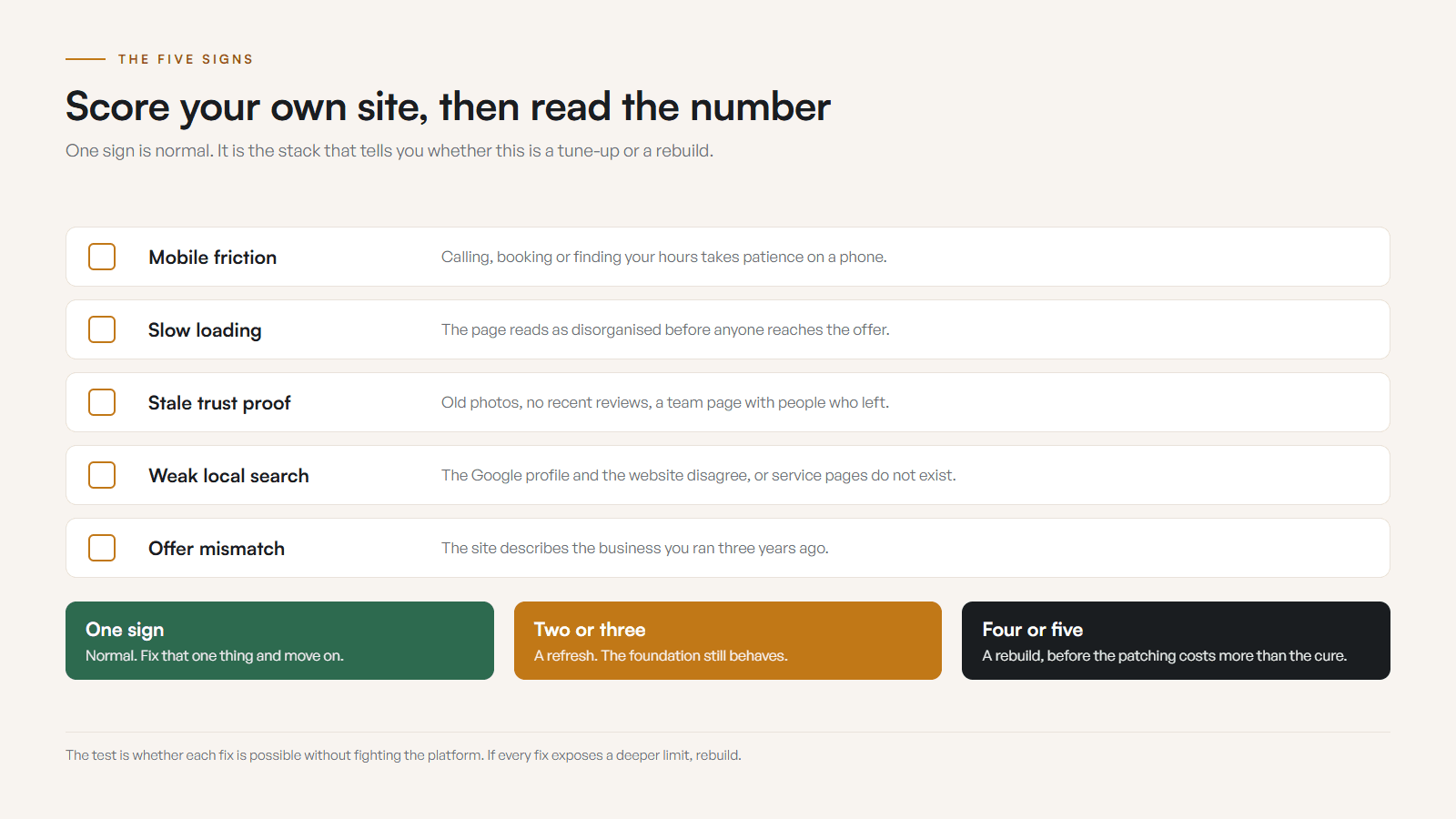
One sign is a paper cut. Five signs together is the site quietly working against you.
Refresh or rebuild: which does my website need?
Refresh when the foundation still behaves and the leaks are copy, photos, calls to action, public facts, or proof placement. Rebuild when the foundation keeps resisting: broken mobile layout, slow code, a CMS that makes updates risky, or pages that cannot support how the business now sells. Both wrong calls are expensive.
A premature rebuild wastes money and attention. A cosmetic refresh on a broken foundation wastes time and leaves the real leak untouched. The decision rule is simple: if you can fix the first screen, mobile action path, proof, search clarity, and public facts without fighting the platform, refresh. If each fix exposes a deeper limitation, rebuild before the patchwork costs more than the cure.
| What is being compared | A refresh is enough | A rebuild is cleaner |
|---|---|---|
| Mobile layout | Works once copy, photos, and CTAs are cleaned up | Structurally broken, or every fix creates a new problem |
| Editing | You can update key info without breaking layouts | The CMS or page builder makes updates slow, risky, or impossible |
| Structure | Main pages are still useful and well organized | Navigation, pages, and offer need rebuilding around a new reality |
| Search depth | Local copy and service pages mostly hold up | Visibility needs service pages, redirects, or architecture the site cannot support |
| Performance | Acceptable after compressing the worst images | Slow code and heavy templates drag every page |
| Best move | Sharpen the first screen, proof, facts, and CTAs | Plan a clean rebuild before the repairs stack up |
If you want the full version of this call, read my refresh vs full rebuild guide. It walks through the foundation question in more detail.
Why does mobile and speed matter so much?
Mobile is the real storefront inspection. People compare businesses from parking lots, job sites, lunch breaks, and trailheads, so a clumsy phone experience makes the business feel clumsy before anyone meets you. Speed is part of trust: a slow page reads as disorganized before the visitor even reaches the offer.
Run a quick test. Open your site on mobile data and try to call, book, request a quote, or find your hours without using patience as fuel. If it fights you, it fights every customer. Here is the checklist a phone visit should pass.
- The primary action is visible without opening the menu.
- Call, booking, quote, order, directions, or contact is easy to tap with one thumb.
- Text is readable outdoors on a phone without pinching to zoom.
- Images are compressed and cropped for fast, clear mobile viewing.
- Forms are short, labelled, and forgiving when someone is distracted.
- Page experience basics hold: HTTPS, no intrusive popups, stable layout, and fast rendering with no obvious drag.
HTTPS, readable contrast, form labels, stable layout, and no intrusive blockers are not advanced features. They are table stakes, and Google frames page experience around exactly these basics.
How do I make a small business website feel trustworthy?
Prove the business is real, current, and easy to choose. That means real photos, recent reviews and proof near the decision point, contact details and policies that are easy to verify, and clean design that signals an established operation. If the site cannot prove those things, the design is just decoration.
- Real photos
- Show the crew, shop, clinic, food, product, worksite, venue, room, or finished result people are actually choosing.
- Current proof
- Use recent reviews, testimonials, project examples, local partnerships, warranties, credentials, or before and after results.
- Easy verification
- Make phone, email, address, service area, hours, and policies simple to confirm before the visitor feels any risk.
- Design credibility
- Clean typography, spacing, contrast, and consistent brand details make the business feel established, not assembled in a panic.
The local trust test: would a stranger from Nelson, Castlegar, Trail, Rossland, or Creston feel safe calling you after one page? If not, the site needs more proof before it needs more flourish. You can see how I handle this across real builds on my portfolio, and the Kootenay web design hub shows how one site can serve several towns instead of pretending each one needs its own page.
How do I show up when locals search for my business?
Google needs structure and customers need answers, so build for both. Align your Google Business Profile with the website, create real service pages when people search by job or town, answer the questions buyers ask before calling, and keep titles, headings, and links clean and crawlable. Skip the tricks.
- 01
Google profile alignment
Hours, services, photos, categories, phone, booking link, and website link should match the site. Contradiction kills confidence.
- 02
Service pages
Create specific pages when people search for specific jobs, towns, products, bookings, menus, treatments, repairs, or comparisons.
- 03
Helpful content
Answer the questions people ask before calling: price context, timing, process, location, parking, policies, fit, and what happens next.
- 04
Structured clarity
Use descriptive titles, headings, internal links, local business details, and clean crawlable pages before chasing tricks.
Search visibility is not just ranking. It is whether a person lands on the page and sees a useful answer. Name the towns, routes, pickup areas, and service zones when they affect whether the visitor chooses you, and give a serious service enough depth to answer fit, cost, timing, and next step. Thin pages rarely carry trust.
What does a Kootenay business website need that a generic one does not?
Local context is not mountain wallpaper. It is how customers decide whether the page is for them. Towns, routes, seasons, parking, service areas, and current local proof change what the website has to answer, and they differ by business type across the West and East Kootenay.
- Contractors and trades
- Castlegar roofers, Trail electricians, Rossland builders, and Nelson renovators need proof photos, service areas, warranty context, and a mobile call path that works from a truck.
- Restaurants, cafes, and food
- Menus, hours, current photos, reservations, takeout, patio notes, dietary details, parking, and holiday changes decide whether someone chooses you or the next place on the map.
- Tourism, lodging, and rentals
- Kootenay Lake stays, Christina Lake rentals, Nakusp cabins, and Slocan Valley guides need route clarity, availability, policies, and booking confidence.
- Clinics and wellness
- Practitioner trust, privacy comfort, booking rules, accessibility notes, parking, and service fit matter before someone books care.
- Retail, makers, and product brands
- Local shops, studios, and farm stands need inventory cues, pickup or shipping details, product photography, and proof the business is active now.
- Professional services
- Bookkeepers, consultants, advisors, and agencies need clear fit, process, proof, town relevance, and a simple way to start.
The local shape of it, in numbers. On The Kootenay List, compiled September 3, 2026, Castlegar has 800 businesses and 320 of them have no website at all, which leaves 60 percent that do. Family Designs & Creations is one of the ones that does: eight pages, four custom-order paths, real product photography, and the 41 Facebook recommendations Kim had already earned, surfaced where a buyer actually sees them. Case study checked September 2026.
How much does a new small business website cost?
The scope of the work sets the price. Presence sites start from $2,000 and cover clean design, clear copy, mobile performance, local trust signals, and a simple contact path. Bigger growth and SEO builds start from $6,500 when local visibility is the real job. Ecommerce, booking, membership, or multi-location builds need a larger scope conversation, and a focused rebuild often runs two to four weeks.
At Kootenay Made Digital, custom presence sites start from $2,000, or $500 today and 12 monthly payments of $142, $2,204 all in on Own It Monthly. Growth and SEO builds start from $6,500, and complex operations with bookings, payments, memberships, or portals are larger projects scoped after I map the work. Timeline tracks scope: a focused rebuild can move from kickoff to launch in two to four weeks when decisions, content, photos, and feedback are ready. You can see the full ladder on my services page.
The real budget question includes what the business loses every month a slow, stale, or confusing site quietly turns buyers away.
What should I fix first on my website?
Do not rebuild randomly. Fix the buyer decision path in the order people experience it: first screen, mobile action, public facts, proof, search structure, then content fit. Even if you cannot afford a full rebuild yet, this sequence tells you whether the site needs a tune-up or a proper rebuild.
- 01Rewrite the first screen so a stranger knows what you do, where you work, why to trust you, and what to click.
- 02Fix the mobile path: tap targets, phone links, forms, booking links, map links, text size, and menu clutter.
- 03Update public facts: hours, phone, email, address, service area, parking, prices or ranges, policies, and seasonal notes.
- 04Move your strongest proof closer to the decision: a review, project photo, credential, guarantee, or local client.
- 05Clean search structure: page titles, headings, service pages, local copy, internal links, and old page redirects.
- 06Remove outdated services, old offers, stale photos, and generic copy that could belong to any business in any town.
If the site is actively embarrassing, do not start with a forty-page dream rebuild. Stabilize the first screen, mobile call path, public facts, top proof, and highest-value page first. Then decide whether the foundation deserves more investment, or talk to me about a clean rebuild path.
Sources and further reading
- Google Search Central: page experience
Google frames good page experience around real visitors: mobile display, Core Web Vitals, HTTPS, clear main content, and no intrusive friction.
- Google Search Central: SEO starter guide
Helpful content, descriptive titles, clear page structure, and meaningful links matter more than tricks when a rebuild needs to keep ranking.
- Google Business Profile help
Keeping hours, services, photos, and contact details current and consistent with the website is core to local trust and visibility.
- WCAG 2.2 quick reference
Readable contrast, form labels, keyboard access, target size, and text alternatives decide whether more visitors can actually use the site.
Frequently asked questions
What are the clearest signs a Kootenay business needs a new website?
Poor mobile usability, slow loading, stale trust proof, weak local search visibility, and a site that no longer matches the offer. If people have to hunt for hours, services, prices, proof, or the next step, the site is no longer doing its job.
Do I need a refresh or a full rebuild?
Refresh when the structure is sound and the issues are copy, photos, calls to action, public facts, or proof placement. Rebuild when the foundation fights you: weak mobile layout, slow code, broken CMS, messy navigation, or pages that cannot support the current business.
How much does a new small business website usually cost?
The scope of the work sets the price. Presence sites start from $2,000 and cover clean design, clear copy, mobile performance, local trust signals, and a simple contact path. Bigger growth and SEO builds start from $6,500 when local visibility is the real job. Ecommerce, booking, or multi-location builds need a wider scope conversation.
How long does a rebuild usually take?
A focused small business rebuild can often move from kickoff to launch in two to four weeks when decisions, content, photos, and feedback are ready. Complex builds take longer because structure, integrations, booking flows, SEO migration, and QA all need time.
Can I keep my domain and rankings if the site is rebuilt?
Yes. The domain stays while the site underneath is rebuilt. Rankings hold or improve when the rebuild keeps useful content, handles redirects and metadata carefully, fixes mobile and performance issues, and aligns the site with your Google Business Profile.
Is a Facebook or Instagram page enough instead of a website?
No. Social profiles help with visibility and updates, but they do not replace a website for search, detailed service pages, proof, booking paths, accessibility, analytics, ownership, and trust. The website is the home base, and social should point back to it.
Related pages
- Trades and contractor websites
- Retail and ecommerce websites
- Web design in Castlegar
- Web design across the West Kootenay
Kootenay Made Digital
I build websites, local presence, and calm AI setups for Kootenay small businesses. Plain language, published prices, and clear work that makes you easier to find and easier to choose.